Need help?
Do you have a question about the KALI AUDIO LP-UNF and is the answer not in the manual?
Details FCC Rules, RF exposure guidelines, and compliance statements for the device.
Outlines compliance with Innovation, Science and Economic Development Canada regulations.
Explains the meaning of LP-UNF and its naming convention.
Details the system's tuning for desktop environments and boundary EQ adjustments.
Describes the various input options available, including TRS, RCA, USB-C, and Bluetooth.
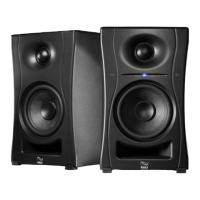
Explains the acoustic design, including waveguide, port tube, tweeter, and woofer.
Details the front panel controls including Volume-Down, Volume-Up, and LED Indicator.
Explains the various states and functions of the front panel LED indicator.
Guides on how to pair and unpair the speaker via Bluetooth.
Explains how the front LED indicates limiter engagement during playback.
Details the procedure to set the primary speaker to play the right or left audio channel.
Explains the DIP switch quick reference guide and their function.
Details the various physical audio inputs: TRS, RCA, and USB-C.
Covers the power input and output to secondary connections.
Explains the 'Input from Primary' and '4-Prong Connector' for linking speakers.
Details the local power cable and the 24V power supply unit.
Details DIP switch settings for boundary EQs in free space and desk placements away from walls.
Details DIP switch settings for boundary EQs on monitor stands and recording desks near walls.
Explains programming mode for firmware updates using the USB-C connector.
Details DIP switch settings for adjusting low frequency response by +/- 2 dB.
Details DIP switch settings for adjusting high frequency response by +/- 2 dB.
Explains how to control the power indication LED using DIP switch 8.
Guides on unboxing, connecting the speakers, and setting up the listening space.
Details on positioning speakers for optimal listening triangle and aiming tweeters.
Addresses initial speaker damage and troubleshooting steps for no audio output.
Provides solutions for distorted sound, cracks, hums, or buzzing from the speakers.
Offers steps to resolve connection issues when using USB-C with a computer.
Details what the warranty covers, Kali's actions, and how to initiate a claim.
Lists conditions and damages that are not covered by the product warranty.
 General
| Tweeter Size | 1 inch |
|---|---|
| Frequency Response | 39 Hz - 25 kHz |
| Frequency Range (±3 dB) | 47 Hz - 21 kHz |
| Amplifier Power | Class D |
| Input Types | RCA |
| Type | Studio Monitor |
| Woofer Size | 4.5 inch |

 To Next Page