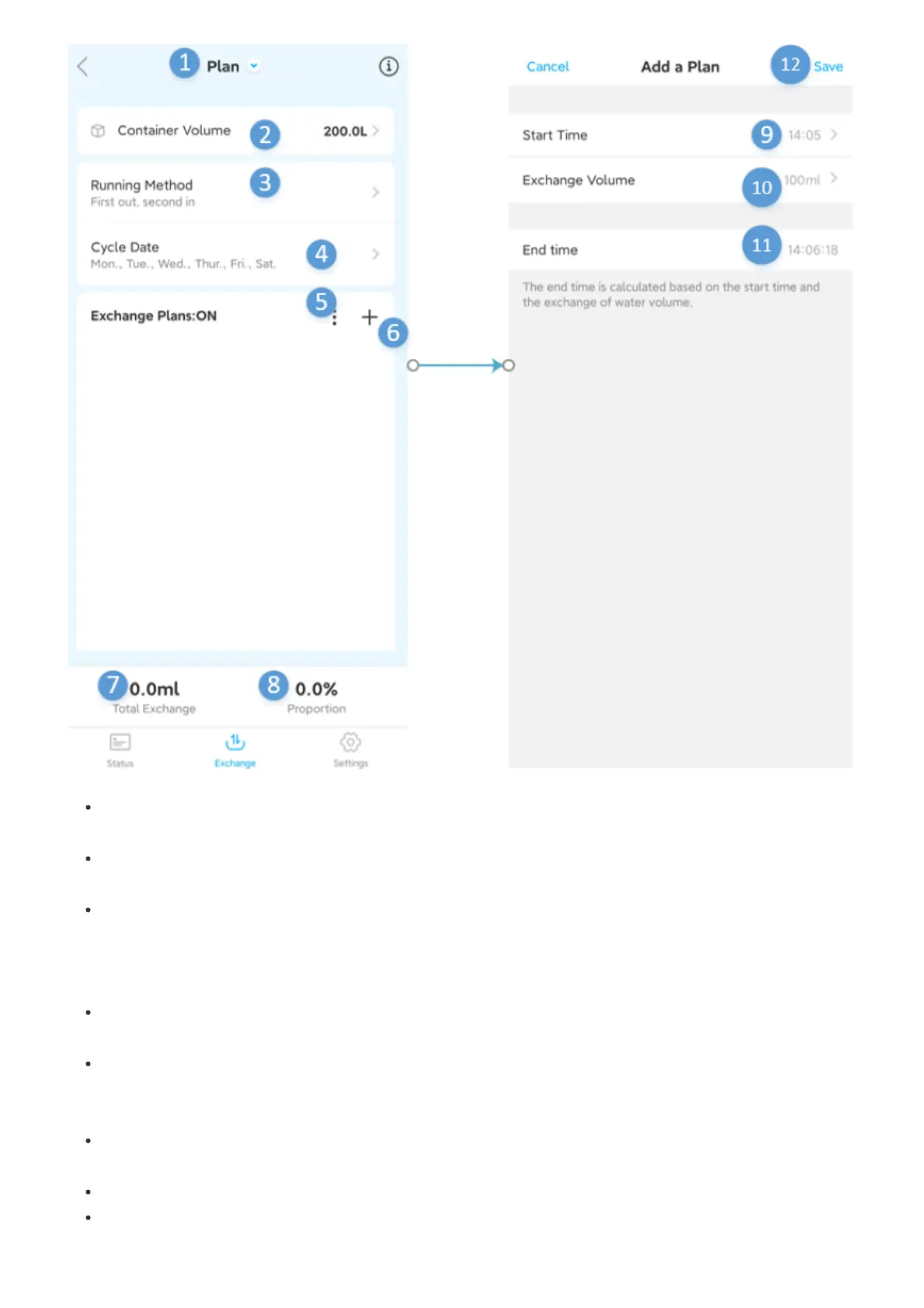
1.Automatic water change::Here to switch between manual water change and automatic water
change
2.Cylinder volume:Set the volume of the water body of your own tank to facilitate the calculation of the
water change ratio when setting the plan
3.Operation mode:The operation mode has two water change modes: edge-in and edge-out and first-
out and then-in. The edge-in and edge-out mode can keep the water level change little when changing
water, but some fresh seawater will be discharged. The water level will change when the water is
changed in the first-out-last-in mode, but fresh seawater will not be discharged
4. Cycle date:Set the water change cycle, there are two ways: cycle by week and cycle by operating
days
5.Automatic water change switch setting:Automatic water change switch, turn on the automatic water
change switch, the automatic water change will proceed as planned, turn off the automatic water change
switch, the automatic water change will not proceed
6.Add plan:Add water change plan, here you can add plans one by one, or you can quickly add multiple
plans at once, up to 24 plans can be added
7.Total amount of water exchange:Total amount of water exchange plan
8.Water change ratio:The water change ratio is calculated by dividing the planned water change by the
volume of water in the tank


 To Next Page