9.Start time:Planned start time
10. Water exchange volume:Planned water exchange volume
11.End time:The planned end time calculated based on the start time and the water change volume
12.Save the plan: Save the water change plan
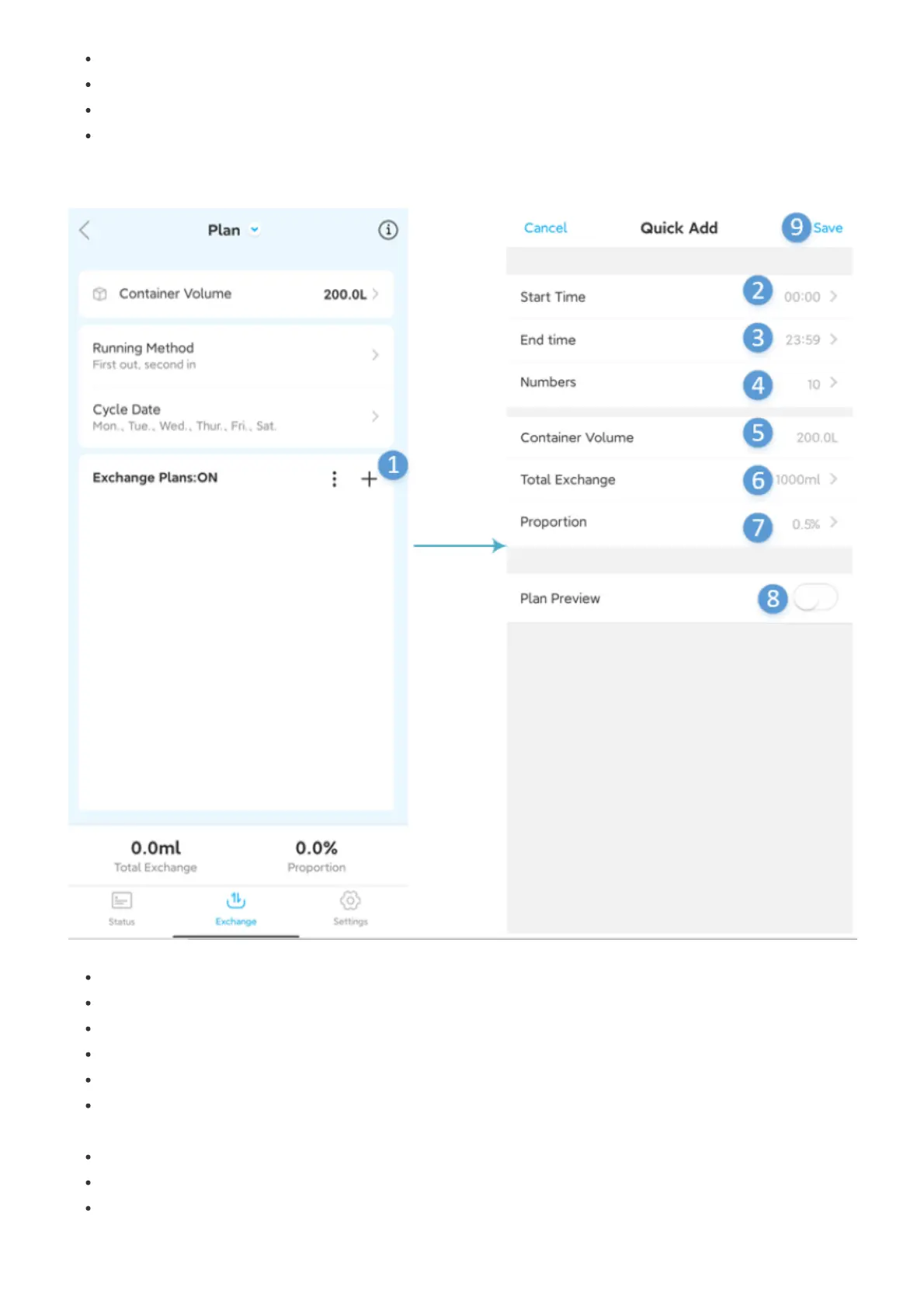
Quick add plan Quick plan can quickly add multiple plans at once
1.Add a quick plan:Click Add to enter the quick plan adding interface
2.Start time:Set the start time period of the quick plan
3.End time::Set the end time period of the quick plan
4.Number of plans:Set the number of plans
5.Cylinder volume:The volume of the previously set cylinder
6.Total amount of water exchange:The total amount of water exchange will be evenly distributed to
each plan
7.Water exchange ratio:Total amount of water exchange divided by the volume of the tank is obtained
8.Plan preview:he plan preview obtained according to the parameters set above
9.Save:Save the set quick plan


 To Next Page