VI. APP Instructions for Use
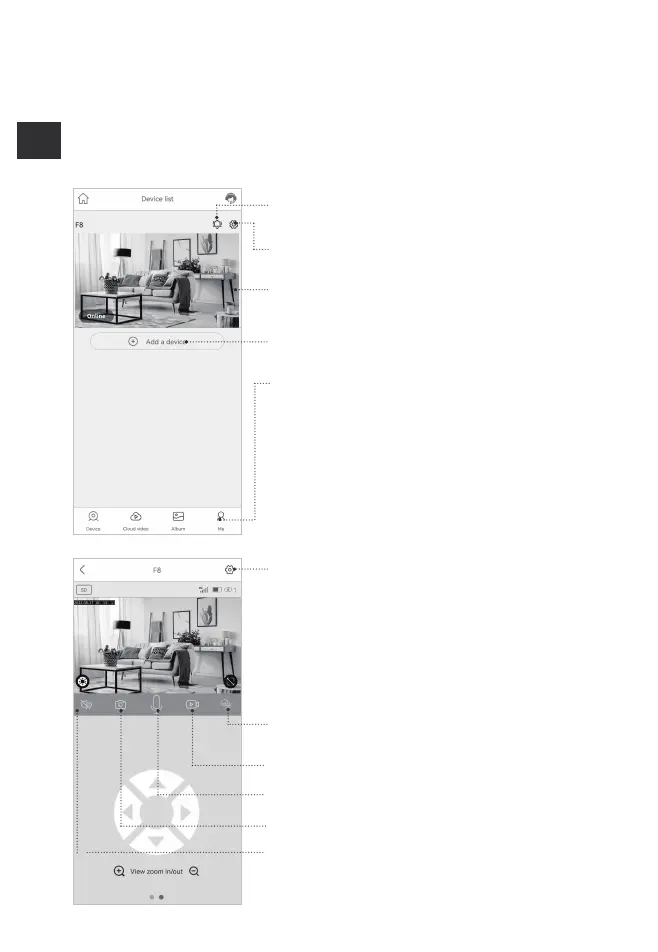
1. APP interface
Enter to select your family or smart device location
Turn on/off the push notification.
Settings: Sharing, Cloud storage, Delete the device..
Press to enter the preview section.
Press to add a smart device
Account and value-added account management
Turn on/off the speaker
Screenshot Bildschirmfoto
Take a video for the live view
Playback switch 'Micro SD memory' and 'Cloud storage'
Microphone - Speak to the smart device side.
Smart device basic settings
Grundeinstellungen des Smartgeräts
Could set Storage management, Flip screen,Environ-
mental model,
PIR detection, Sleep time, Power frequency, LED
indicator, Device
name' Could check the information of "Device name,
Device ID,
Model, FW version, Manufacurter, Check for the FW
updates..'


 To Next Page