ap2dbl
7
4.2.2 MIC input
When the switch turns to “MIC”, the microphone input is used for connecting with dynamic microphone.
There are two different connections:
1) Unbalanced connection:
a) “╧” connects to ground, and “-” connects to signal.
b) “╧” connects to ground, and “+” connects to signal.
2) Balanced connection: “+” connects to positive, “-” connects to negative and “╧” connects to ground.
4.2.3 LINE input
When the switch turns to “LINE”, the microphone input is used for connecting with normal audio or wireless
microphone output. There are two different connections:
1) Unbalanced connection:
a) “╧” connects to ground, and “-” connects to signal.
b) “╧” connects to ground, and “+” connects to signal.
2) Balanced connection: “+” connects to positive, “-” connects to negative and “╧” connects to ground.
5. Buttons Control
The buttons provides the control of volume/EQ control and switching.
5.1 Audio switching
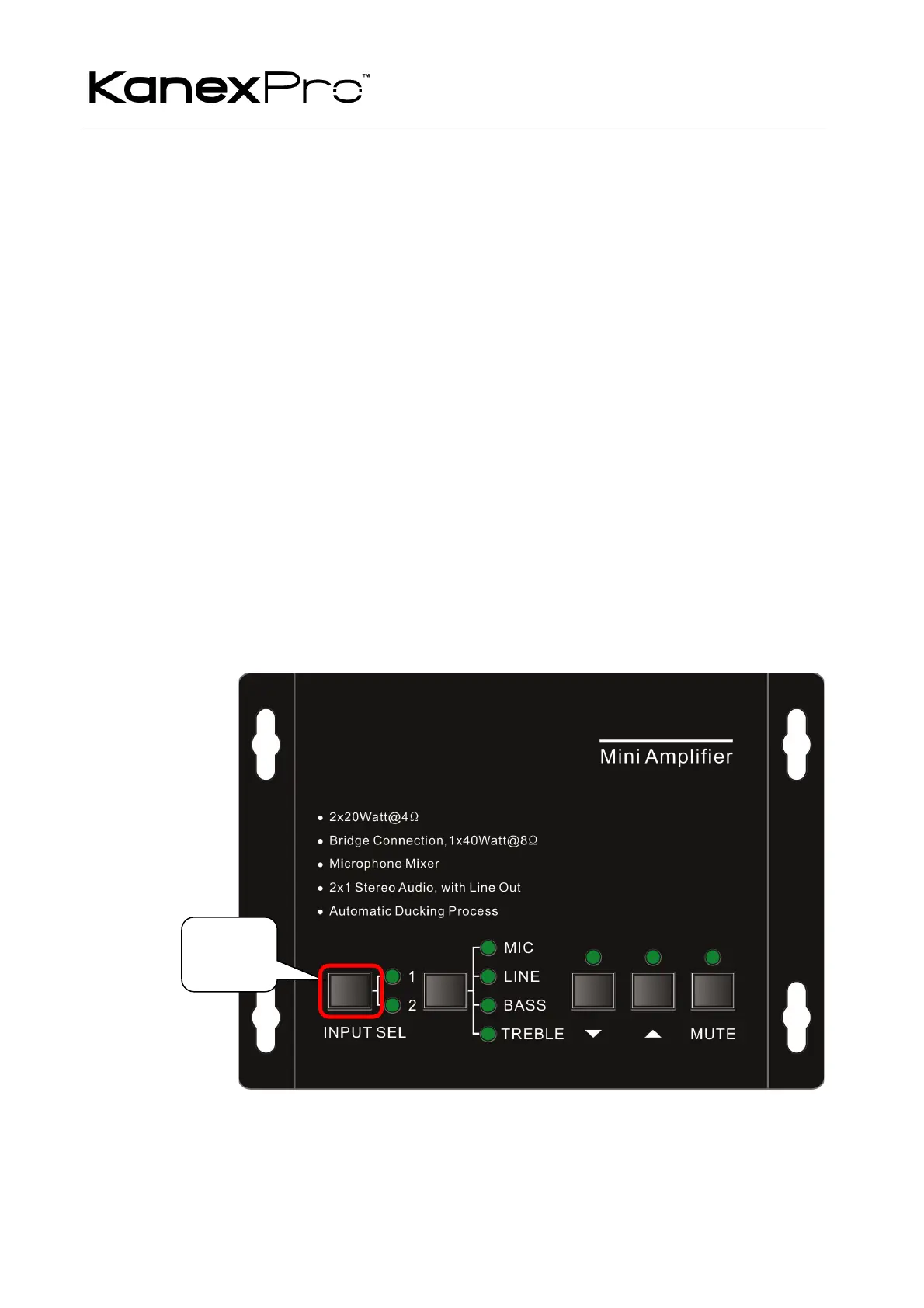
There are two switchable stereo audio inputs, one 2xRCA input, and one 3.5mm jack input, switchable
through the buttons as below:
Source
Selection


 To Next Page