3
Output 1 Output 2
InputPower
GAIN
PEAK
VGA Input
VGA Output
Output 1 Output 2
InputPower
GAIN
PEAK
VGA Input
VGA Output
VGA Output
4
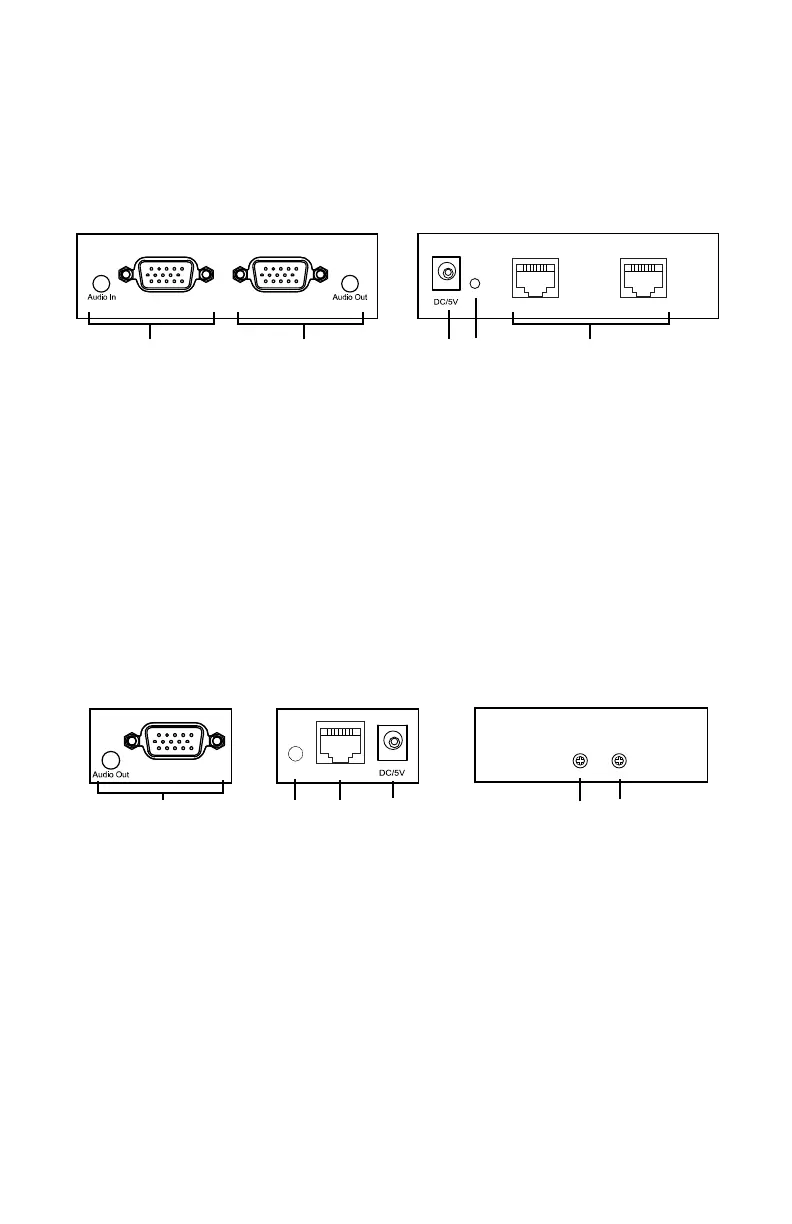
Unit Layout & Description
1) Video/Audio Input
a. Connect to VGA source (TV, Monitor, Projector, etc) using a VGA 15 pin Male to Male cable for video and
3.5mm Stereo Male to Male cable for audio.
2) Video/Audio Output
a. Connect to VGA display (TV, Monitor, Projector, etc) using a VGA 15 pin Male to Male cable for video
and 3.5mm Stereo Male to Male cable for audio.
3) DC/5V Connector
a. Connect the 5V Switch Splitter power supply to this port
4) Power LED
a. LED will be active when unit is powered on
5) Cat5e/6 Output
a. ConnecttotheCat5e/6(UTP)inputontheReceiverunit.
Transmitter
Back
1
2
3
Front
4
5
Receiver
Input
Power
GAIN
PEAK
VGA Input
VGA Output
VGA Output
Output
InputPower
GAIN
PEAK
VGA Input
VGA Output
VGA Output
Back
Front
1) Video/Audio Output
a. Connect to VGA display (TV, Monitor, Projector, etc) using a VGA 15 pin Male to Male cable for video
and 3.5mm Stereo Male to Male cable for audio.
2) Power LED
a. LED will be active when unit is powered on
3) Cat5e/6(UTP)input
a. Connect to the Cat5e/6 output on the Transmitter
4) DC/5V Connector
a. Connect the 5V Switch Splitter power supply to this port
5) Gain
a. Rotarydialusedforadjustingthebrightnessonthedisplays
6) Peak
a. Rotarydialusedforadjustingtheskewforlongcableruns
3
4
1
2
GAIN
PEAK
VGA Input
VGA Output
VGA Output
Side
5
6



 To Next Page