EasyManua.ls Logo

Kanomax 3889 - Preset; History

Kanomax 3889
25 pages
Print Icon
To Next Page IconTo Next Page
To Previous Page IconTo Previous Page
Loading...
14
Preset
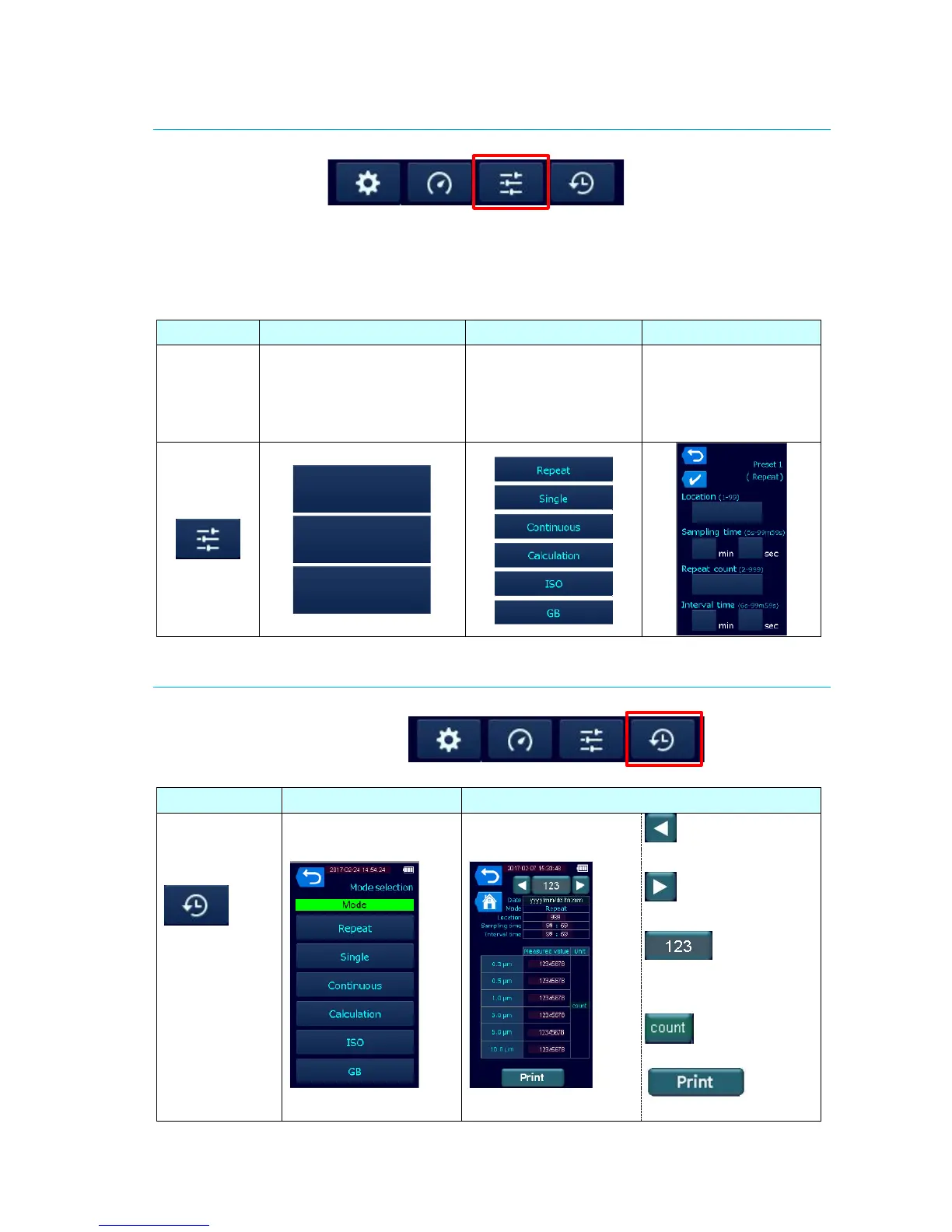
Select [Preset] in the Main screen to set and select measurement conditions.
Three options of Preset number provide 6 measurement modes each; therefore 18
measurement conditions in total can be preset.
When setting the Preset, select one of the 18 measurement modes in the Step 3, then set
the measurement conditions in the Step 4 as shown below:

Step 1
Step 2
Step 3
Step 4
Select
[Preset] in
the Main
Screen.
Select one Preset number.
No measurement
conditions have been
selected yet.
Select the Mode.
Measurement
conditions have been
selected here.
Set or confirm the
measurement
conditions. Tap to
select mode.
History
Select [History] in the Main screen to confirm the previous measurement results.
Step 1
Step 2
Step 3
Select
[History] in the
Main screen.
Select one of the
measurement modes.
The measurement
results is displayed.
Displays the history
of the previous number.
Displays the history
of the next number.
Selects and
display the history of
the arbitral number.
Selects the unit.
Prints the result.
P1
P2
P3

Other manuals for Kanomax 3889

Related product manuals