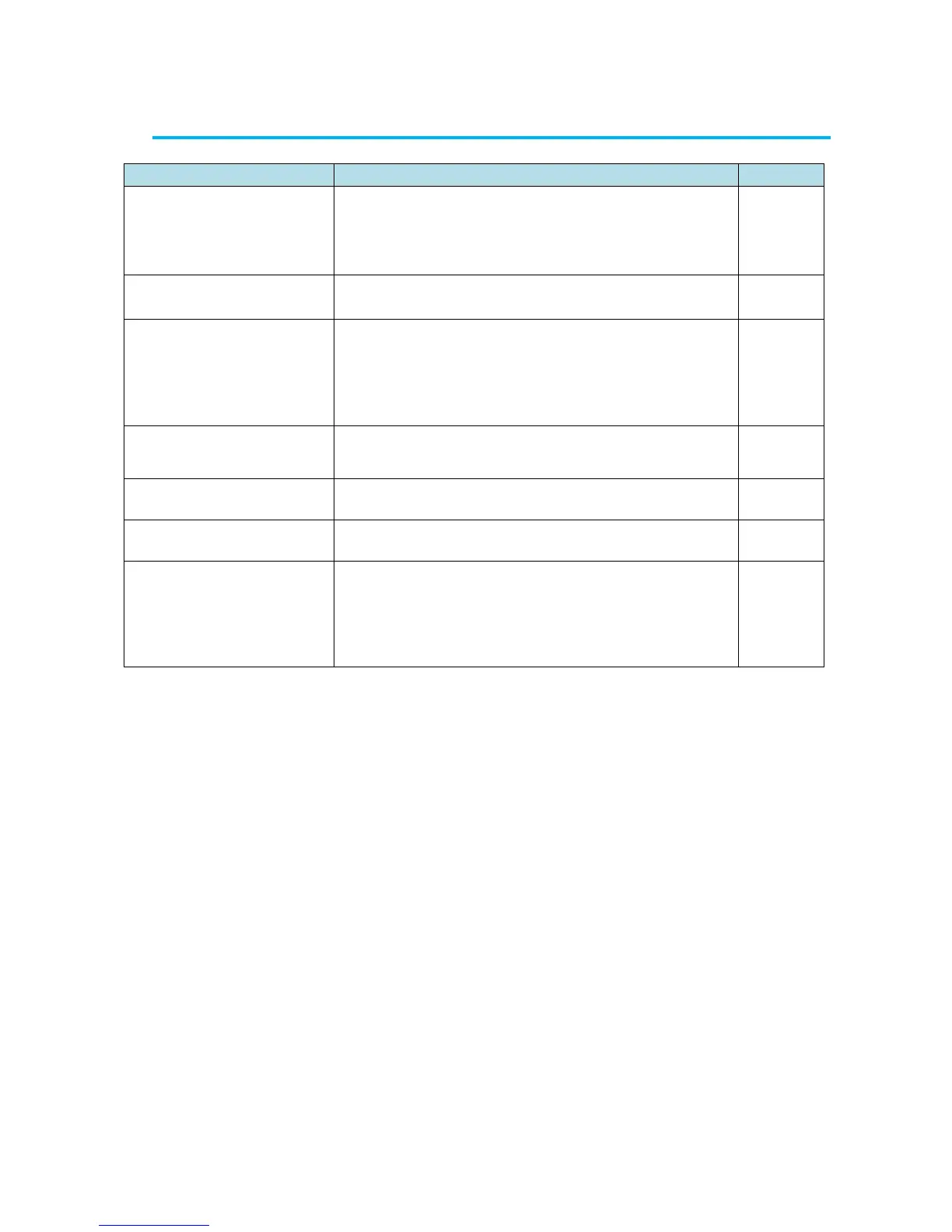
Possible causes(s) → Solution(s)
The display does not
appear when the power is
turned ON.
The AC adapter is not connected properly.
→ Confirm the AC adapter and power cable.
Low battery
→ Replace the batteries.
→ Recharge the batteries.
The battery is deteriorated.
→ Replace the battery
Particle count or
concentration is too high.
The actual concentration is high or the instrument may
malfunction.
→ Attach the provided Zero count filter and confirm
that the reading drops to zero. If the reading
remains high, the instrument may malfunction.
Please contact Kanomax USA.
Particle count or
concentration is too low.
Laser power failure or flow error
→ The instrument may malfunction.
Please contact Kanomax USA.
The printer does not
operate.
Incorrect baud rate setting
→ Confirm the printer setting.
Saving data function is OFF →Confirm the save setting.
The number of recorded data may exceed 10,000.
The measured value of the
particles maybe higher in
Wi-Fi remote mode.
If Wi-Fi remote connection is used above a metal
conductor, the Wi-Fi radio wave may be reflected and affect
the measured result.
→ When using Wi-Fi connection above any metal
conductor, please use a non - metallic spacer of 3 cm or
more.


 To Next Page