DN1726-0811
36
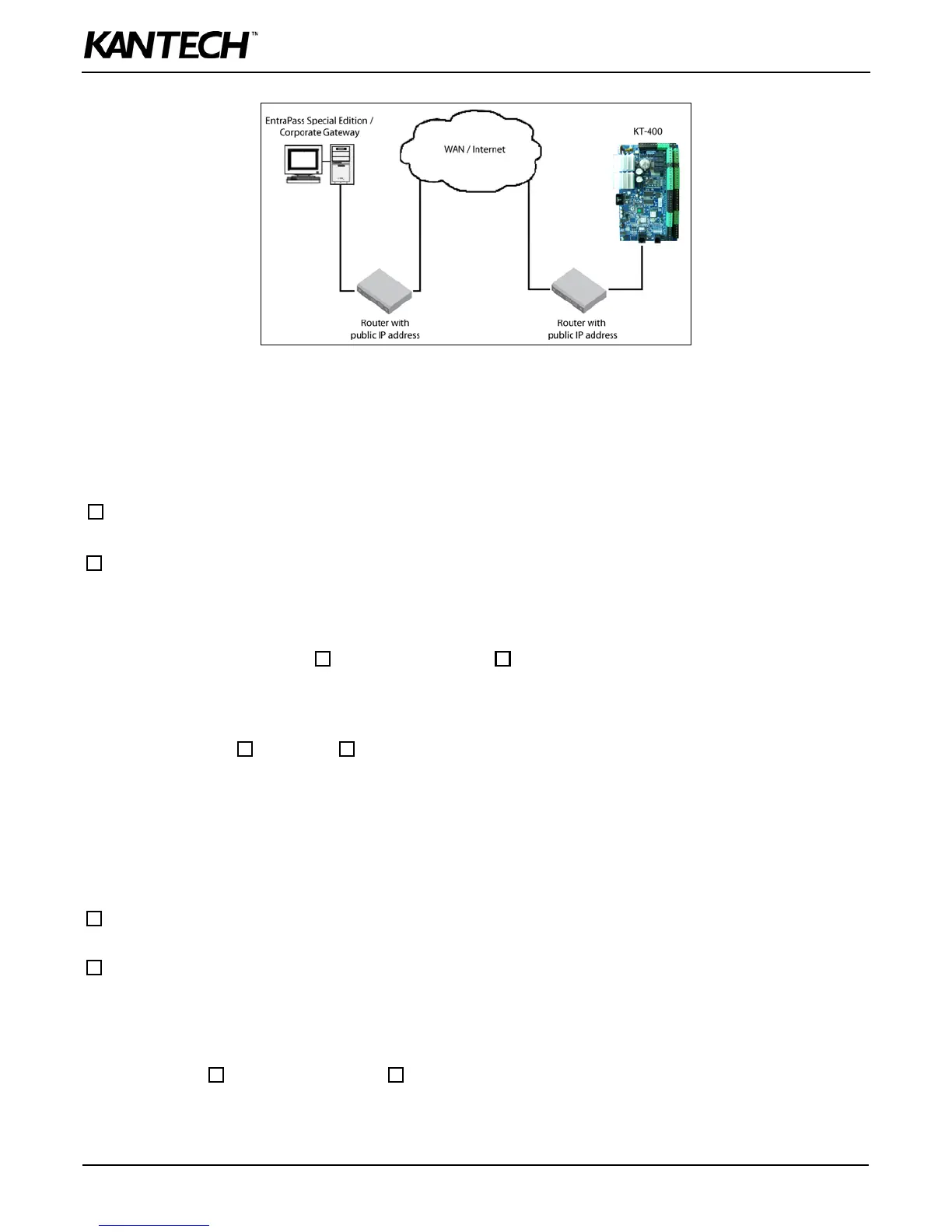
Configuration in a Wide Area Network (WAN)
EntraPass Site
For more details, refer to the EntraPass Reference Manual.
EntraPass Special Edition / Corporate Gateway
IP Address: ______.______.______.______
Router
Public IP Address:______.______.______.______
or
Domain name: ____________________________
Port Forwarding Checklist
For more details, refer to the EntraPass Reference Manual.
EntraPass Gateway Ports: 18001 (UDP) and 18801 (UDP)
KT-400 Ethernet Four-Door Controller Site
MAC Address: 00:50:F9: ______:______:______
IP Address Type: Static or Reserved DHCP
IP Address: ______.______.______.______
Subnet Mask: ______.______.______.______
Default Gateway (Router): ______.______.______.______
DNS Server IP Address:______.______.______.______
Router
Public IP Address:______.______.______.______
or
Domain name: ____________________________
Port Forwarding Checklist
Note: If you are using more than one KT-400 at the same remote site, you must use a unique port number for each KT-400.
KT-400 Ports: 18803 (UDP) and 18810 (UDP) or _________


 To Next Page