DN1726-0811
5
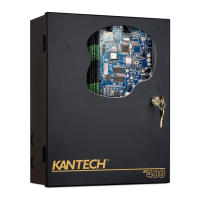
KT-400 Ethernet Four-Door Controller Installation Manual
Overview
The KT-400 Ethernet Four-Door Controller is designed to meet the highest standards of access control and point
monitoring applications. Here are the features of the KT-400 Ethernet Four-Door Controller.
Compatible with all EntraPass Special, Corporate and Global Editions
The KT-400 Ethernet Four-Door Controller is compatible with all EntraPass Editions v4.01 and higher:
- EntraPass Special Edition
- EntraPass Corporate Edition with a Corporate Gateway
- EntraPass Global Edition with a Corporate Gateway
- EntraPass Global Edition with a Global Gateway
- EntraPass Global Edition with a KT-NCC Network Communications Controller
Multiple Configuration Options
- EntraPass: The KT-400 Ethernet Four-Door Controller can be configured with all EntraPass Editions v4.01 and
higher.
- Web Configuration Page: The Web Configuration Page is accessible through any browser. It can be used to verify
and configure the IP settings of the following Kantech devices: the KT-400 Ethernet Four-Door Controller, the KT-
NCC and the Kantech IP Link. Refer to the procedure “Configuring the KT-400 Ethernet Four-Door Controller with
the Web Configuration Page” on page 32 for further details.
- KT-Finder: The KT-Finder is a stand-alone application that can be used to verify and configure the IP settings of the
following Kantech devices: the KT-400 Ethernet Four-Door Controller, the KT-NCC and the Kantech IP Link. The
Kantech device can be located within the same LAN or in a remote location over the internet. Refer to the procedure
“Configuring the KT-400 Ethernet Four-Door Controller with the KT-Finder” on page 33 for further details.
Four Onboard doors
The KT-400 Ethernet Four-Door Controller is a full 4 onboard doors access controller. See Figure 1 for a description of
the PCB and Figure 2 for all the connection possibilities offered by the KT-400 Ethernet Four-Door Controller.
Communication Ports
• 1 10/100Base-T Ethernet for network connection with the EntraPass Gateway
• 1 RS-232 (COM3) for direct connection to the EntraPass Gateway and RS-485 communication with KT-100, KT-200,
KT-300 and KT-400
• 1 RS-485 (COM1) for RS-485 communication between the EntraPass Gateway and the KT-100, KT-200, KT-300 and
KT-400
• 1 SPI (Serial Peripheral Interface) port for expansion modules such as the KT-MOD-REL8 (8-Relay Outputs), the KT-
MOD-INP16 (16-Input) and the KT-MOD-OUT16 (16-Output)
IP Connectivity
The KT-400 Ethernet Four-Door Controller, when used with EntraPass Special Edition or a Corporate Gateway, can
report events, gather its configuration through an IP connection over the LAN (Local Area Network) and over the Internet
for a WAN (Wide Area Network). In this mode, the 1st or local controller becomes a “Master Controller” and can poll up
to 31 Kantech controller(s). The KT-400 Ethernet Four-Door Controller is compatible with all the controllers. Unlike the
other controllers, the KT-400 Ethernet Four-Door Controller asynchronously polls the controllers (KT-100, KT-200, KT-
300) and communicates with the EntraPass Gateway only when necessary. This significantly reduces the amount of
bandwidth required to operate your security system on the network.
• AES Encryption 128-Bit: The KT-400 Ethernet Four-Door Controller is extremely secure. It uses 128-bit AES
encryption to communicate with the Gateway which prevents any hacking from the internet and ensures secure
communications when used over the internet on a wide area network (WAN).


 To Next Page