5
Supporting your digital lifestyle
™
AUX
RCA
OPT2OPT1
BALANCE
TREBLEBASS
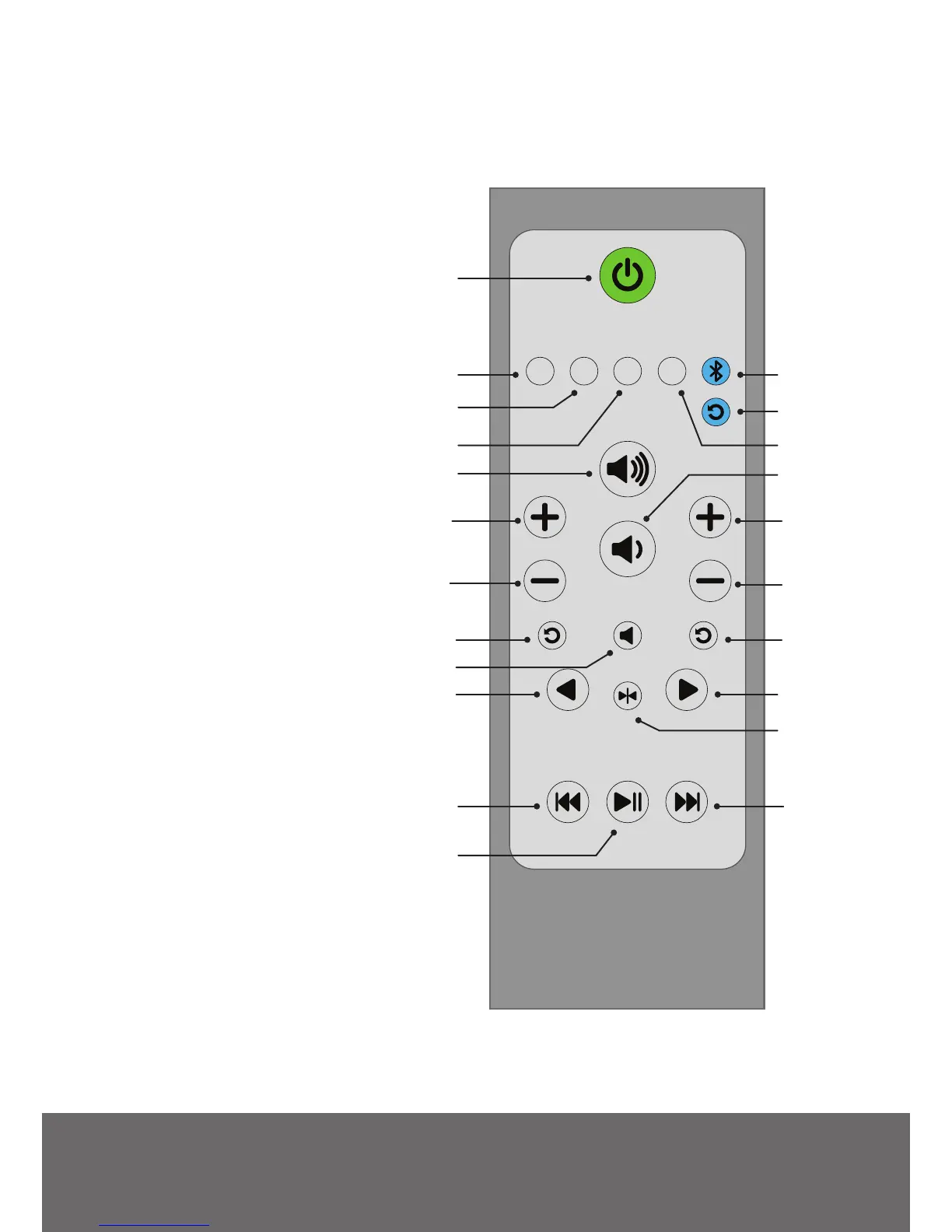
Remote Control
1 Standby Button - press to enter
Standby Mode or return to
Playback Mode
2 RCA Input Select
3 3.5 mm Stereo Mini-Jack AUX
Input Select
4 Optical 1 Input Select
5 Optical 2 Input Select
6 Bluetooth Input Select
7 Bluetooth Reset
8 Increase Volume
9 Decrease Volume
10 Increase Bass Output
11 Decrease Bass Output
12 Reset Bass Output
13 Increase Treble Output
14 Decrease Treble Output
15 Reset Treble Output
16 Mute
17 Balance Control Left Channel
18 Balance Control Right Channel
19 Reset Balance (Left and Right
Channels)
20 Previous Track
21 Play / Pause
22 Next Track
2
3
1
6
7
8
4 5
9
10
11
13
14
15
12
18
19
17
16
20
22
21
Install two supplied AAA batteries in the back of your SYD6 remote. Remote Control functions
are listed below.


 To Next Page