8
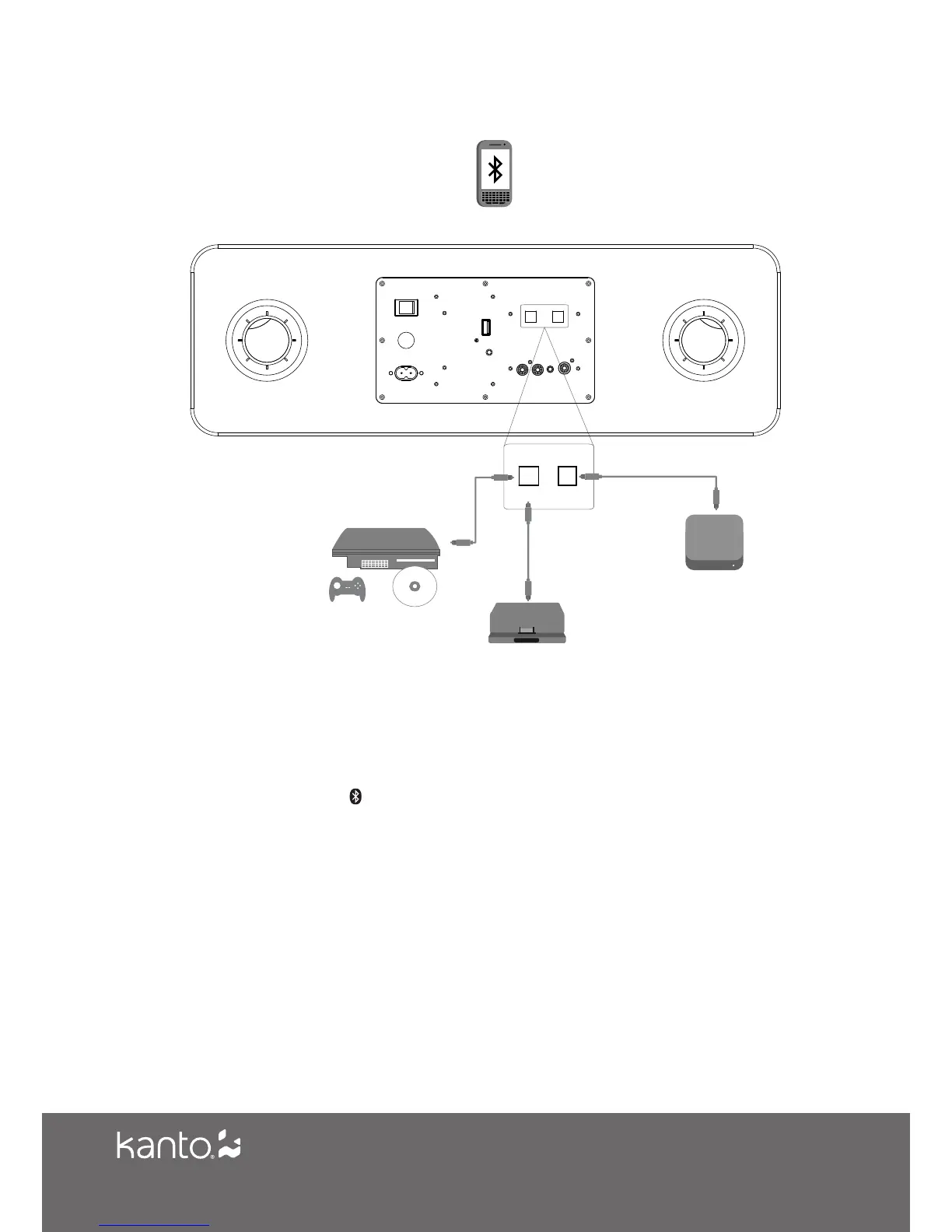
Optical & Bluetooth Connection
MOBILE
DEVICES
OPT 2 OPT 1
GAME CONSOLES
DIGITAL DOCK
MEDIA PLAYERS
Bluetooth Pairing
SYD6 features Bluetooth 4.0 with aptX CODEC technology and can be paired with many
devices for wireless audio playback from your phone, MP3 player or tablet. Pairing is easy.
1. Press the Bluetooth button on SYD6’s remote to select it as the input source. The
Bluetooth LED (white) will flash slowly to indicate that SYD6 is in pairing mode.
2. Enable your Bluetooth device to search for a new device to pair with. Select ‘SYD6 by
Kanto’ from the list of Bluetooth devices available for pairing.
3. If pairing is successful, the Bluetooth LED (white) will remain solid. You will not need to pair
the same Bluetooth device again - ‘SYD6 by Kanto’ will remain on your device list until you
remove it from the list.
4. If the device does not pair with SYD6, turn the speaker’s ON/OFF Switch to the OFF
position, then repeat Steps 1 to 3. Alternatively, you can turn off Bluetooth in your device
and turn it back on again.


 To Next Page