EasyManua.ls Logo

Kantronics KPC-4 - Page 10

Default Icon
72 pages
Print Icon
To Next Page IconTo Next Page
To Previous Page IconTo Previous Page
Loading...
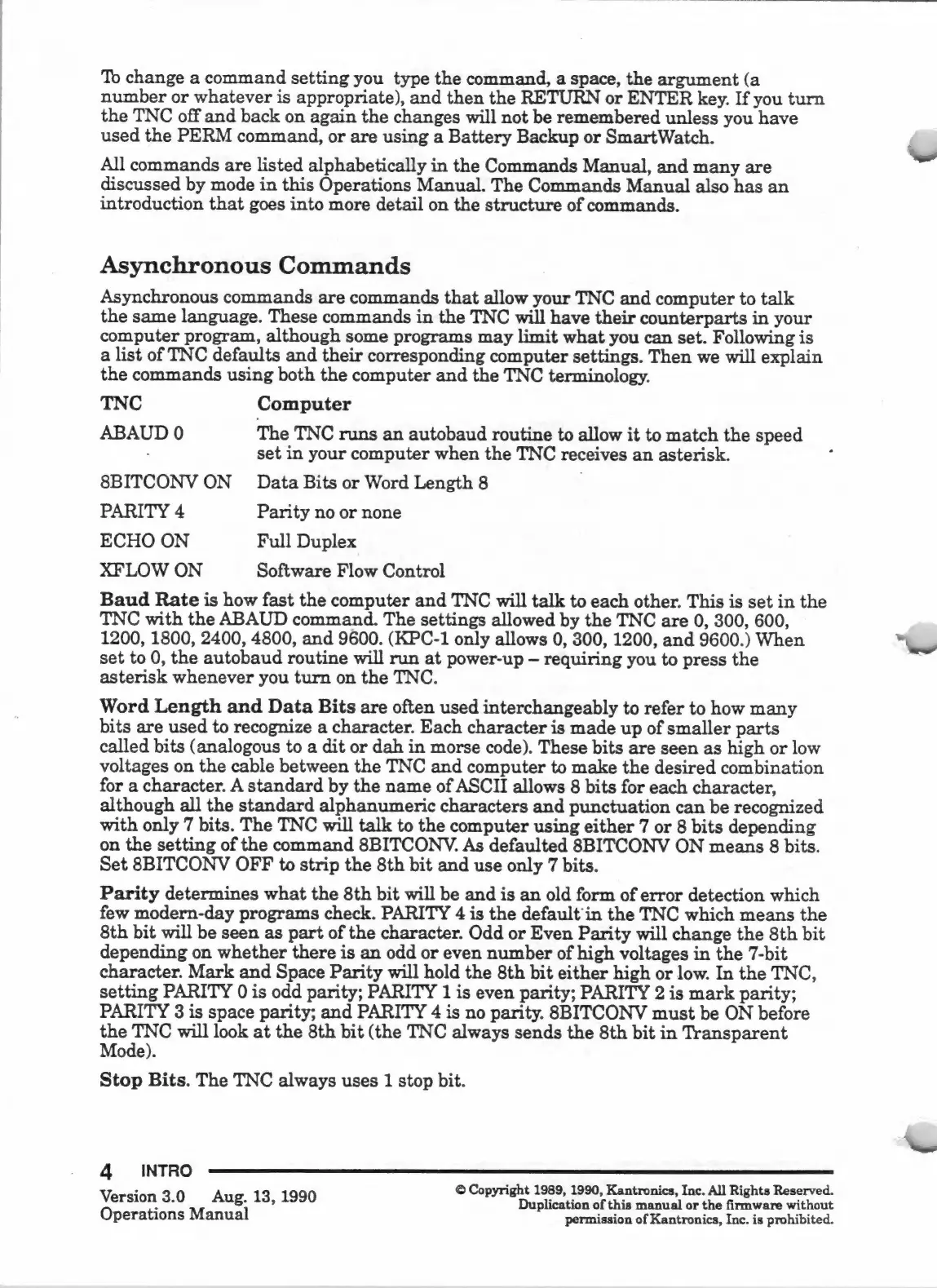
To
change
a
command
setting
you
type
the
command,
a
space,
the
argument
(a
number
or
whatever
is
appropriate),
and
then
the
RETURN
or
ENTER
key.
If
you
turn
the
TNC
off
and
back
on
again
the
changes
will
not
be
remembered
unless
you
have
used
the
PERM
command,
or
are
using
a
Battery
Backup
or
SmartWatch.
All
commands
are
listed
alphabetically
in
the
Commands
Manual,
and
many
are
discussed
by
mode
in
this
Operations
Manual.
The
Commands
Manual
also
has
an
introduction
that
goes
into
more
detail
on
the
structure
of
commands.
Asynchronous
Commands
Asynchronous
commands
are
commands
that
allow
your
TNC
and
computer
to
talk
the
same
language.
These
commands
in
the
TNC
will
have
their
counterparts
in
your
computer
program,
although
some
programs
may
limit
what
you
can
set.
Following
is
a
list
of
TNC
defaults
and
their
corresponding
computer
settings.
Then
we
will
explain
the
commands
using
both
the
computer
and
the
TNC
terminology.
TNC
Computer
ABAUD
0
The
TNC
runs
an
autobaud
routine
to
allow
it
to
match
the
speed
-
set
in
your
computer
when
the
TNC
receives
an
asterisk.
8BITCONV
ON
Data
Bits
or
Word
Length
8
PARITY
4
Parity
no
or
none
ECHO
ON
Full
Duplex
XFLOW
ON
Software
Flow
Control
Baud
Rate
is
how
fast
the
computer
and
TNC
will
talk
to
each
other.
This
is
set
in
the
TNC
with
the
ABAUD
command.
The
settings
allowed
by
the
TNC
are
0,
300,
600,
1200,
1800,
2400,
4800,
and
9600.
(KPC-1
only
allows
0,
300,
1200,
and
9600.)
When
set
to
0,
the
autobaud
routine
will
run
at
power-up
requiring
you
to
press
the
asterisk
whenever
you
turn
on
the
TNC.
Word
Length
and
Data
Bits
are
often
used
interchangeably
to
refer
to
how
many
bits
are
used
to
recognize
a
character.
Each
character
is
made
up
of
smaller
parts
called
bits
(analogous
to
a
dit
or
dah
in
morse
code).
These
bits
are
seen
as
high
or
low
voltages
on
the
cable
between
the
TNC
and
computer
to
make
the
desired
combination
for
a
character.
A
standard
by
the
name
of
ASCII
allows
8
bits
for
each
character,
although
all
the
standard
alphanumeric
characters
and
punctuation
can
be
recognized
with
only
7
bits.
The
TNC
will
talk
to
the
computer
using
either
7
or
8
bits
depending
on
the
setting
of
the
command
8BITCONV.
As
defaulted
SBITCONV
ON
means
8
bits.
Set
8BITCONV
OFF
to
strip
the
8th
bit
and
use
only
7
bits.
Parity
determines
what
the
8th
bit
will
be
and
is
an
old
form
of
error
detection
which
few
modern-day
programs
check.
PARITY
4
is
the
default'in
the
TNC
which
means
the
8th
bit
will
be
seen
as
part
of
the
character.
Odd
or
Even
Parity
will
change
the
8th
bit
depending
on
whether
there
is
an
odd
or
even
number
of
high
voltages
in
the
7-bit
character.
Mark
and
Space
Parity
will
hold
the
8th
bit
either
high
or
low.
In
the
TNC,
setting
PARITY
0
is
odd
parity;
PARITY
1
is
even
parity;
PARITY
2
is
mark
parity;
PARITY
3
is
space
parity;
and
PARITY
4
is
no
parity.
8BITCONV
must
be
ON
before
the
TNC
will
look
at
the
8th
bit
(the
TNC
always
sends
the
8th
bit
in
Transparent
Mode).
Stop
Bits.
The
TNC
always
uses
1
stop
bit.
4
INTRO
:
©
Copyright
1989,
1990,
Kantronics,
Inc.
All
Rights
Reserved.
Version
3.0
Aug.
13,
1990
Duplication
of
this
manual
or
the
firmware
without
Operations
Manual
permission
of
Kantronics,
Inc.
is
prohibited.

Related product manuals