15
Using the Laser Detector
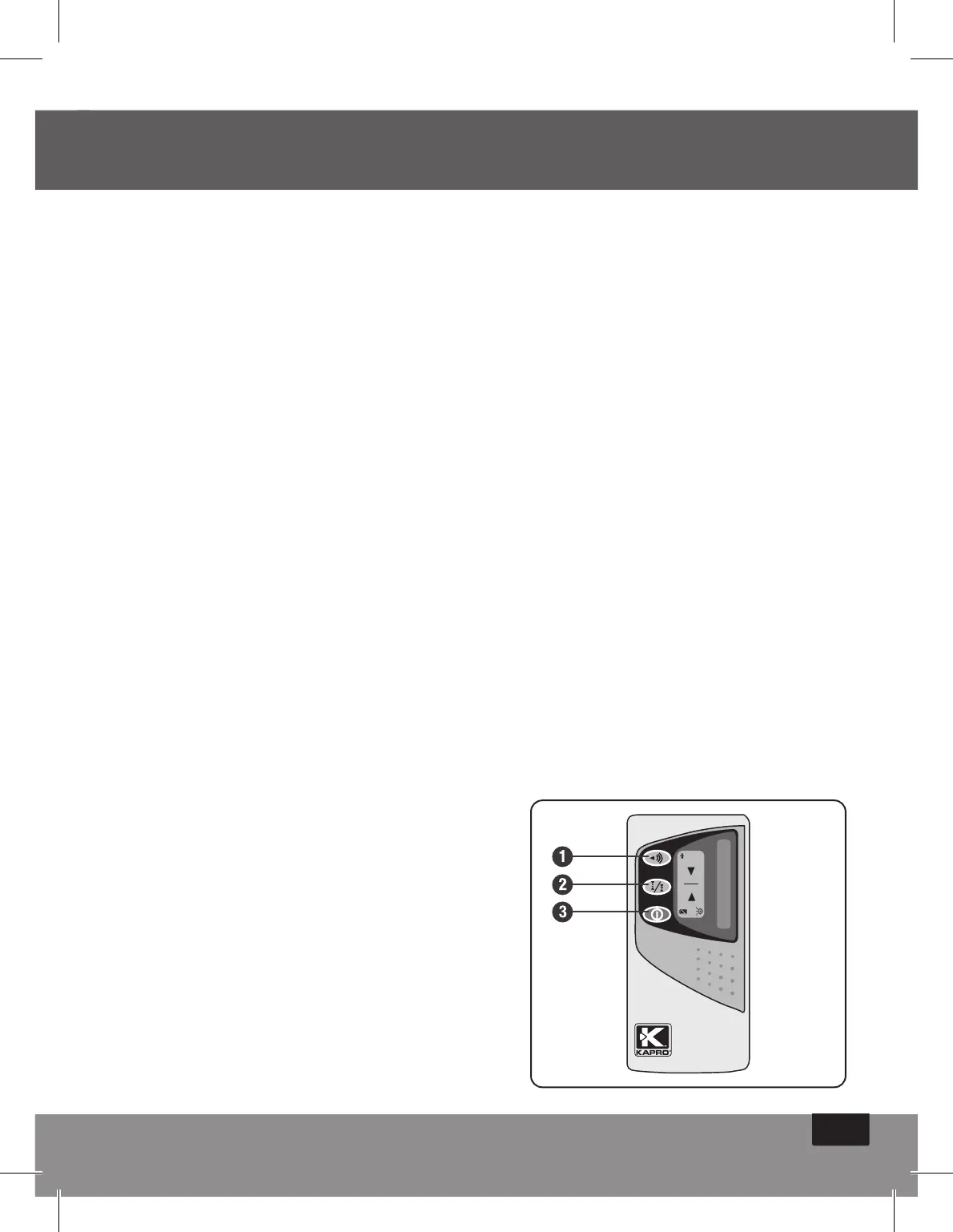
1. Press the On/Off button.
2. Press to select the ne or coarse detection mode: a
symbol appears on the right of the LCD, displaying which
mode has been selected.
3. Select the mute or sound mode. The sound symbol
appears on the display when you select the sound option.
No symbol indicates that you are in mute mode.
4. Turn the detection window towards the laser beam and
move the detector up and down following the direction of
the arrow on the LCD.
• Lower the Laser Detector if the arrow points down
(Beeping Sound).
• Raise the Laser Detector if the arrow points up (Beeping Sound).
5. The level marks on the sides of the Laser Detector are level
with the laser beam when the horizontal beam is displayed
on the LCD (Continuous Sound).
1. Sound/mute mode
2. Fine/coarse adjustment button
3. On/Off button


 To Next Page