26
Connectivity
20.00
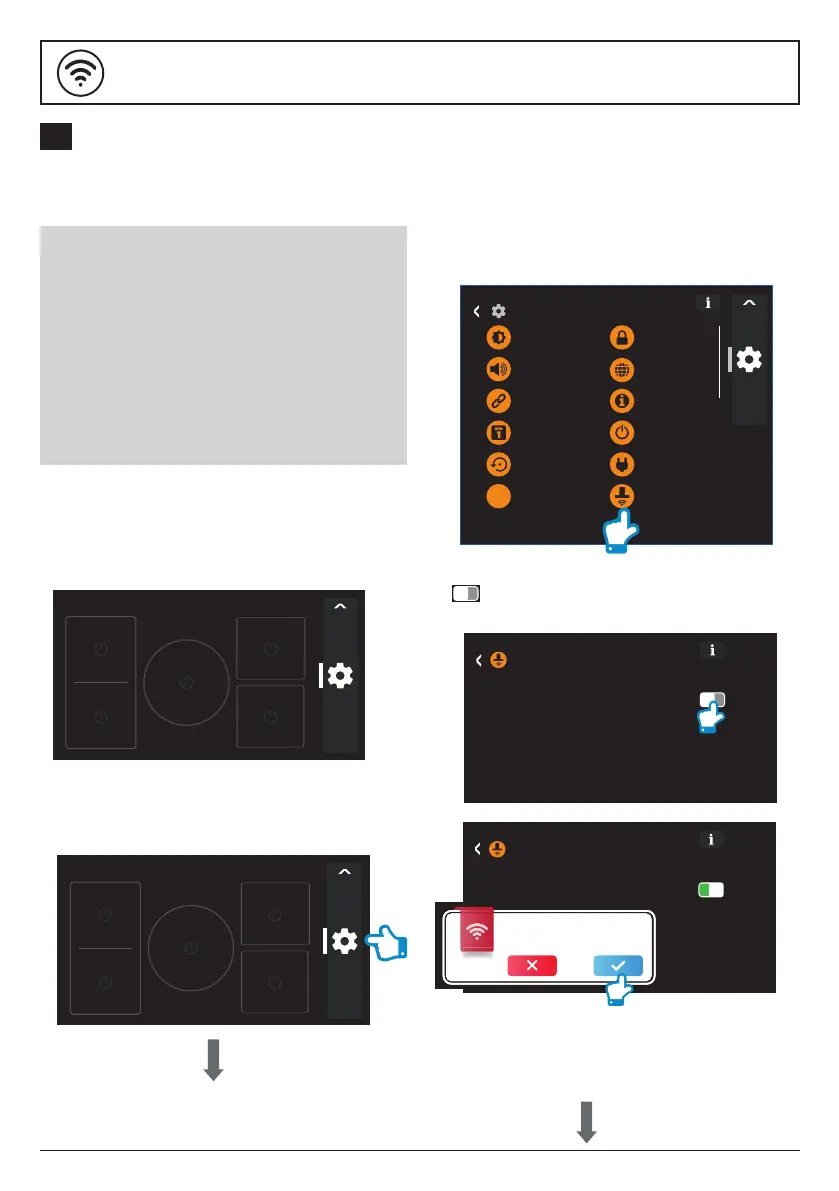
The process for connecting a WRCE90RF
ceiling hood to a KARLSON hob
happens in 3 stages:
A: Congure the hob to transmit a radio
frequency signal.
B: Congure the ceiling hood to receive
this signal.
C: Lock the connectivity between the
two appliances and complete the
pairing process.
Setting up new linking method
3. Scroll down and touch the 'Hood Options'
- go to 'Hood Connectivity'.
Stage A - Congure hob
1. The induction hob must be switched on and
showing the Home Screen display
before proceeding.
2. Touch the Settings icon to open the Settings
Menu of the hob.
20.00
20.00
Settings
Display
Sound
Connectivity
Date and Time
Default settings
Security
Language
Information
Energy settings
Test Cookware
Power Limit
Hood Options
(Stage B shown overleaf)
The hob will briey show a connected
message to indicate that the hob is
transmitting a radio frequency signal.
4. Now touch the hood connection button
on the hob and it will turn green.
20.00
Hood Options
Hood Connectivity
20.00
Hood Options
Hood Connectivity
Enable connectivity of the hood according
to hood instructions manual.
Conrm hob and hood are connected.
B
CONNECTING A WRCE90RF CEILING HOOD WITH A
KARLSON HOB


 To Next Page