27
Connectivity
Note: When the 'Hood Connectivity' is
activated, the option selected by default
must be 'Intense Mode'.
Stage C - (continued)
20.00
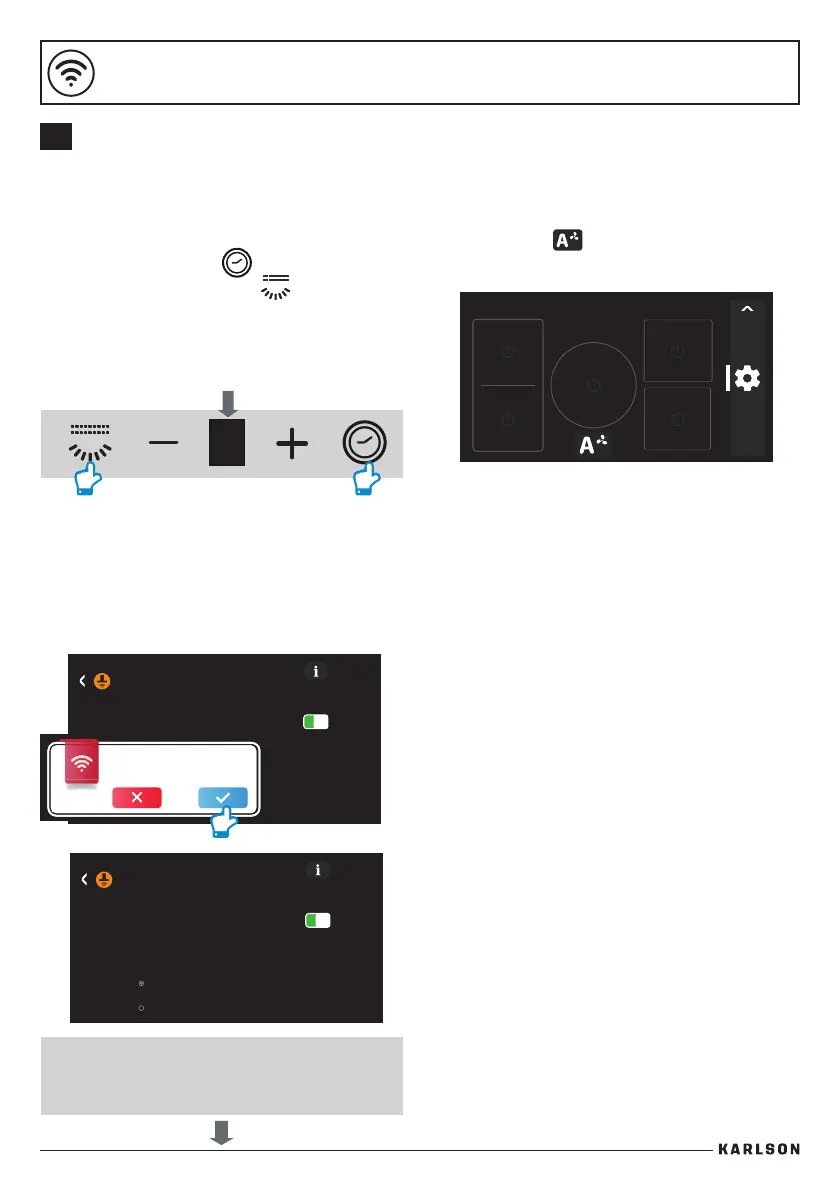
Stage B - Congure ceiling hood
1. Make sure that the hood is o.
2. Touch the Timer Key
and the Light On/O Key on the hood
control panel simultaneously for more than
2 seconds. All icons will blink in blue/white
alternately for 2 minutes whilst waiting for
the pairing code from the hob.
20.00
Hood Options
Hood Connectivity
Enable connectivity of the hood according
to hood instructions manual.
Conrm hob and hood are connected.
Stage C - Pairing Complete
1. The control panel of the hood will show 'A'
for 5 seconds to indicate connectivity has
been made with the hob.
4. The fan icon will display in hob, now the
hood and hob indicate pairing is complete.
2. Click to accept hob and hood connection.
20.00
Hood Options
Hood Connectivity
Auto Mode Level
Intense Mode
ECO Mode
3.
B
CONNECTING A WRCE90RF CEILING HOOD WITH A
KARLSON HOB


 To Next Page