
 Need help?
Do you have a question about the Kasda KW5583 and is the answer not in the manual?
Lists core functionalities like extending internet, easy setup, WPS support, and security compatibility.
Details IEEE compatibility, data rate up to 300 Mbps, ISM band, and supported security types.
Outlines Web Based GUI, FTP/HTTP upgrade, Telnet CLI, and firmware enhancement capabilities.
Lists required hardware and software including routers, adapters, OS, and browsers.
Specifies operating and storage temperature and humidity ranges for the device.
Lists the physical items included: KW5583 unit and a CD.
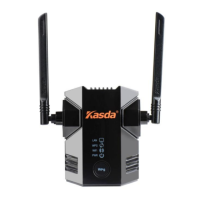
Describes the front panel LEDs (PWR, LAN, WIFI, WPS) and explains their operational functions.
Explains the extender's role as a bridge and access point for extending wireless networks.
Details the process of connecting a PC via Ethernet for initial device configuration.
Explains how to log into the extender's web interface using default credentials.
Describes how to configure LAN IP parameters, including IP address and subnet mask.
Explains different WAN connection types (DHCP, Static IP) and their required settings.
Covers guest access, SSID broadcast, and various wireless security modes available.
Details time settings, password management, and backup/restore/reset functionalities.
Guides through connecting the extender to an existing wireless network using quick setup.
Explains how to use WPS for quick and secure wireless device connection to the extender.
 General
| Standards | IEEE 802.11b/g/n |
|---|---|
| Wireless Speed | 300 Mbps |
| Frequency Band | 2.4 GHz |
| Ports | 1 x 10/100Mbps Ethernet Port |
| Operating Temperature | 0°C~40°C (32°F~104°F) |
| Storage Temperature | -40°C~70°C (-40°F~158°F) |
| Operating Humidity | 10%~90% non-condensing |
| Storage Humidity | 5%~90% non-condensing |
| Maximum Speed | 300 Mbps |
| Antenna | 2 x External Antennas |
| Security | WPA/WPA2 |
| Button | WPS Button |
| Wireless Standard | 802.11n |

 To Next Page