14
Default Gateway – Enter the gateway IP address provided by your ISP.
DNS 1-3 – Enter the DNS (Domain Name System) server IP address(es) provided by your
ISP.
3.1.3 Wireless configuration
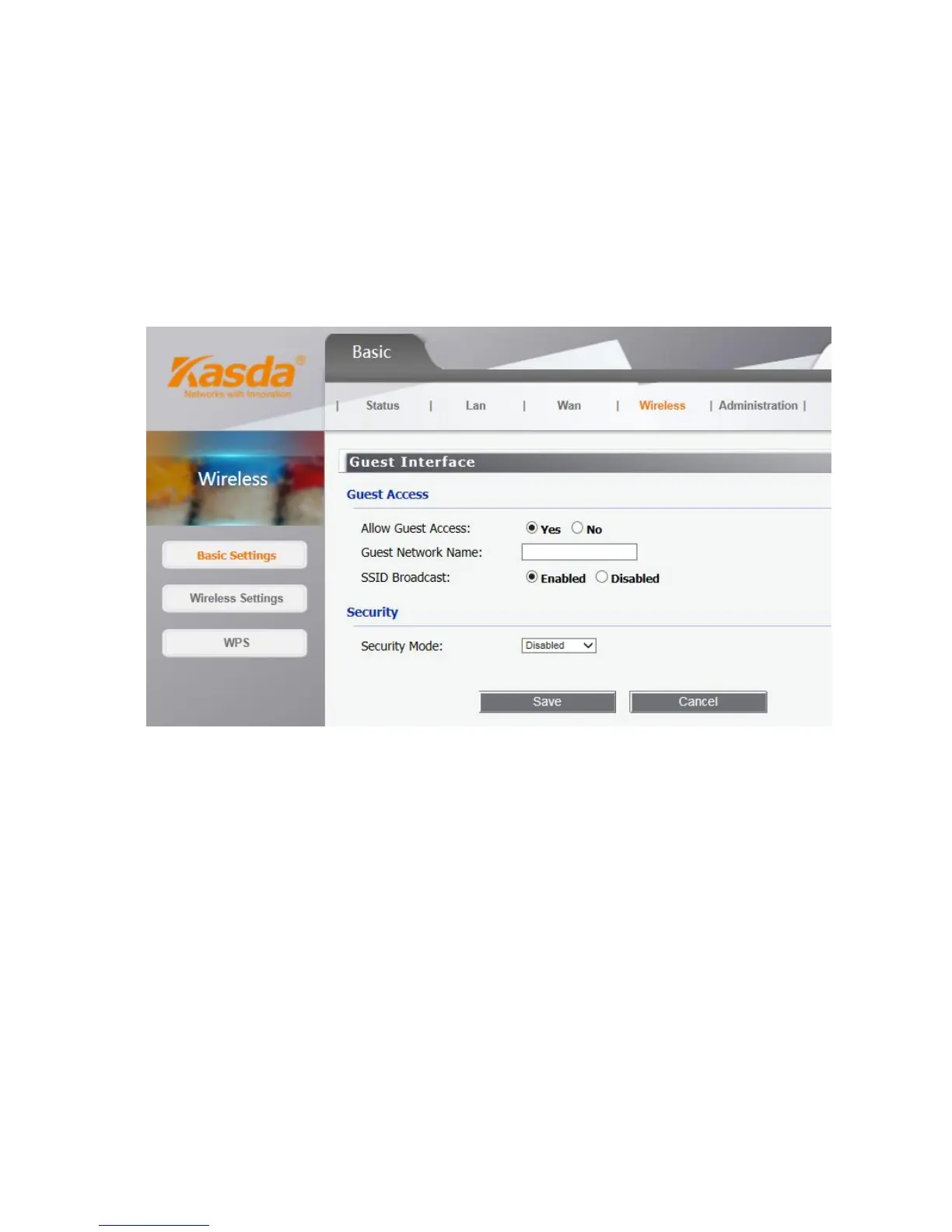
Wireless basic settings
Use the Guest Access feature to provide guests visiting your home with Internet access only. The
guest network is a wireless network separate from your local network.
• Allow Guest Access – To allow Internet access through a guest network, select yes.
• Guest Network Name – The name of the guest network is displayed.
• SSID Broadcast – When wireless devices survey the local area for wireless networks to
associate with, they will detect the SSID (wireless network name) broadcast by the Router. To
broadcast the SSID of the guest network, keep the default, Enabled.
You can select one of the following security options:
• Disabled – The wireless security function can be enabled or disabled. If disabled, the


 To Next Page