2.
Software Update (CA49)
1
Initial update using PianoRemote app (cont.)
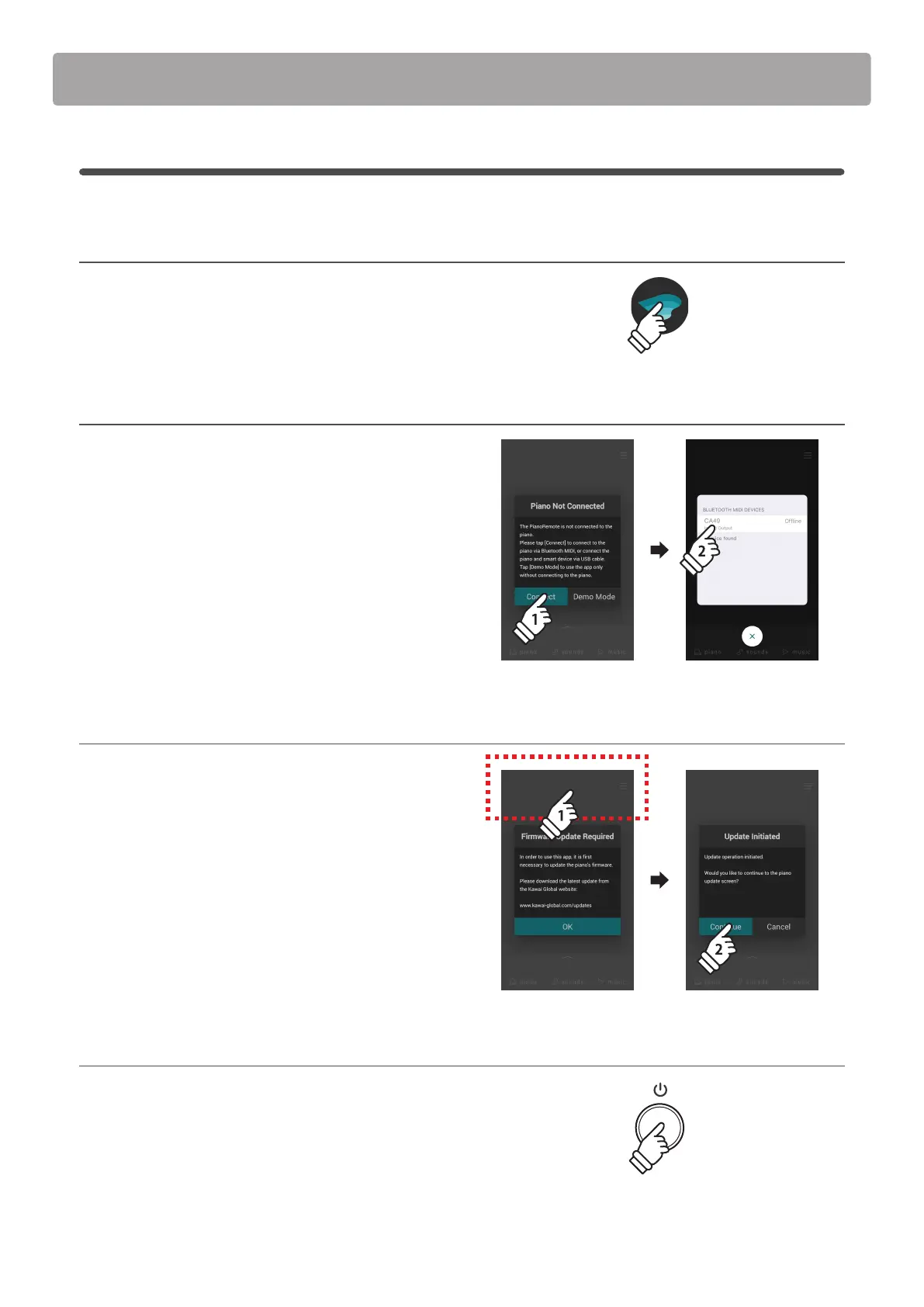
1. Launch the PianoRemote app
Launch the PianoRemote app on the iOS or Android device.
* Ensure that Bluetooth is enabled on the iOS or Android device.
2. Connect to the digital piano
After launching the PianoRemote app, a window will appear
prompting to connect to the piano.
Tap the [Connect] button to show the Bluetooth MIDI Devices
window, then select the CA49 entry.
3. Initiate the update process
After connecting to the CA49, the PianoRemote app will indicate
that a software update is necessary.
Tap the top area of the iOS or Android device 10 times to initiate
the software update.
After tapping 10 times, a conrmation message will be shown.
Tap the [Continue] button to start the software update, then
continue to follow the on-screen guidance.
4. Finish the update
After approximately 3 minutes an [Update Complete!] message
will be shown.
Press and hold the POWER button to turn the instrument o.
Next, continue to Stage 2.
* If this stage of the update is unsuccessful, please restart from step 1.
PianoRemote
× 10× 10
holdhold



 To Next Page