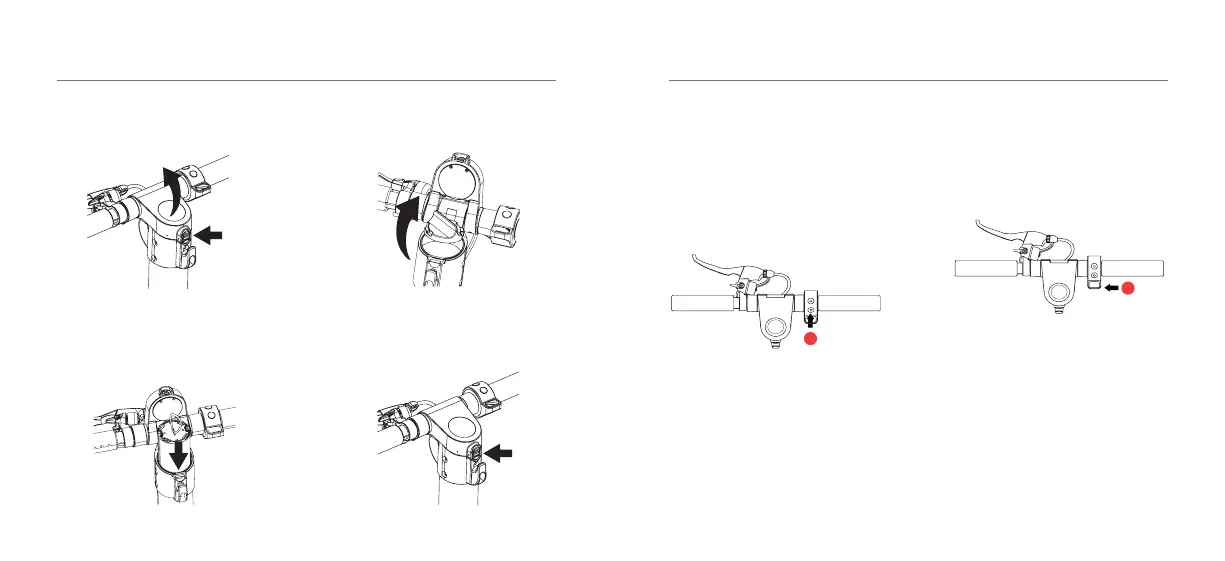
INSTALLING THE BATTERY UNIT
17 - ENG
1. Press the lock button and pull the
dashboard up.
2. Align the battery groove and slowly
insert the battery. (Note: Please pay
attention to the groove direction).
3. Tighten the battery cap.
4. Lockthedashboardtonishinstalling
the battery.
HOW TO RIDE YOUR E3 E-SCOOTER
18 - ENG
Warning:WhileusingyourE-Scooter,
there is always a risk of falling. We highly
recommendyoualwayswearacertied
safety helmet.
1. Turn on the E-Scooter by pressing the
Power button for 3 seconds. Check the
power level indicator.
2. Oncethepowerison,liftthekickstand,
place one foot on the deck and one foot on
the ground.
The E-Scooter is push to start so you need
toreachaminimumof6km/hbeforethe
acceleratorwillstartworking.Pusho
using your foot on the ground to reach a
speedofover6km/h.
Accelerator
1
2
You can push the accelerator and when
you feel safe place both feet on the deck.
Push the accelerator button to increase the
speed of your E-Scooter.
Cruise Control
You can activate Cruise Control by
maintaining a constant speed with the use
oftheaccelerator.Toactivate,holdthe
desired speed for 6 seconds (accelerator
position)untilyouhearabeepsound,then
release the accelerator.
Applying the brake or pushing the
accelerator will disable the Cruise Control.



 To Next Page