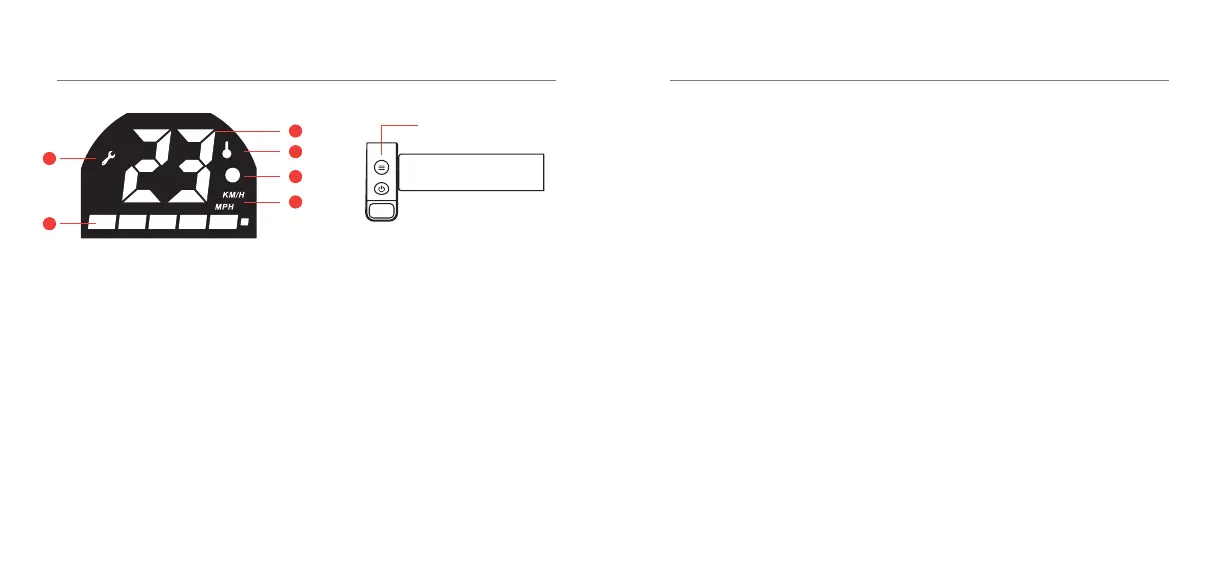
DISPLAY DESCRIPTION
21 - ENG
Mode / Light
To turn on the light: When the E-Scooter
ison,quicklydoublepresstheMode/Light
buttontoturnonorothefrontlight.
To change Speed Modes: Turn on the
E-Scooter and switch between the 3 speed
modes by pressing the Mode button.
Speed Modes
Set your maximum speed mode.
Low(upto12km/h)-NoModeCircle
Medium(upto20km/h)-WhiteCircle
High(upto30km/h)-RedCircle
1. Fault Display
2. Power
3. Speed
4. Temperature Monitor
4. Speed Modes
5. Unit Display
1
2
3
5
4
6
Mode/Light
SPECIFICATIONS & SUPPORT
22 - ENG
Support
Having trouble with your E-Scooter?
Don’tworry,ourfriendlysupportteam
can help. Please visit us at:
www.kaiserbaas.com/support
Orsendusanemailat:
helpdesk@kaiserbaas.com
Weight 13kg
Frame Aluminium
Tyre Size 8.5 inches
Color Black/Silver/Red
Tyre Material Pneumatic
Maximum Load 100kg
Maximum Speed 30km/h
Maximum Range 15km-25km
Motor Size 350W
Battery
36V 6.4Ah Lithium
(Removable)
Charger Voltage 100-240V-50/60Hz
Braking Distance 4-6m
Resistance
IP54Splash&
Dust Proof
Unfolded 1056 x 420 x 1166mm
Folded 1056 x 420 x 450mm



 To Next Page