CLEANING
After uncrating, remove protective coating from
all bright surfaces with a soft cloth moistened
with kerosene. Do
not
use acetone, gasoline or
lacquer thinner
-
these will damage painted
surfaces.
To prevent rust, wax the table with
paste wax.
INSTALLATION
The most accurate and vibration-free operation
will require the machine to be bolted to the
floor.
While this is not absolutely necessary, it
is highly recommended. The drill press should
be level and
rest solidly on the floor.
Place
shims under the three bolt holes to level the
drill press.
Equal pressure should be applied to
all three nuts when tightening to prevent
distorting the base.
RAISING HEAD
The drill press head is lowered on the column
to ease crating and transportation.
Before
operating the drill press, the head will need to
be raised to the operational level:
1.
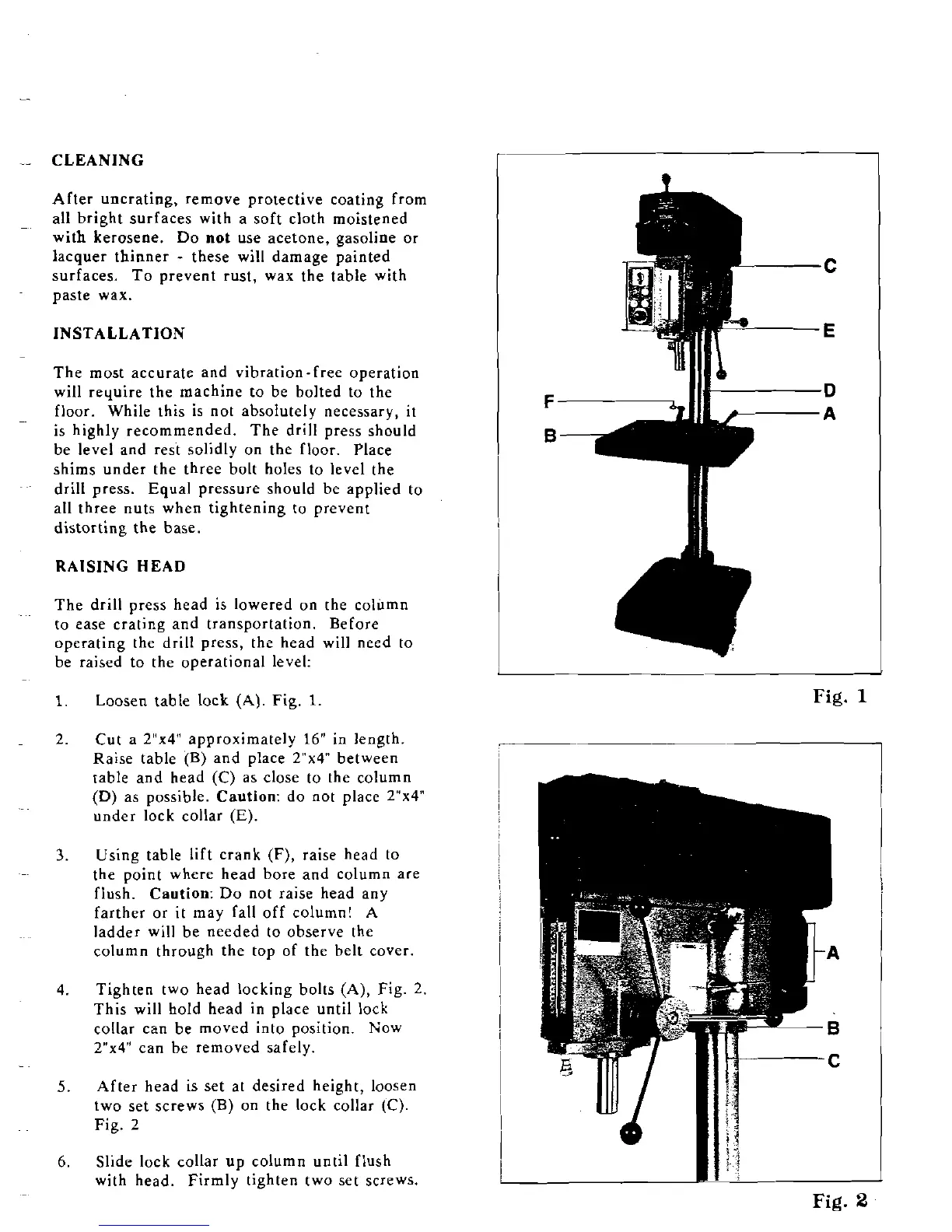
Loosen table lock
(A).
Fig.
1
2.
Cut a
2"x4" approximately
16"
in length.
Raise table (B) and place
2"x4 between
table and head
(C)
as close to the column
(D)
as possible. Caution: do not place Z"x4"
under lock collar
(E).
3.
Using table lift crank (F), raise head to
the point where head bore and column are
flush. Caution: Do not raise head any
farther or it may fall off column!
A
ladder will be needed to observe the
column through the top of the belt cover.
4.
Tighten two head locking bolts (A), Fig. 2.
This will hold head in place until lock
collar can be moved into position. Now
Z"x4" can be removed safely.
5.
After head is set at desired height, loosen
two set screws (B) on the lock collar
(C).
Fig. 2
6.
Slide lock collar up column until flush
with head.
Firmly tighten two set
scrcws.
1
Fig.
Fig.


 To Next Page