© Copyright 2016 KE2 Therm Solutions, Inc., Washington, Missouri 63090
Q.1.20 February 2016
Page 2
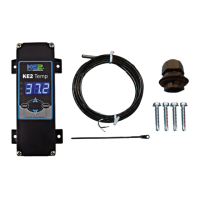
KE2 Temp + Defrost (pn 20611)
For Medium Temperature Applications with Air Defrost
Installation Manual
When wiring the controller rst remove the dis-
play by loosening the four corner screws. The
display is connected to the lower board by a
short ribbon cable.
Caution: The board may be damaged if exces-
sive force is used when removing the cover.
1
1
Wiring the Controller
The KE2 Temp was designed with simplicity in
mind. The controller accepts 120V / 208-240V
to power the controller and 12V - 240V solenoid
voltage via the liquid line solenoid relay through
the lower conduit connection. The temperature
sensor and communication wires are attached
via the upper conduit connector.
After the four screws have been detached from
the lower section, the cover may be gently
moved to the side.
2
2
Next remove the high voltage protective cover.
There are two screws holding it in place.
3 3
With the high voltage cover removed, the two
screw terminal connectors can be seen. The
2-position connector is the controller’s power
supply. The voltage selector switch should be
positioned to match the voltage supplied.
4
4



 To Next Page