OTHER ADJUSTMENTS OF SEWING MACHINE
In addition to the obvious controls of your machine, there are other small
regulators and controls to aid you in using your sewing machine.
PRESSURE REGULATOR
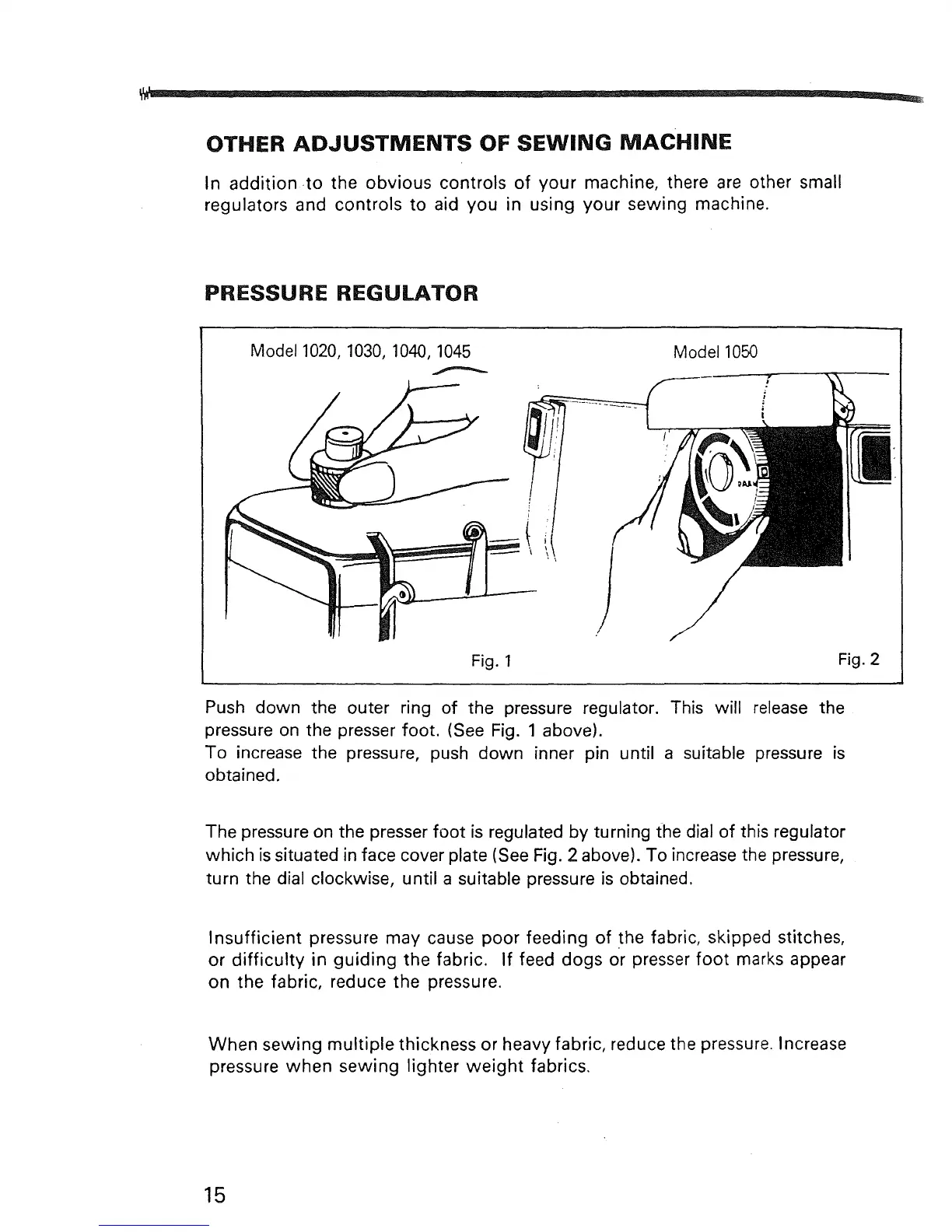
Model1020, 1030, 1040, 1045 Model 1050
Fig. 1
Fig. 2
Push down the outer ring of the pressure regulator. This will release the
pressure on the presser foot. (See Fig. 1 above).
To increase the pressure, push down inner pin until a suitable pressure is
obtained.
The pressure on the presser foot is regulated by turning the dial of this regulator
which is situated in face cover plate (See Fig. 2 above). To increase the pressure,
turn the dial clockwise, until a suitable pressure is obtained.
Insufficient pressure may cause poor feeding of the fabric, skipped stitches,
or difficulty in guiding the fabric. If feed dogs or presser foot marks appear
on the fabric, reduce the pressure.
When sewing multiple thickness or heavy fabric, reduce the pressure. Increase
pressure when sewing lighter weight fabrics.
15


 To Next Page