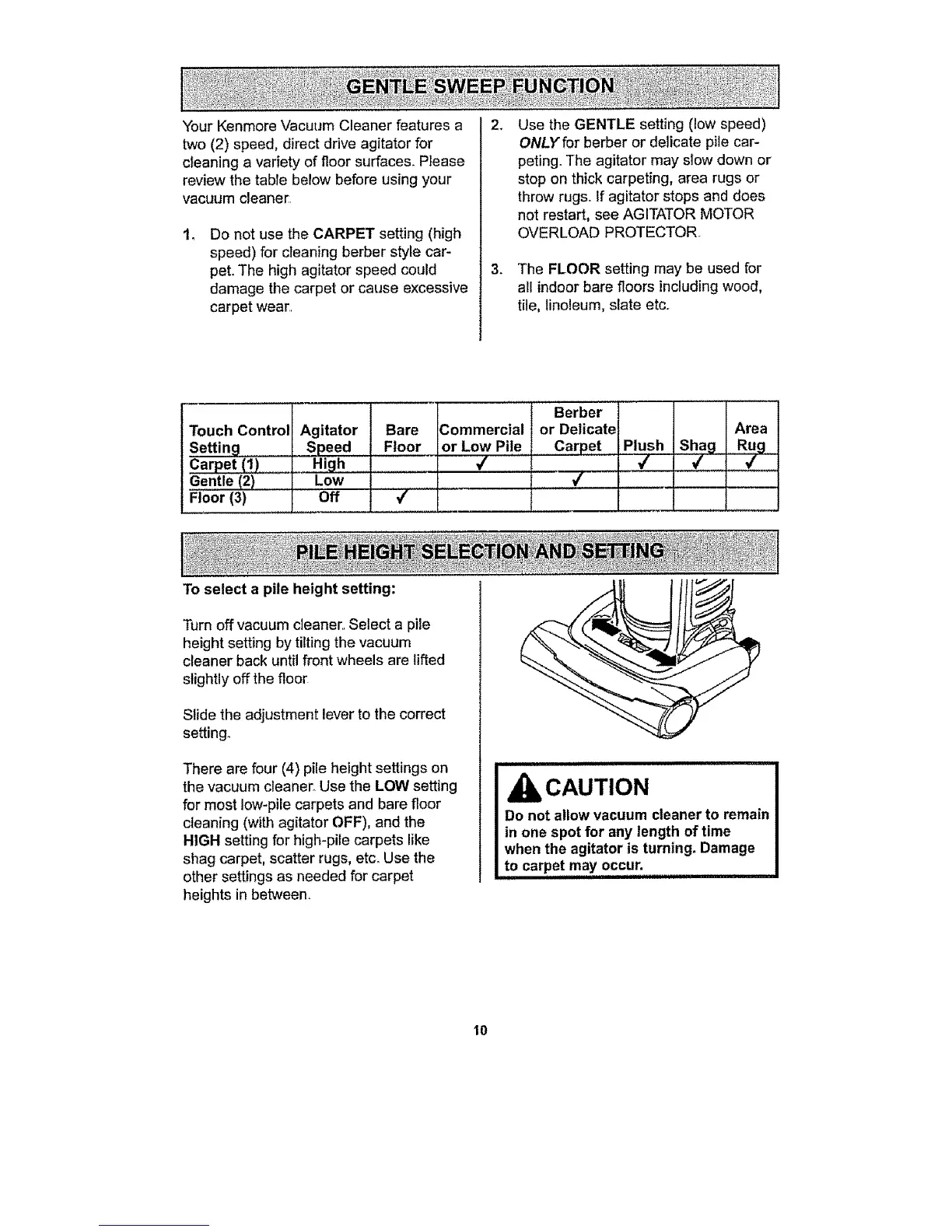
Your Kenmore Vacuum Cleaner features a
two (2) speed, direct drive agitator for
cIeaning a variety of floor surfaces. Please
review the tabTebelow before using your
vacuum cleaner
Do not use the CARPET setting (high
speed) for cleaning berber style car-
pet. The high agitator speed could
damage the carpet or cause excessive
carpet wear
.
.
Use the GENTLE setting (low speed)
ONLY for berber or delicate pile car-
peting. The agitator may slow down or
stop on thick carpeting, area rugs or
throw rugs. If agitator stops and does
not restart, see AGITATOR MOTOR
OVERLOAD PROTECTOR.
The FLOOR setting may be used for
all indoor bare floors including wood,
tile, linoleum, slate etc..
Touch Control
Settin_l
Carpet (1)
Gentle (2)
Floor (3)
Agitator
_Speed
_ High .........
Low
Off
,,,,,,,, ....
Bare
Floor
To select a pile height setting:
4
Commercial
or Low Pi!e....
Berber I I
or Delicate Area
Carpet Plush Shag Rug
.....................,/ 4
L__ ,, :,,,i,,,,
Turn off vacuum cleaner.. Select a pile
height setting by tilting the vacuum
cleaner back until front wheels are lifted
slightly off the floor
Slide the adjustment lever to the correct
setting.
There are four (4) pile height settings on
the vacuum cleaner. Use the LOW setting
for most low-pile carpets and bare floor
cleaning (with agitator OFF), and the
HIGH setting for high-pile carpets like
shag carpet, scatter rugs, etcoUse the
other settings as needed for carpet
heights in between.
CAUTION
Do not allow vacuum cleaner to remain
in one spot for any length of time
when the agitator is turning. Damage
to carpe,! may occur.
10




 To Next Page