IbWARNING
Electrical Shock Or Personal Injury
Hazard
Disconnect e|ectrical supply before
performing maintenance to the
vacuum cleaner. Failure to do so
could result in electrical shock or
personal injury from the vacuum
cleaner suddenly starting,
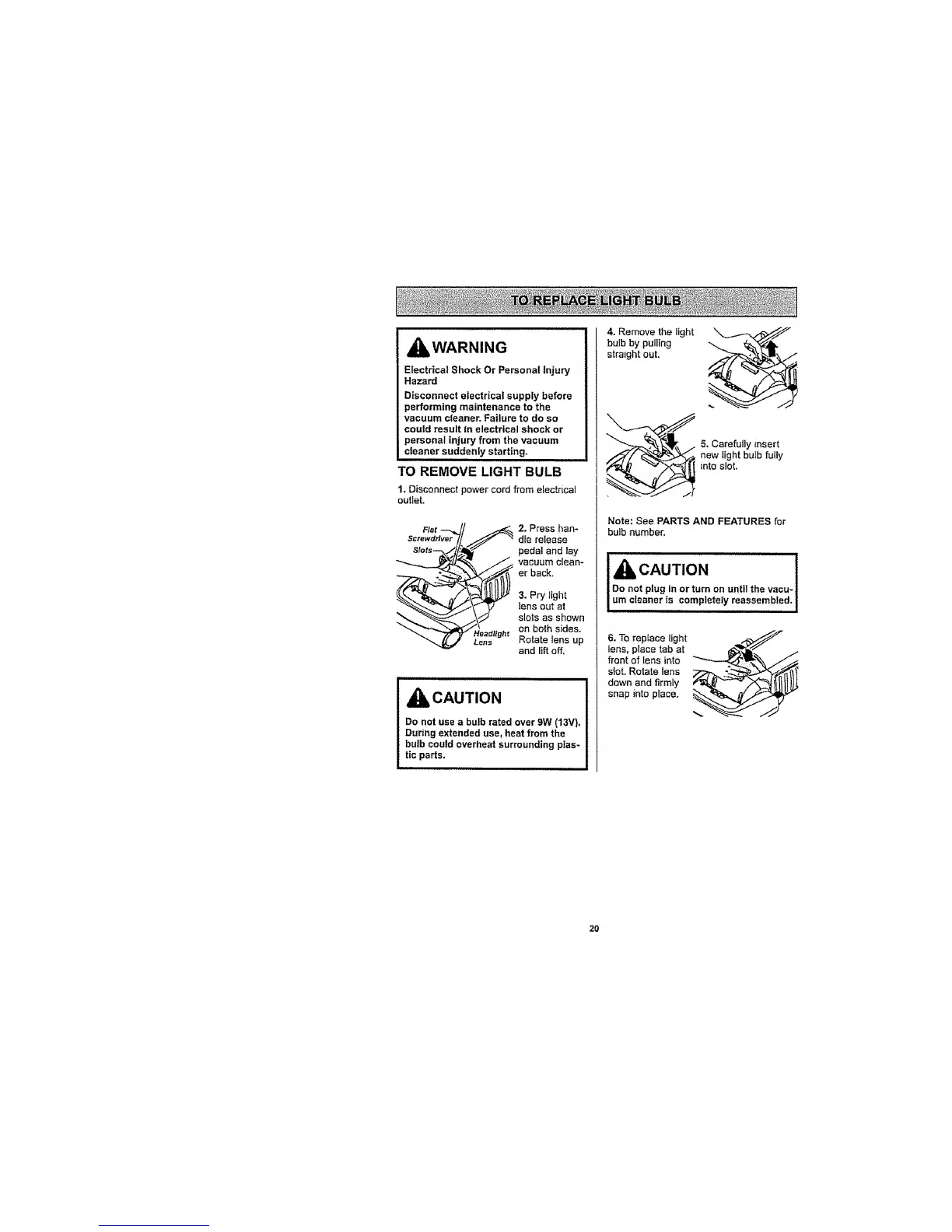
TO REMOVE LIGHT BULB
1. Disconnect power cord from electrical
outlet.
2. Press han-
dle release
pedal and lay
vacuum clean-
er back.
3. Pry light
lensout at
slots as shown
Headlight on both sides.
Lens Rotate lens up
and lift off.
CAUTION
Do not use a bulb rated over 9W (13V).
During extended use, heat from the
bulb could overheat surrounding plas-
tic parts.
4. Remove the light
bulb by putling
straight out.
5. Carefully insert
new light bulb futly
into slot.
Note: See PARTS AND FEATURES for
bulb number.
IAcAu,,o. !
Do not plug in or turn on untilthe vacu-!
um cleaner is completely reassembled, !
i NIIIIIIIIIIIIIIIIi Ill I
6. To replace light
lens, place tab at
front of lens into
slot. Rotate lens
down and firmly
snap into place.
2o




 To Next Page