5
TOUCH PAD
ELECTRONIC CONTROL
Air Conditioner Features
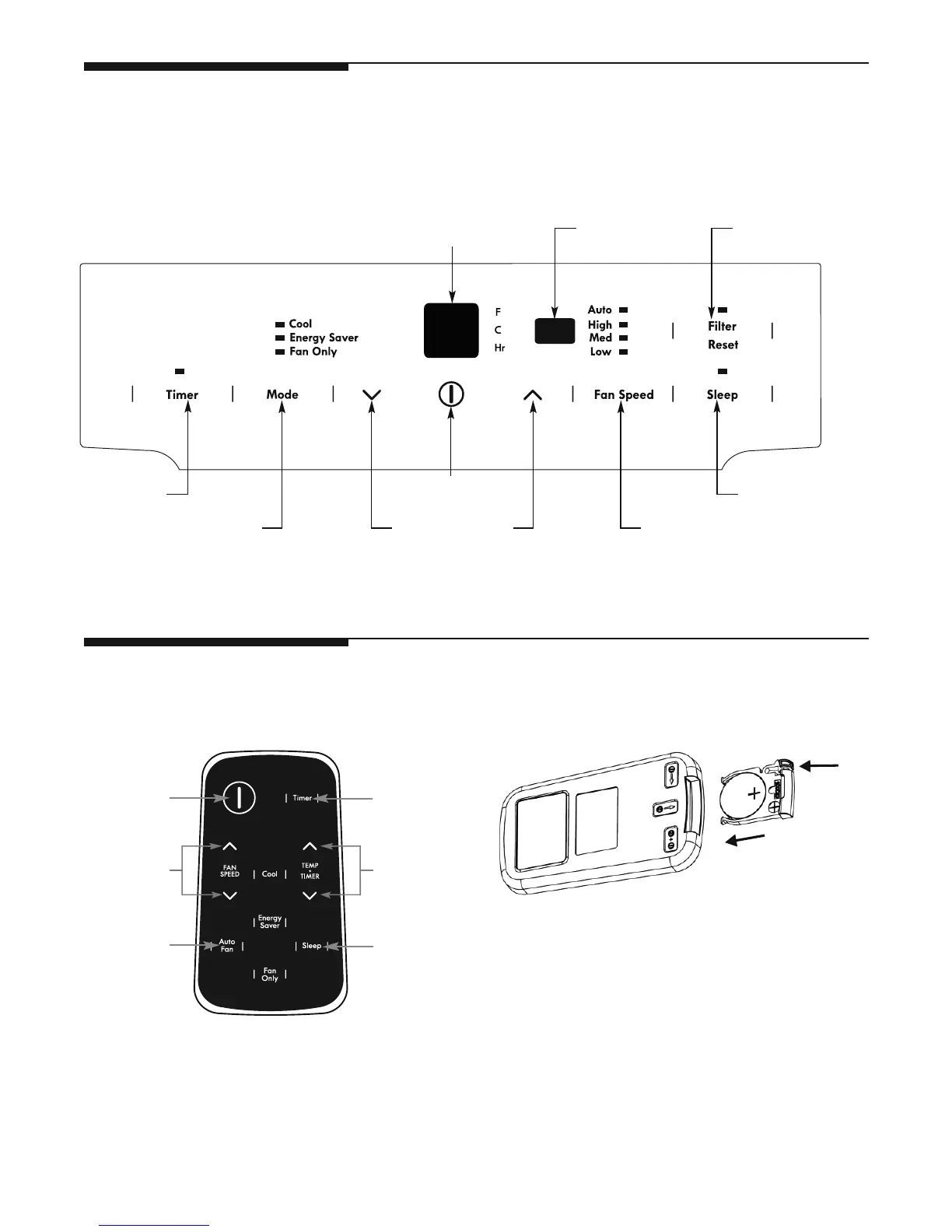
Before you begin, thoroughly familiarize yourself with the control panel and remote as shown below and all its functions, then
touch the symbol pads for the functions you desire. The unit can be controlled by the panel touch pads or with the remote control.
Turn Remote Control upside down. Squeeze tab and pull
to remove battery tray. Place battery in tray with
POSITIVE(“+”) side facing UP, according to diagram.
Re-insert battery tray.
TO REPLACE BATTERY
Battery Size: CR2025
REMOTE CONTROL
ACTIVATES
TIMER
SLEEP MODE
SETS FAN SPEEDSADJUSTS
TEMPERATURE
OR TIME
TURNS UNIT
ON OR OFF
DISPLAYS
TEMPERATURE/TIME
SETS MODE
FILTER RESET
BUTTON
INFRARED
REMOTE WINDOW
TAB
ON/OFF
ADJUSTS
TEMP & TIME
AUTO FAN
SLEEP
MODE
SETS FAN
SPEEDS
ACTIVATES
TIMER
Note: Pull off the protecting film to activate the
remote control, when use for the first time.



 To Next Page