OPERATING THE WASHER
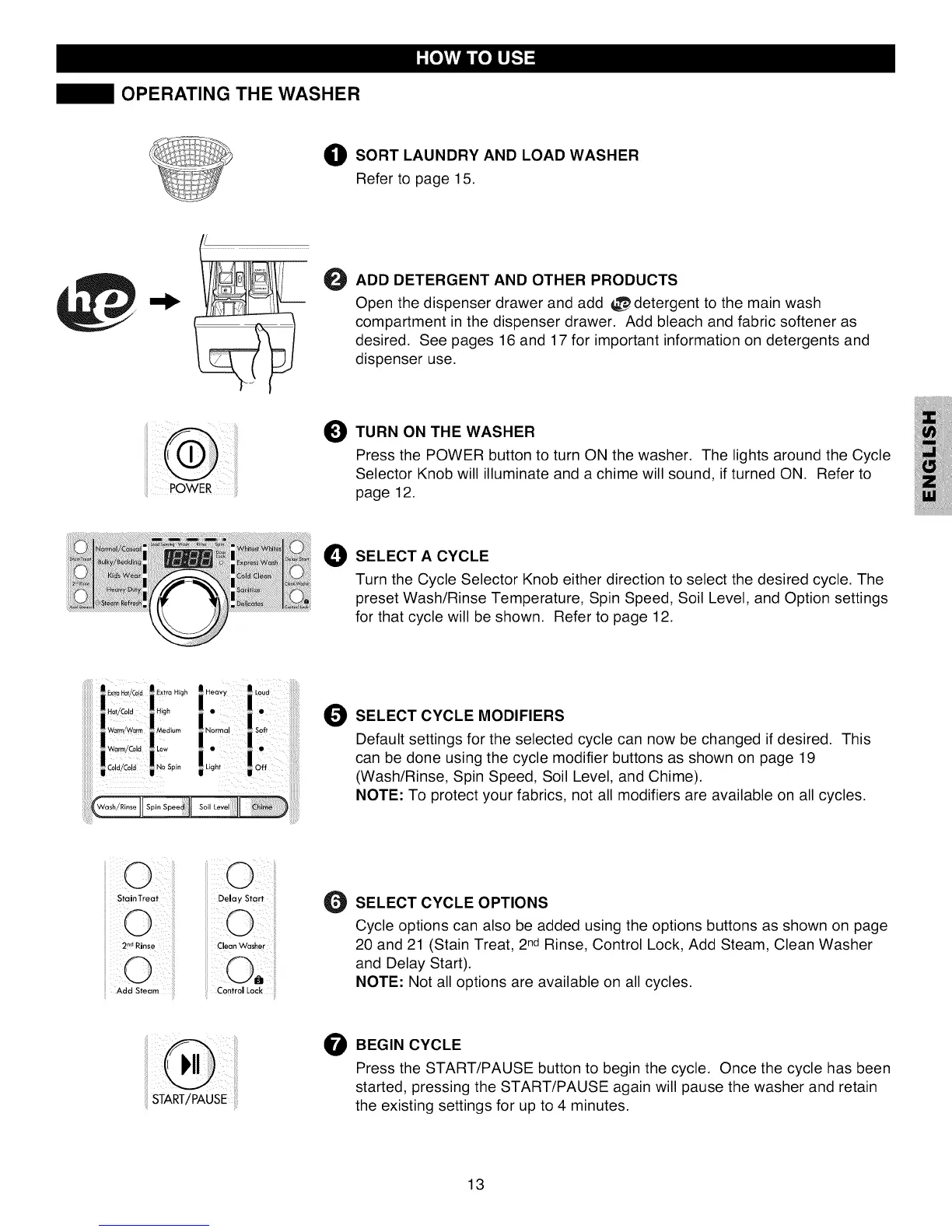
O SORT LAUNDRY AND LOAD WASHER
Refer to page 15.
@
ADD DETERGENT AND OTHER PRODUCTS
Open the dispenser drawer and add _detergent to the main wash
compartment in the dispenser drawer. Add bleach and fabric softener as
desired. See pages 16 and 17 for important information on detergents and
dispenser use.
O TURN ON THE WASHER i_l
JJ
Press the POWER button to turn ON the washer. The lights around the Cycle I_iiii.
Selector Knob will illuminate and a chime will sound, if turned ON. Refer to
..... POWER page 12. i_ill
O SELECT A CYCLE
Turn the Cycle Selector Knob either direction to select the desired cycle. The
preset Wash/Rinse Temperature, Spin Speed, Soil Level, and Option settings
for that cycle will be shown. Refer to page 12.
O SELECT CYCLE MODIFIERS
Default settings for the selected cycle can now be changed if desired. This
can be done using the cycle modifier buttons as shown on page 19
(Wash/Rinse, Spin Speed, Soil Level, and Chime).
NOTE: To protect your fabrics, not all modifiers are available on all cycles.
(
Add Steam
Clean Washer
0
SELECT CYCLE OPTIONS
Cycle options can also be added using the options buttons as shown on page
20 and 21 (Stain Treat, 2ndRinse, Control Lock, Add Steam, Clean Washer
and Delay Start).
NOTE: Not all options are available on all cycles.
START/PAUSE
O BEGIN CYCLE
Press the START/PAUSE button to begin the cycle. Once the cycle has been
started, pressing the START/PAUSE again will pause the washer and retain
the existing settings for up to 4 minutes.
13


 To Next Page
 Loading...