.
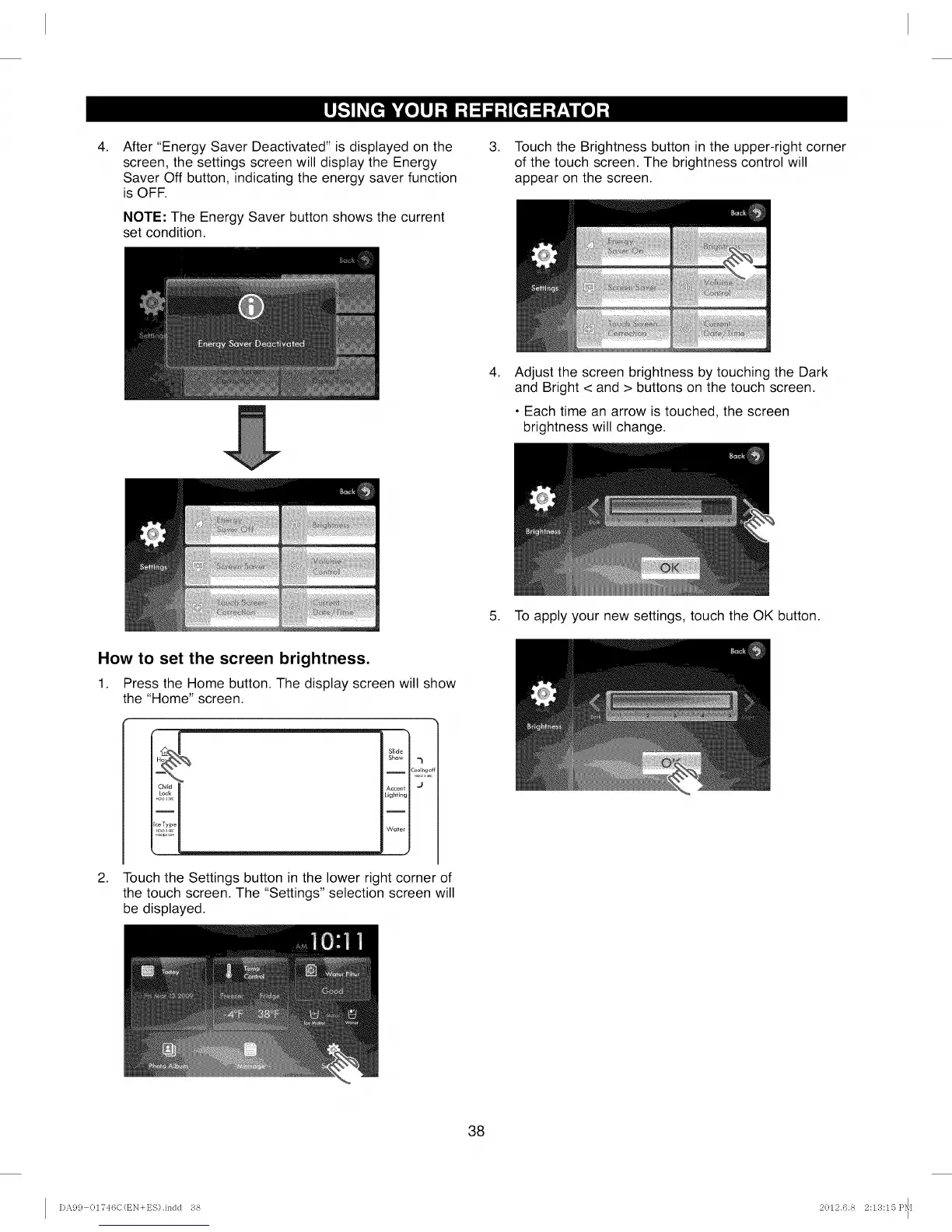
After "Energy Saver Deactivated" is displayed on the
screen, the settings screen will display the Energy
Saver Off button, indicating the energy saver function
is OFF.
NOTE: The Energy Saver button shows the current
set condition.
.
Touch the Brightness button in the upper-right corner
of the touch screen. The brightness control will
appear on the screen.
.
Adjust the screen brightness by touching the Dark
and Bright < and > buttons on the touch screen.
• Each time an arrow is touched, the screen
brightness will change.
5. To apply your new settings, touch the OK button.
How to set the screen brightness.
1. Press the Home button. The display screen will show
the "Home" screen.
.
Slide
Show 7
Cool_r,gc
Accent J
Lighting
Water
J
Touch the Settings button in the lower right corner of
the touch screen. The "Settings" selection screen will
be displayed.
38
I)A99 OI'746C(EN+ES).indd 38 2012.6.8 2:113:15 P_[



 To Next Page