How to set the screen saver.
Ifthe screen saver is lefton for extended periods, it is a
good idea to set the slide show at the photo album as the
screen saver.
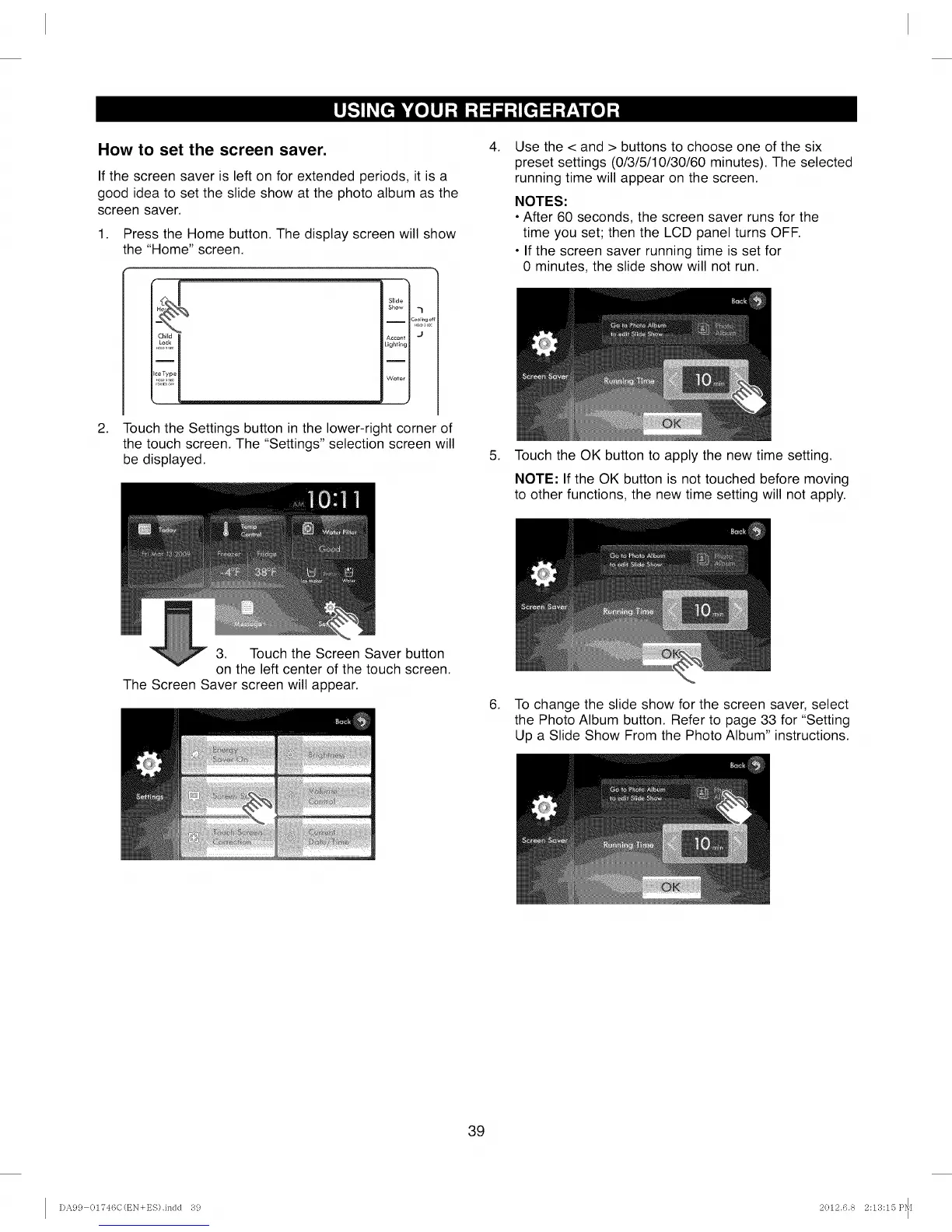
1. Press the Home button. The display screen will show
the "Home" screen.
.
[4
Slide
Show ,_
-- Coolrngc
Lighting
Water
J
Touch the Settings button in the lower-right corner of
the touch screen. The "Settings" selection screen will
be displayed.
.
.
Use the < and > buttons to choose one of the six
preset settings (0/3/5/10/30/60 minutes). The selected
running time will appear on the screen.
NOTES:
• After 60 seconds, the screen saver runs for the
time you set; then the LCD panel turns OFF.
• If the screen saver running time is set for
0 minutes, the slide show will not run.
Touch the OK button to apply the new time setting.
NOTE: If the OK button is not touched before moving
to other functions, the new time setting will not apply.
3. Touch the Screen Saver button
on the left center of the touch screen.
The Screen Saver screen will appear.
6. To change the slide show for the screen saver, select
the Photo Album button. Refer to page 33 for "Setting
Up a Slide Show From the Photo Album" instructions.
39
I)A99 01746C(EN+ES).indd 39 2012.6.8 2:13:15 P_[



 To Next Page