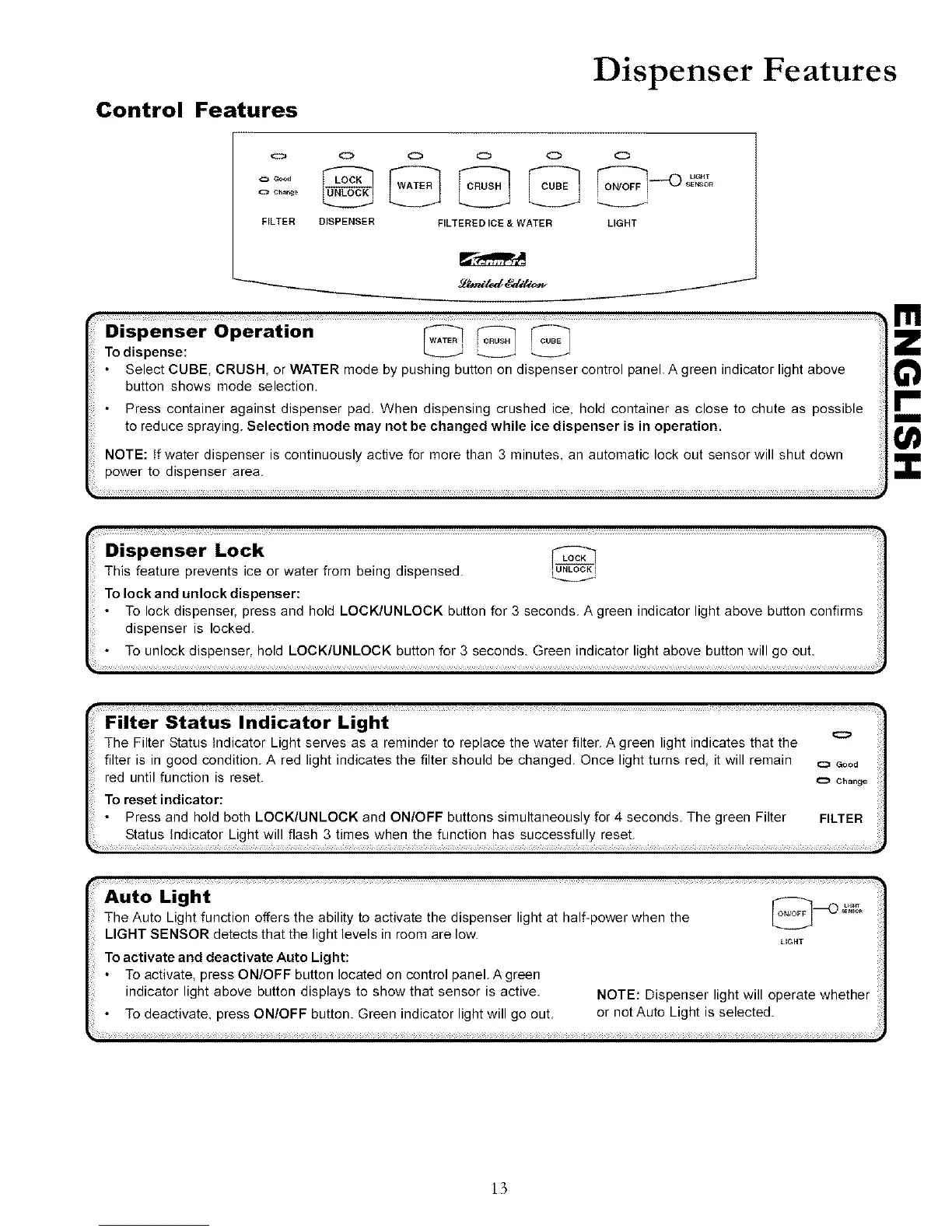
Control Features
Dispenser Features
o O O O O O
SENSOR
cha_
FILTER DISPENSER FILTERED ICE & WATER LIGHT
Dispe.serOperatio.
To dispense:
Select CUBE, CRUSH, or WATER mode by pushing button on dispenser control panel. A green indicator light above
button shows mode selection.
Press container against dispenser pad, When dispensing crushed ice, hold container as close to chute as possible
to reduce spraying. Selection mode may not be changed while ice dispenser is in operation.
NOTE: tf water dispenser is continuously active for more than 3 minutes, an automatic lock out sensor will shut down
power to dispenser area.
i
Dispenser Lock
This feature prevents ice or water from being dispensed.
To lock and unlock dispenser:
• To lock dispenser, press and hold LOCK/UNLOCK button for 3 seconds. A green indicator light above button confirms
dispenser is locked.
• To unlock dispenser, hold LOCK/UNLOCK button for 3 seconds. Green indicator light above button will go out.
i
I11
m
Filter Status Indicator Light
The Filter Status Indicator Light serves as a reminder to replace the water filter. A green light indicates that the
filter is in good condition. A red light indicates the filter should be changed. Once light turns red, it will remain o Good
red until function is reset, o Cho.go
TOreset indicator:
Press and hold both LOCK/UNLOCK and ON/OFF buttons simultaneously for 4 seconds. The green Filter FILTER
Status Indicator Light will flash 3 times when the function has successfully reset.
Auto LightThe Auto Light function offers the ability to activate the dispenser light at half-power when the _ _'_
LIGHT SENSOR detects that the light levels in room are low.
LIGHT
To activate and deactivate Auto Light:
• To activate, press ON/OFF button located on control panel. A green
indicator light above button displays to show that sensor is active. NOTE: Dispenser light will operate whether
• To deactivate, press ON/OFF button. Green indicator light will go out. or not Auto Light is selected.
13



 To Next Page