- 48 -
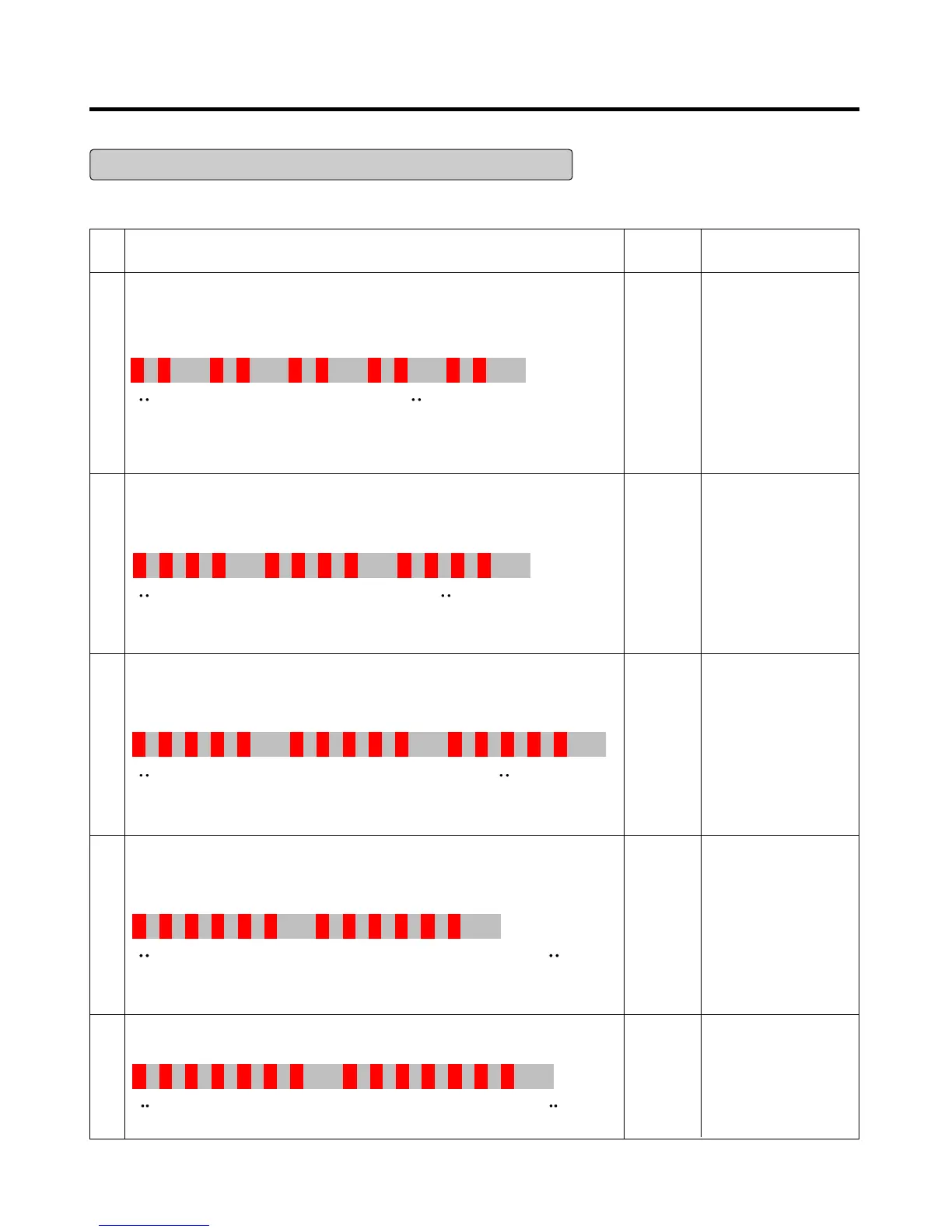
Actions to take according to Led blinking frequency
LED two - time repetiton (Stroke Trip)
on - on - off - on - on - off - on - on - off repeating
PCB Parts
defect or
Compress
or
Connector
miss
connecting
(Piston
over run)
1. Please check, Whether
connector of
compressor is attached
rightly or not. after
power off
2. After the first action,
You check on normal
operation of
compressor.
3. If the same symptom
arises after the second
action, replace PCB
Outlet
clogging
1. After resetting power,
check if it is running
normal
2. If the same symptom
arises after the first
action
3. If the same symptom
arises after the second
action, replace
compressor
Piston
constraint
1. After resetting power,
check if it is running
normal
2. If the same symptom
arises after the first
action
3. If the same symptom
arises after the second
action, replace
compressor
Circuit
over
current
error
Or cycle
error
1. After resetting power,
check if it is running
normal
2. If the same symptom
arises after the first
action
3. If the same symptom
arises after the second
action, replace
compressor
PCB parts
defect
(IPM)
1. After resetting power,
check if it is running
normal
2. If the same symptom
arises after the first
action, replace PCB
1
LED four - time repetiton (Overload Protect)
on - on - on - on - off - on - on - on - on - off repeating
2
LED five - time repetiton (Piston Lock Trip)
on - on - on - on - on - off - on - on - on - on - on - off repeating
3
LED six - time repetiton (Current Trip)
on
-
on
-
on
-
on
-
on
-
on
- off -
on
-
on
-
on
-
on
-
on
-
on
- off
repeating
4
LED seven- time repetiton (IPM Fault Trip)
on - on - on - on - on - on - on - off - on - on -on - on - on - on- on - off repeating
5
No LED operating condition Cause Service guideline



 To Next Page