- 24 -
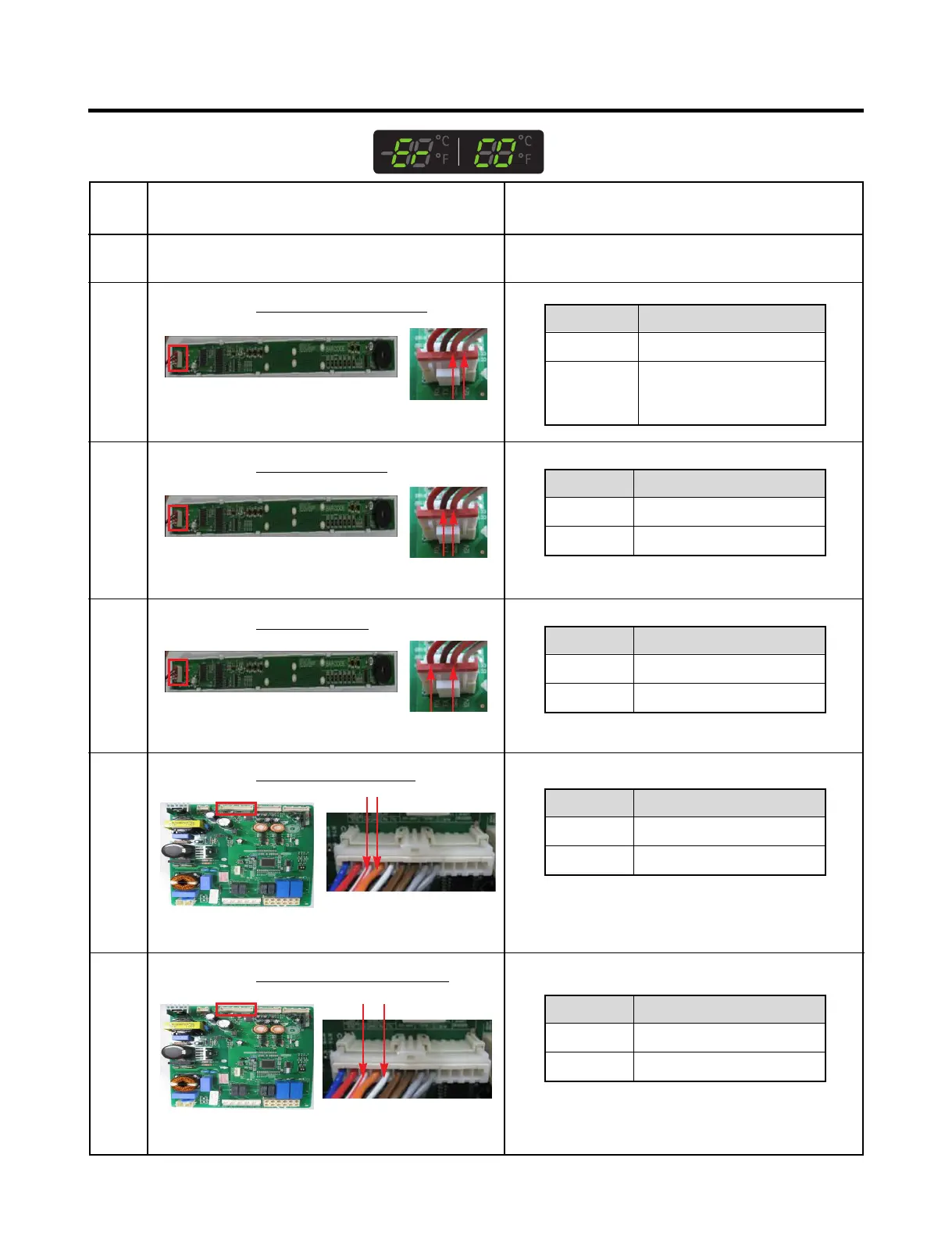
7-8 Communication Error (Er CO)
No
1
2
Checking flow
Check the loose connection.
Check the Orange to White/Black.
Result & SVC Action
Result
12 V
Other
SVC Action
Go to the 3
Check the Hinge
(loose connection)
Change the Main PCB
5 Check the White/Red to Orange.
<CON5>
6 Check the White/Red to White/Black.
<CON5>
<CON101><Display>
3 Check the Orange to Brown.
Result
0 V or 5 V
Other
SVC Action
Change the Display PCB
Go to the 4
4 Check the Orange to Red.
Result
0 V or 5 V
Other
SVC Action
Change the Main PCB
Go to the 5
Result
0 V or 5 V
Other
SVC Action
Change the Display PCB
Go to the 6
Result
0 V or 5 V
Other
SVC Action
Change the Main PCB
Explain to customer
<CON101><Display>
<CON101><Display>
CON101
CON101
CON101



 To Next Page