- 32 -
9. Troubleshooting Without Error Display
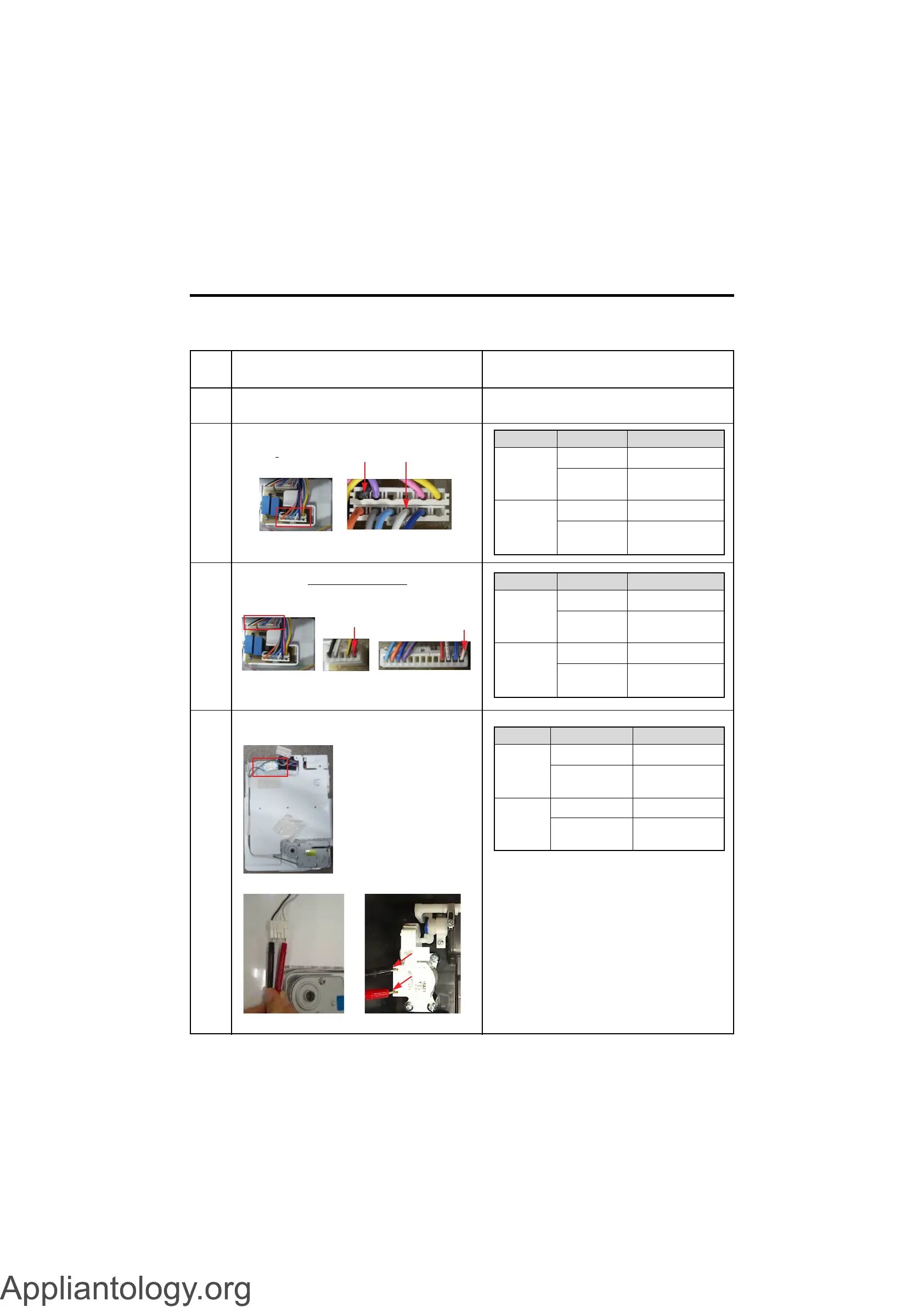
9-1 Cube mode doesn’t work
No
1
2
Checking flow
Check the loose connection on the
Dispenser PCB
Check the Black to White on the Dispenser
PCB (While pushing the Pad S/W)
Result & SVC Action
<CON2>
3 Check the RED to White Red.
(While pushing the Pad S/W)
4 Check the resistance value.
<CON1><CON3>
<Ice Maker>
<AC Indoor Motor> <Dispenser Motor>
(2)(1)
(3)
(4)
Pushing
Not
pushing
112 ~ 115 V
Other
0 ~2 V
Other
Go to the 3
Change
Dispenser PCB
Go to the 3
Change
Dispenser PCB
Ice Button
Result SVC Action
Pushing
Not
pushing
9 ~ 12 V
Other
0 ~2 V
Other
Go to the 4
Change
Dispenser PCB
Go to the 4
Change
Dispenser PCB
Ice Button
Result SVC Action
(1) to (2)
(3) to (4)
31.1 ~ 42.1
Ω
Other
9.9 ~ 12.1
Ω
Other
Explain
Replace
AC Indoor Motor
Explain
Replace
AC Indoor Motor
Point Result SVC Action



 To Next Page