10
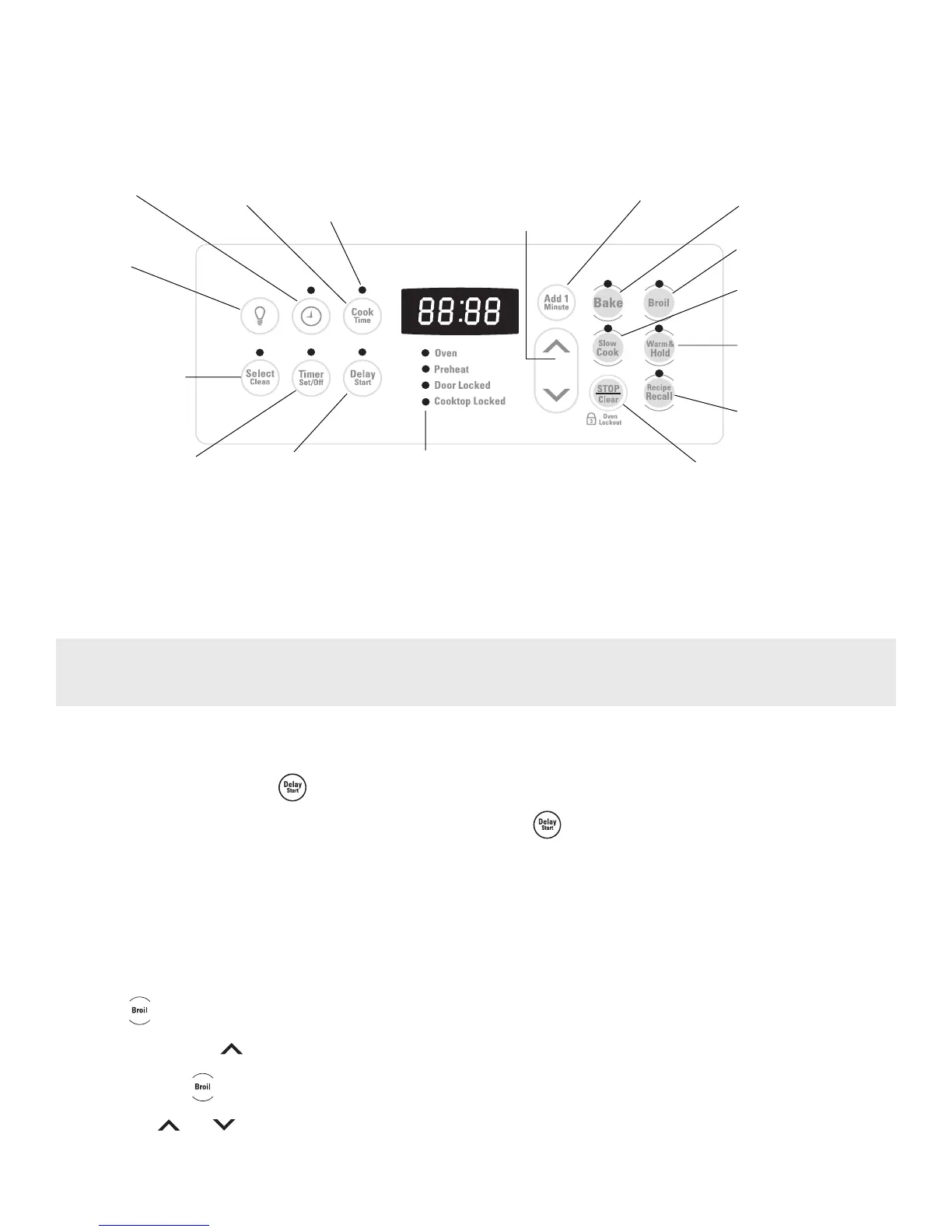
Oven Control Functions
READ THE INSTRUCTIONS CAREFULLY BEFORE USING THE OVEN. For satisfactory use of your oven, become familiar with
the various pad functions of the oven as described below.
BROIL PAD— Used to
select the variable broil
function.
UP and DOWN ARROW PADS—
Used along with the function pads to
select oven temperature, cook time,
start time (when programming an
automatic start time), time of day,
clean time and minute timer.
BAKE PAD—
Used to select
the bake
function.
DELAY START
PAD— Used to set
the desired start
time for baking &
Self-Clean. May be
used with COOK
TIME to program a
delayed bake cycle.
COOK TIME
PAD— Used to
enter the length of
the baking time.
SELECT SELF-CLEAN
PAD— Used to select
the Self-Cleaning
cycle. A 2, 3 or 4 hour
Self-Clean time may be
selected.
OVEN, PREHEAT & DOOR LOCKED LIGHTS* — The
"OVEN" light will glow each time the oven turns on to
maintain the set oven temperature. The "PREHEAT" light
will glow when the oven is first set to operate, or if the
desired temperature is reset higher than the actual oven
temperature. The "DOOR LOCKED" light will flash when
the oven door locks and unlocks or when using the Self-
Clean cycle or the oven door lockout is activated. The
indicator light will glow constantly after the door locks.
FEATURE
INDICATOR
LIGHTS— These
light to show
which feature is
in use.
CLOCK SET
PAD— Used
to set the
time of day.
STOP/CLEAR PAD—
Used to clear any
function previously
entered except the time
of day and minute timer.
Press STOP/CLEAR to
stop cooking. Also the
STOP/CLEAR pad is
used to activate oven
door lockout setting.
For a silent control panel
When choosing a function, a beep will be heard each time a pad is pressed. If desired, the control can be programmed for
silent operation. Press and hold . After 7 seconds, the control will beep once. This will block the controls from
sounding when a pad is pressed. To return the sound, press and hold again for 7 seconds until the control beeps
once.
Temperature conversion
The electronic oven control is set to operate in °F (Fahrenheit) when shipped from the factory. The oven can be programmed
for any temperature from 170°F to 550°F (77°C to 287°C).
To change the temperature to °C (Celsius) or from °C to °F (control should not be in a Bake or Clean mode):
1. Press . "— —" appears in the display.
2. Press and hold the until "HI" appears in the display.
3. Press and hold until °F or °C appears in the display.
4. Press the or to change °F to °C or °C to °F.
5. Press any control pad to return to normal operating mode.
TIMER SET/OFF PAD—
Used to set or cancel the
minute timer. The minute
timer does not start or stop
cooking. Also,
TIMER SET/OFF pad is
used to set the Continuous
Bake feature.
*Note: The OVEN indicator light on the electronic display will turn ON and OFF when using the Bake feature and during
preheat. This is normal and indicates that the oven is cycling to maintain the selected baking temperature. When the
preheat indicator light turns OFF, your oven is ready.
OVEN INTERIOR
LIGHT PAD— Used to
turn oven interior light
ON or OFF.
WARM & HOLD PAD—
Used to set the Warm &
Hold feature.
RECIPE RECALL PAD—
Used to set the Recipe
Recall feature.
SLOW COOK PAD—
Used to set the Slow Cook
feature.
ADD 1 MINUTE —
Use to select Add
1 Minute feature.



 To Next Page