Operating instructions
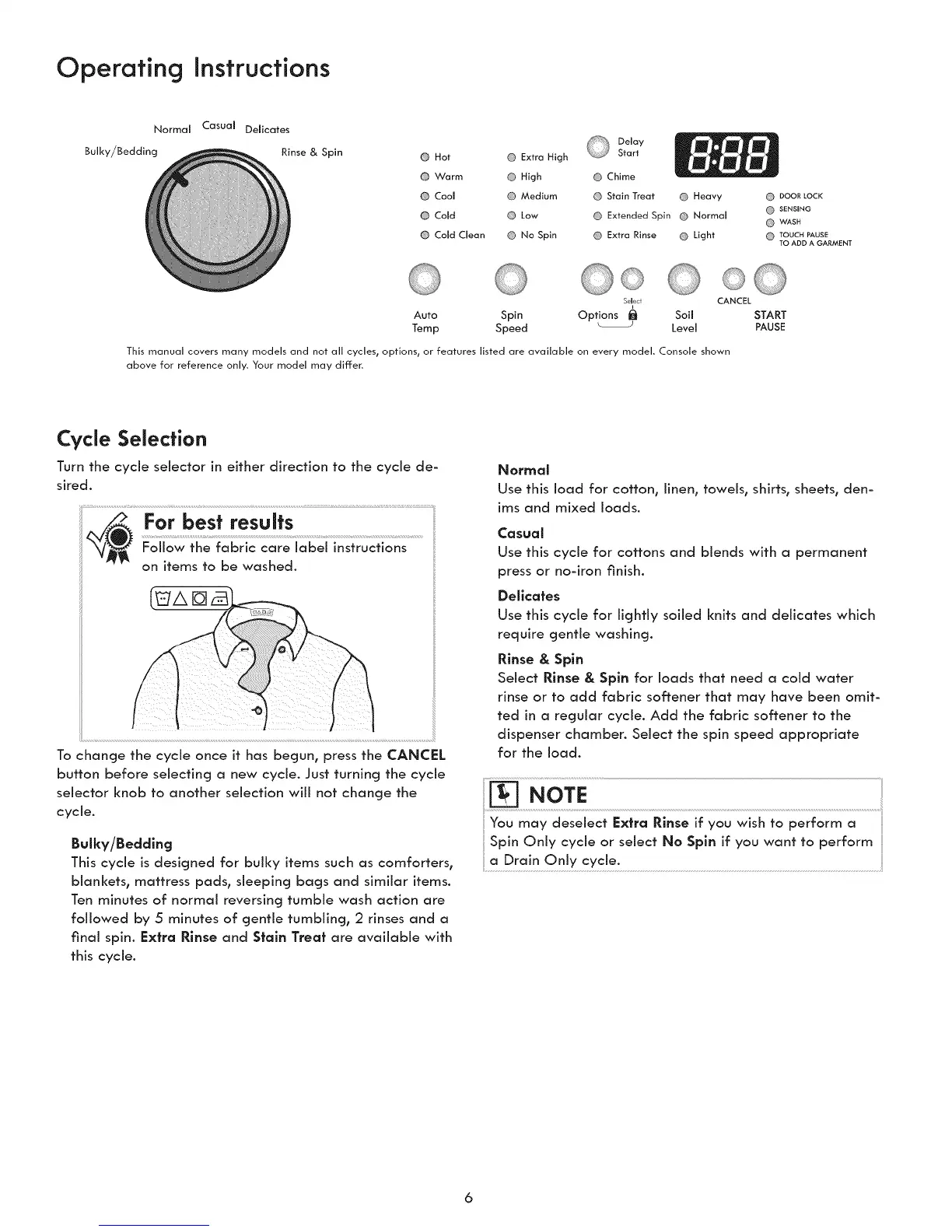
Normal Casual DeJicates
Bulky/Bedding Rinse & Spin
@ Hot @ Extra High
@ Warm High
@ Cool Medium
@ Cold Low
@ Cold aean @ No Spin
Delay
Start
Chime
Stain Treat Heavy
Extended Spin Normal
Extra Rinse Light
DOOR LOCI(
SENSING
WASH
TOUCH PAUSE
TO ADD A GARMENT
Auto Spin Soil
Temp Speed Level
Selec
Op,ions0
CANCEL
START
PAUSE
This manual covers many models and not all cycles, options, or features listed are available on every model. Console shown
above for reference only. Your model may differ.
Cycle Selection
Turn the cycle selector in either direction to the cycle de-
sired.
For best results
Follow the fabric care label instructions
on items to be washed.
To change the cycle once it has begun, press the CANCEL
button before selecting a new cycle. Just turning the cycle
selector knob to another selection will not change the
cycle.
BuJky/Beddlng
This cycle is designed for bulky items such as comforters,
blankets, mattress pads, sleeping bags and similar items.
Ten minutes of normal reversing tumble wash action are
followed by 5 minutes of gentle tumbling, 2 rinses and a
final spin. Extra Rinse and Stain Treat are available with
this cycle.
NOFJ_a_
Use this load for cotton, linen, towels, shirts, sheets, den-
ims and mixed loads.
Casucl_
Use this cycle for cottons and blends with a permanent
press or no=iron finish.
Delicates
Use this cycle for lightly soiled knits and delicates which
require gentle washing.
Rinse & Spin
Select Rinse & Spln for loads that need a cold water
rinse or to add fabric softener that may have been omit-
ted in a regular cycle. Add the fabric softener to the
dispenser chamber. Select the spin speed appropriate
for the load.
You may deselect Extra Rinse if you wish to perform a
Spin Only cycle or select No Spin if you want to perform
a Drain Only cycle.



 To Next Page