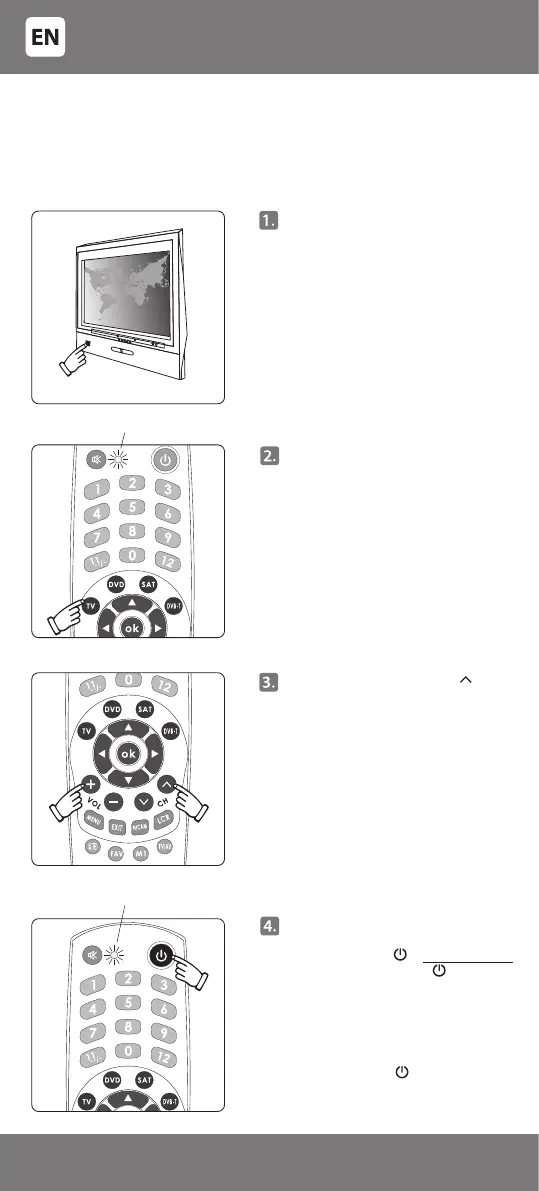
Press [VOL+] and [PROG ] keys
simultaneously and release them
only when the indicator switches
on again and remains lit after
having gone out.
Point the remote towards the
controllable device, press and
hold the key [ ]. Immediately
release the key [ ] if the
controllable device switches o -
the indicator should go out.
Finding the correct code for
specic models can take over 10
minutes, therefore be patient and
release the key [ ] only when the
device (e.g. TV) switches o.
The indicator ashes
Press the key of the controllable
device on the remote (e.g. for the
television – [TV]). A light indicator
will switch on. Release the key.
The indicating light is on
Manually switch on the
controllable device (e.g. TV).
As with the ‘Code setup from the
code table’ method, the device
must be fully switched on, not just
in standby mode
B. AUTOMATIC CODE SEARCH
Use the ‘Automatic code search‘ if you have tried ‘Code setup from the
code table‘, but the device cannot be controlled yet. This function ensures
selection of code from an even wider code list entered in the remote
control memory so that the remote can also be programmed for more
specic models.
- 6 -
3301053


 To Next Page