6 7
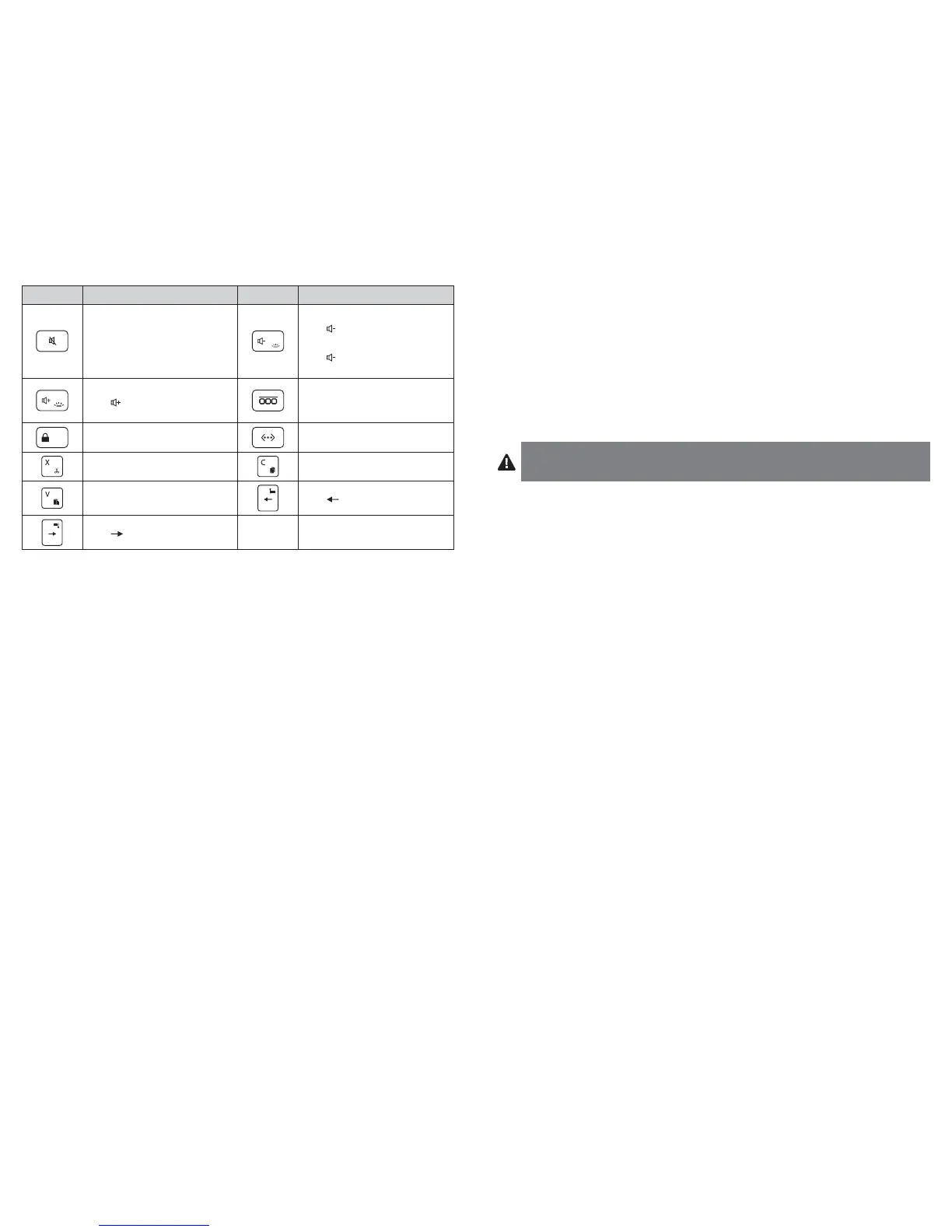
Key
Function
Key
Function
Mute
Volume down
Fn +
= decrease backlight
brightness
Fn +
again or twice =
turn off backlight
Volume up
Fn +
= increase backlight
brightness
Display recently opened apps
Lock Pair
Fn + X = Cut Fn + C = Copy
Fn + V = Paste Fn + = Select left word
Fn + = Select right word
* Toggles between available languages
Troubleshooting
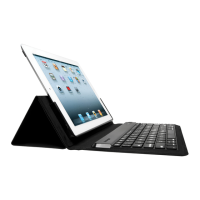
I can’t connect the Keyboard to my iPad.
Try the following in sequence. You can stop when the problem is fixed.
1 Make sure you have installed and set up Bluetooth correctly on your iPad. Check the
documentation that came with your iPad for instructions.
2 Make sure that the Keyboard is within range of your iPad. Maximum Bluetooth range is
about 10 meters/33 feet.
3 If your iPad is connected to other Bluetooth devices, you may need to disconnect some
devices before you can connect to the Keyboard.
4 If you changed any Bluetooth settings on your iPad, try connecting the Keyboard to
your iPad again.
5 Make sure that both your iPad battery and the Keyboard battery are sufficiently
charged.
If this does not solve the problem, please contact Kensington Support at kensington.com.
Technical Support
Technical support is available to all registered users of Kensington products. Technical
Support contact information can be found on the back page of this manual.
Web Support
You may find the answer to your problem in the Frequently Asked Questions (FAQ) section
of the Support area on the Kensington Website: www.support.kensington.com.
Telephone Support
There is no charge for technical support except long-distance charges where applicable.
Please visit www.kensington.com for telephone support hours. In Europe, technical
support is available by telephone Monday to Friday 09:00 to 18:00 (Central European time).
Please note the following when calling support:
• Call from a phone where you have access to your device.
• Be prepared to provide the following information:
– Name, address, and telephone number
– Name of the Kensington product
– Make and model of your computer
– System software and version
– Symptoms of the problem and what led to them
WARNING! IMPORTANT SAFETY INSTRUCTIONS
Failure to read and follow these safety instructions could result in fire, explosion, electrical
shock or other hazard, causing serious and/or fatal injury and/or property damage.
• Do not modify, disassemble, open, drop, crush, puncture, or shred the KeyFolio.
• The KeyFolio contains a lithium-polymer battery, which is flammable. Keep away from open flame.
• To prevent short circuit or other potential hazards, prevent metal objects such as coins or keys from
coming into contact with the KeyFolio, and do not insert foreign objects into the KeyFolio or its
ports.
• Keep your KeyFolio dry, and do not use with wet hands. Moisture in or on the KeyFolio may lead to
electrical shock. If exposed to moisture during use, unplug the KeyFolio immediately. If your
KeyFolio gets wet, have a qualified technician evaluate the product’s safety before resuming use.
• Your KeyFolio may become warm during operation. This is normal. However, to prevent
overheating, keep area around KeyFolio ventilated and do not place anything on or around KeyFolio
during operation. Do not operate your KeyFolio near a heat source, heat vent, or in direct sunlight.
Your KeyFolio should be used in temperatures between 50–80°F (10–27°C).
• If the KeyFolio begins to swell or expand, emits a strong odor, or becomes hot to the touch,
discontinue use of the KeyFolio, and have the product examined by a qualified electronic technician.
• Inspect your KeyFolio and cables for damage before use. Have any damaged part repaired or
replaced before use.
• Your KeyFolio is not user serviceable. Do not attempt to open, modify, or repair.
• If the battery inside the KeyFolio leaks for any reason, discontinue use, and do not allow the
KeyFolio’s contents to contact your skin or eyes. In the event of accidental contact wash the
affected area with large amounts of water and seek medical attention immediately.
• Your KeyFolio is not a toy. Keep them away from children. Insure that all persons who use this product
read and follow these warnings and instructions.
• Do not leave the KeyFolio on prolonged charge when not in use.
Enhancing Performance by Proper Care and Storage of your
KeyFolio
• Do not store your KeyFolio either fully charged or discharged. It is best to store your KeyFolio with
at least 30 % charge remaining. To check the charge level of your KeyFolio press the battery
indicator button.
• Avoid frequent full discharges because this puts additional strain on the battery in the KeyFolio.
Charge your KeyFolio between uses even if it is not fully discharged. The lithium-polymer battery
used in this product has no “memory effect.” Therefore, several partial discharges with frequent
recharges are better than one full discharge, and will help prolong the life of your KeyFolio. Short
battery life in laptops is mainly caused by heat, rather than charge/discharge patterns.
•
Do not store your
KeyFolio
at elevated temperatures (such as in your car) or in high humidity.



 To Next Page