EasyManua.ls Logo

Kenwood Basic M1 - Parts List

Kenwood Basic M1
7 pages
Print Icon
To Next Page IconTo Next Page
To Previous Page IconTo Previous Page
Loading...
Speakers
This
amplifier
has
two
pairs
of
speaker
terminals,
SPEAKERS
A
and
SPEAKERS
B.
Connecting
one
speaker
system
Connect
speakers
rated
at
4
ohms
or
more
to
the
SPEAKERS
A
terminals.
Although
ordinary
speaker
cords
can
be
connected
to
the
SPEAKERS
A
terminals,
the
£
drive
system
will
reproduce
better
sound
with
the
L
cables
connected
to
the
SPEAKERS
A
terminals.
Speaker
cords
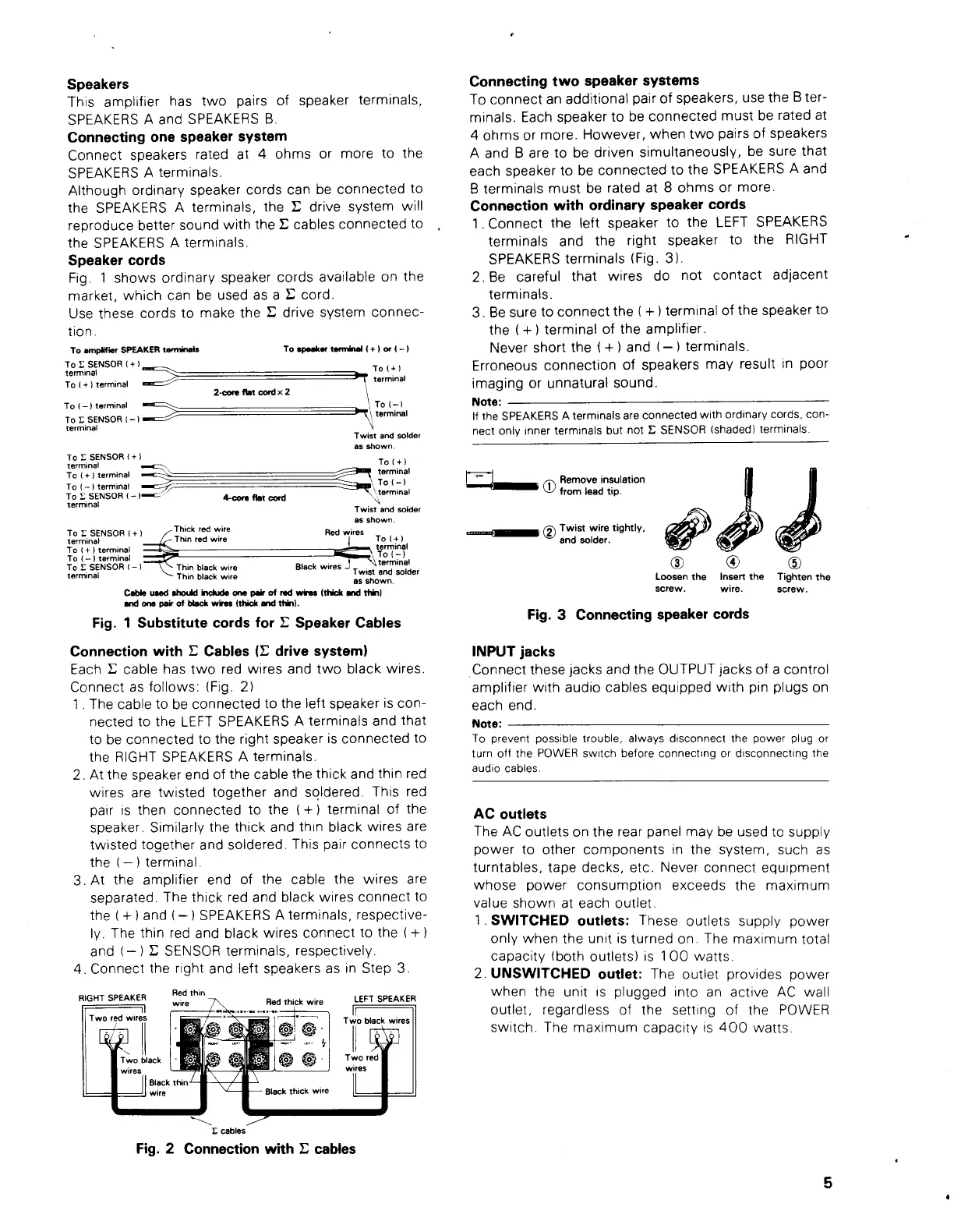
Fig.
1
shows
ordinary
speaker
cords
available
on
the
market,
which
can
be
used
as
a
Y
cord.
Use
these
cords
to
make
the
©
drive
system
connec-
tion.
To
ampiitier
SPEAKER
terminais
To
©
SENSOR
{+}
terminal
»
rolt)
|
terminal
,
To(-}
Poenes
|
.
\
terminal
To
speaker
terminal
(+)
or
(—)
To
(+)
terminal
ae
2-core
fiat
cord
x
2
To
(—)
terminal
"=
To
E
SENSOR
(—}
sx"
terminal
Twist
and
solder
as
shown.
To
©
SENSOR
(+}
terminal
To
(+
}
To
(+)
terminal
sco
Lan
terminal
To(-)
terminal
—mac7-
SR
To(-)
To
£
SENSOR
(—
)==c”
4-core
flat
cord
‘terminal
terminal
UN
Twist
and
solider
as
shown.
Thick
red
wire
.
T
or
lominsNSOR
‘4
Thin
red
wire
Red
es
To
(+)
To
(+)
terminal
terminal
To
(—)
terminal
"9
(=)
To
©
SENSOR
(—)
Black
wires
J
termina’
Thin
black
wire
-
terminal
i
Twist
and
solder
Thin
black
wire
as
shown.
Cable
used
should
include
one
pair
of
red
wires
(thick
and
thin)
and
one
pair
of
black wires
(thick
and
thin}.
Fig.
1
Substitute
cords
for
©
Speaker
Cables
Connection
with
L
Cables
(i
drive
system)
Each
©
cable
has
two
red
wires
and
two
black
wires.
Connect
as
follows:
(Fig.
2)
1.
The
cable
to
be
connected
to
the
left
speaker
is
con-
nected
to
the
LEFT
SPEAKERS
A
terminals
and
that
to
be
connected
to
the
right
speaker
is
connected
to
the
RIGHT
SPEAKERS
A
terminals.
2.
At
the
speaker
end
of
the
cable
the
thick
and
thin
red
wires
are
twisted
together
and
soldered.
This
red
pair
is
then
connected
to
the
(+)
terminal
of
the
speaker.
Similarly
the
thick
and
thin
black
wires
are
twisted
together
and
soldered.
This
pair
connects
to
the
(—)
terminal.
3.At
the
amplifier
end
of
the
cable
the
wires
are
separated.
The
thick
red
and
black
wires
connect
to
the
(+)
and
(—)
SPEAKERS
A
terminals,
respective-
ly.
The
thin
red
and
black
wires
connect
to
the
(+)
and
(—)
£
SENSOR
terminals,
respectively.
4.
Connect
the
right
and
left
speakers
as
in
Step
3.
Red
thin
wire
IN
Red
thick
wire
RIGHT
SPEAKER
|
Two
red
wires
LEFT
SPEAKER
Two
black
wires
Black
thick
wire
©
cables
Fig.
2
Connection
with
©
cables
Connecting
two
speaker
systems
To
connect
an
additional
pair
of
speakers,
use
the
B
ter-
minals.
Each
speaker
to
be
connected
must
be
rated
at
4
ohms
or
more.
However,
when
two
pairs
of
speakers
A
and
B
are
to
be
driven
simultaneously,
be
sure
that
each
speaker
to
be
connected
to
the
SPEAKERS
A
and
B
terminals
must
be
rated
at
8
ohms
or
more.
Connection
with
ordinary
speaker
cords
1.Connect
the
left
speaker
to
the
LEFT
SPEAKERS
terminals
and
the
right
speaker
to
the
RIGHT
SPEAKERS
terminals
(Fig.
3).
2.Be
careful
that
wires
do
not
contact
adjacent
terminals.
3.
Be
sure
to
connect
the
(+)
terminal
of
the
speaker
to
the
(+)
terminal
of
the
amplifier.
Never
short
the
(+)
and
(—)
terminals.
Erroneous
connection
of
speakers
may
result
in
poor
imaging
or
unnatural
sound.
Note:
If
the
SPEAKERS
A
terminals
are
connected
with
ordinary
cords,
con-
nect
only
inner
terminals
but
not
£
SENSOR
(shaded)
terminals.
es
®
Remove
insulation
from
lead
tip.
GP
CD)
Twist
wire
tightly,
and
solder.
Loosen
the
Insert
the
Tighten
the
screw.
wire.
screw.
Fig.
3
Connecting
speaker
cords
INPUT
jacks
Connect
these
jacks
and
the
OUTPUT
jacks
of
a
contro!
amplifier
with
audio
cables
equipped
with
pin
plugs
on
each
end.
Note:
To
prevent
possible
trouble,
always
disconnect
the
power
plug
or
turn
off
the
POWER
switch
before
connecting
or
disconnecting
the
audio
cables.
AC
outlets
The
AC
outlets
on
the
rear
panel
may
be
used
to
supply
power
to
other
components
in
the
system,
such
as
turntables,
tape
decks,
etc.
Never
connect
equipment
whose
power
consumption
exceeds
the
maximum
value
shown
at
each
outlet.
1.
SWITCHED
outlets:
These
outlets
supply
power
only
when
the
unit
is
turned
on.
The
maximum
total
capacity
(both
outlets)
is
100
watts.
2.
UNSWITCHED
outlet:
The
outlet
provides
power
when
the
unit
is
plugged
into
an
active
AC
wall
outlet,
regardiess
of
the
setting
of
the
POWER
switch.
The
maximum
capacity
is
400
watts.

Other manuals for Kenwood Basic M1

Related product manuals