EasyManua.ls Logo

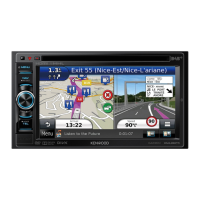
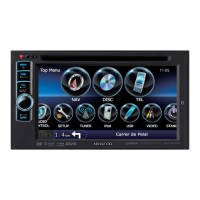
Kenwood DNX4150BT - User Manual

Kenwood DNX4150BT
211 pages
Print Icon
To Next Page IconTo Next Page
Loading...
B5K-0081-00 (KN/RN)© 2014 JVC KENWOOD Corporation
DNX892
DNX7150BT
DNX772BH
DNX692
DNX572BH
DNX4150BT
GPS NAVIGATION SYSTEM
Quick Start Guide
SISTEMA DE NAVEGACIÓN GPS
Guía de inicio rápido
Take the time to read through this instruction manual.
Familiarity with installation and operation procedures will help you obtain the best
performance from your new GPS Navigation System.
For your records
Record the serial number, found on the back of the unit, in the spaces designated on the warranty card,
and in the space provided below. Refer to the model and serial numbers whenever you call upon your
Kenwood dealer for information or service on the product.
Model DNX892/ DNX7150BT/ DNX772BH/ DNX692/ DNX572BH/ DNX4150BT
Serial number
US Residence Only
Register Online
Register your Kenwood product at www.Kenwoodusa.com
You can update the system by connecting a USB device containing an update le.
For updating the system, visit <http://www.kenwood.com/cs/ce/>.
Puede actualizar el sistema conectando un dispositivo USB que incluya un archivo de
actualización.
Para actualizar el sistema, visite <http://www.kenwood.com/cs/ce/>.

Table of Contents

Other manuals for Kenwood DNX4150BT

Questions and Answers

  • E
    Elizabeth WalkerSep 17, 2025
    Why does the sound skip when playing audio files on my Kenwood DNX4150BT Car Navigation system?
    • C
      Chelsea MillerSep 17, 2025
      If the sound skips when an audio file is being played on your Kenwood Car Navigation system, the disc may be scratched or dirty, or the recording condition may be bad. Clean the disc, record the file again, or use another disc.
  • S
    Shelly BrownAug 25, 2025
    Why can't I set up the crossover network on my Kenwood DNX4150BT?
    • R
      robertreyesAug 25, 2025
      If you cannot set up the crossover network on your Kenwood Car Navigation system, the dual zone function may be enabled. Turn off the dual zone function.
  • D
    David JenningsAug 25, 2025
    Why can't I select the output destination of the subsource in the dual zone on my Kenwood DNX4150BT?
    • S
      Sandra FloresAug 26, 2025
      If you cannot select the output destination of the subsource in the dual zone on your Kenwood Car Navigation system, it is because the dual zone function is disabled. Set the dual zone function to on.
  • J
    Joshua AdamsAug 26, 2025
    Why can't I adjust the volume of the rear speakers on my Kenwood DNX4150BT?
    • C
      Caleb KentAug 27, 2025
      If you cannot adjust the volume of the rear speakers on your Kenwood Car Navigation system, it is because the dual zone function is disabled. Set the dual zone function to on.
  • S
    Shirley BryanSep 18, 2025
    Why doesn't the Touch Sensor Tone sound on my Kenwood DNX4150BT Car Navigation system?
    • D
      Destiny EdwardsSep 18, 2025
      The Touch Sensor Tone cannot be output from the preout jack.
  • S
    Susan GrossSep 23, 2025
    What does 'Parental Level Error' mean on my Kenwood Car Navigation system?
    • S
      Samuel MooreSep 23, 2025
      If your Kenwood Car Navigation system displays 'Parental Level Error,' the disc you're trying to play has a higher level than the parental level you've set. Set the parental level.
  • E
    Emily MitchellSep 9, 2025
    What does 'Authorization Error' mean on my Kenwood DNX4150BT when connecting an iPod?
    • E
      Emily BrownSep 9, 2025
      If you're getting an 'Authorization Error' on your Kenwood Car Navigation system when connecting your iPod, it means the connection has failed. Try removing the iPod and reconnecting it.
  • T
    Tracy DoyleSep 10, 2025
    What does 'Navigation Error. Please turn on power again later' mean on my Kenwood DNX4150BT Car Navigation system?
    • A
      Allison HorneSep 12, 2025
      If your Kenwood Car Navigation system displays 'Navigation Error. Please turn on power again later,' it means a communication error has occurred due to severely cold temperature. Turn on the power again after warming up your car interior.
  • J
    Jared EllisSep 3, 2025
    What does 'Mecha Error' mean on my Kenwood Car Navigation system and how to fix it?
    • C
      Chris ForbesSep 3, 2025
      If your Kenwood Car Navigation system displays 'Mecha Error,' it indicates a disc player malfunction. Eject the disc and try reinserting it.
  • T
    torresmarcusSep 1, 2025
    What to do if my Kenwood DNX4150BT says 'Read Error'?
    • G
      Guy SmithSep 1, 2025
      If your Kenwood Car Navigation system is showing 'Read Error', it could be due to a dirty disc or the disc being inserted upside down. Clean the disc, or load it with the labeled side facing up.

Kenwood DNX4150BT Specifications

General IconGeneral
Resolution800 x 480 pixels
TouchscreenYes
BluetoothYes
GPS NavigationYes
USB Ports1
Audio Formats SupportedMP3, WMA, AAC, WAV
NavigationGarmin Navigation
DVD PlayerYes
SD Card SlotYes
Rear View Camera InputYes
CD PlaybackYes
AM/FM TunerYes
Voice ControlYes
Steering Wheel ControlYes
iPod CompatibilityYes
Built-in MicrophoneYes
Video Formats SupportedMPEG-1, MPEG-2

Related product manuals