EasyManua.ls Logo

Kenwood DNX419DABS - User Manual

Kenwood DNX419DABS
117 pages
Print Icon
To Next Page IconTo Next Page
Loading...
In store "130" you can find and buy almost all necessary goods for your auto in
Kyiv and other cities, delivery by ground and postal services. Our experienced
consultants will provide you with exhaustive information and help you to chose
the very particular thing. We are waiting for you at the address
https://130.com.ua
PHONES
0 (800) 800 130
(050) 462 0 130
(063) 462 0 130
(067) 462 0 130
Internet store of
autogoods
CAR RECEIVERS — Receivers • Media receivers and stations • Native receivers • CD/DVD changers • FM-modulators/USB adapters • Flash memory • Facia plates and adapters • Antennas • Accessories |
CAR AUDIO — Car audio speakers • Amplifiers • Subwoofers • Processors • Crossovers • Headphones • Accessories | TRIP COMPUTERS — Universal computers • Model computers • Accessories |
GPS NAVIGATORS — Portable GPS • Built-in GPS • GPS modules • GPS trackers • Antennas for GPS navigators • Accessories | VIDEO — DVR • TV sets and monitors • Car TV tuners • Cameras • Videomodules
• Transcoders • Car TV antennas • Accessories | SECURITY SYSTEMS — Car alarms • Bike alarms • Mechanical blockers • Immobilizers • Sensors • Accessories | OPTIC AND LIGHT — Xenon • Bixenon • Lamps
• LED • Stroboscopes • Optic and Headlights • Washers • Light, rain sensors • Accessories | PARKTRONICS AND MIRRORS — Rear parktronics • Front parktronics • Combined parktronics • Rear-view mirrors
• Accessories | HEATING AND COOLING — Seat heaters • Mirrors heaters • Screen-wipers heaters • Engine heaters • Auto-refrigerators • Air conditioning units • Accessories | TUNING — Vibro-isolation
• Noise-isolation • Tint films • Accessories | ACCESSORIES — Radar-detectors • Handsfree, Bluetooth • Windowlifters • Compressors • Beeps, loudspeakers • Measuring instruments • Cleaners • Carsits
• Miscellaneous | MOUNTING — Installation kits • Upholstery • Grilles • Tubes • Cable and wire • Tools • Miscellaneous | POWER — Batteries • Converters • Start-charging equipment • Capacitors
• Accessories | MARINE AUDIO AND ELECTRONICS — Marine receivers • Marine audio speakers • Marine subwoofers • Marine amplifiers • Accessories | CAR CARE PRODUCTS — Additives • Washer fluid •
Care accessories • Car polish • Flavors • Adhesives and sealants | LIQUID AND OIL — Motor oil • Transmission oil • Brake fluid • Antifreeze • Technical lubricant
SKYPE
km-130

Table of Contents

Question and Answer IconNeed help?

Do you have a question about the Kenwood DNX419DABS and is the answer not in the manual?

Summary

Before Use

Safety Precautions and Important Information

Critical safety information for operating the navigation system and preventing accidents. Read carefully.

Basic Operations

Functions of the Buttons on the Front Panel

Detailed explanation of each button on the unit's front panel and their corresponding functions.

Turning on the Unit

Instructions on how to power on the unit, with variations depending on the specific model.

Initial Settings

Guide to performing the initial setup for locale, language, display, and camera configurations.

Security Code Setup

Procedure to set a security code to protect the receiver system against theft and manage codes.

Adjusting the volume

Instructions on how to adjust the unit's volume using physical buttons or knobs.

Navigation Operation

Instructions on how to start and use the navigation system, including accessing the main menu.

How to Use the Navigation System

Step-by-step guide on operating the navigation system, finding destinations, and following routes.

Disc

Playing a disc

Steps for inserting and playing discs, including model-specific instructions.

Eject a disc

Procedure for safely ejecting discs from the unit, with options for normal and forced ejection.

DVD;VCD Basic Operation

Basic operations for DVD and VCD playback, controlled via source and playback screens.

Music CD;Disc media Basic Operation

Basic operations for Music CD and disc media playback from the source control screen.

DVD Setup

Configuration options for DVD playback functions, including screen ratio and language settings.

APPS

Apple CarPlay Operation

Overview of Apple CarPlay for safe iPhone usage while driving, including directions and calls.

Android Auto Operation (DNX9190 DABS; DNX7190 DABS; DNX5190 DABS)

Guide to using Android Auto for convenient driving features like route guidance and music.

Spotify Operation

Instructions for listening to and controlling Spotify from your iPhone or Android device.

USB;SD

Inserting the SD

Instructions for inserting SD and microSD cards into the unit's slots.

USB;SD Basic Operation

Basic operations for USB and SD media playback, controlled via source and playback screens.

iPod;iPhone

iPod;iPhone Basic Operation

Basic operations for iPod/iPhone playback, including track information and content lists.

Radio

Radio Basic Operation

Basic radio operations including information display, seek modes, and operation keys.

Radio Setup

Settings related to tuner parameters, including news, AF, regional, auto TP seek, and language.

DAB (Except DNR3190 BTS)

DAB Basic Operation

Basic DAB operations including signal strength, station info, seek modes, and preset lists.

DAB Setup

Digital Radio related settings, including priority, PTY watch, announcement select, and antenna power.

Bluetooth Control

Register the Bluetooth device

Necessary steps to register Bluetooth audio players or cell-phones with the unit.

Bluetooth Setup

Settings for Bluetooth, including device connection, PIN code, and device name.

Playing the Bluetooth Audio Device

How to control Bluetooth audio playback from the source control screen.

Using the Hands-Free Unit

Guide to using the telephone function via Bluetooth, including making calls and managing contacts.

Hands-Free Setup

Various settings for the Hands-Free function, such as auto response, pairing, and sort order.

Other External Components

View Camera

Instructions for displaying camera screens, switching views, and setting camera assignments.

Controlling Audio

Connection;Installation

Before Installation

Important precautions and safety guidelines to follow before installing the unit.

Connecting a USB device

Detailed instructions for connecting various USB devices to the unit.

Troubleshooting

Problems and Solutions

Table of common problems and their corresponding solutions for settings, audio, and disc playback.

Error Messages

Explanation of error messages displayed on the screen and troubleshooting steps.
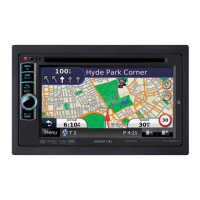
Kenwood DNX419DABS Specifications

General IconGeneral
BrandKenwood
ModelDNX419DABS
CategoryGPS
LanguageEnglish

Related product manuals