EasyManua.ls Logo

Kenwood DPX-5300M - User Manual

Kenwood DPX-5300M
52 pages
Print Icon
To Next Page IconTo Next Page
Loading...
Function al Operation EZ Operation
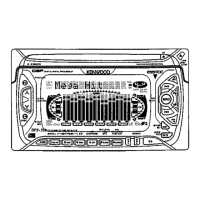
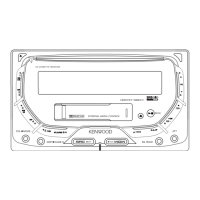
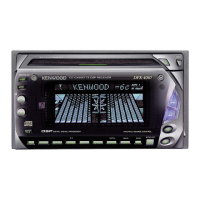
Dual size CD / MD receiver
DPX-5300M
Instruction Manual
Source selection / time adjustment
CD / MD / Changer mode
Mastery!
Functional operation
If you read this, it's OK for the
time being! Easy operation
© B64-2455-00 / 00 (JW)
Name Set
Audio control
Help
TUNER mode
Function
DSP control
Thank you for purchasing this product. Before using the
product, please read this instruction manual carefully and
use the product correctly as described. Also, please keep
this instruction manual in a safe place. This machine is a
model exclusively for Japan, so it cannot be used in foreign
countries.
Equalizer control
Display control
Machine Translated by Google
Question and Answer IconNeed help?

Do you have a question about the Kenwood DPX-5300M and is the answer not in the manual?

Overview

This document describes the KENWOOD DPX-5300M Dual Size CD/MD Receiver, a car audio system designed exclusively for the Japanese market. It covers its functions, technical specifications, usage, and maintenance.

Function Description

The DPX-5300M is a versatile car audio system that supports both CD and MD playback, along with FM/AM radio reception. It features a dual-size design, allowing for flexible installation.

Source Selection: The unit allows users to switch between various audio sources, including FM/AM tuner, CD player, MD player, and external changers (CD-CH, MD-CH) or AUX input if connected. The SRC button cycles through available sources.

CD/MD/Changer Mode:

  • Track Search: Navigate through songs on a disc or within an MD group using dedicated forward/backward buttons.
  • Manual Search: Fast forward or rewind the currently playing song by holding the search buttons.
  • Disk/Group Search: For disc changers or group-registered MDs, select specific discs or MD groups.
  • Repeat Play: Repeat the current track, disc, or an entire MD group.
  • Random Play: Play songs on the current disc in random order.
  • Group Random Play: For group-registered MDs, play songs within the selected group in random order.
  • Magazine Random Play: For disc changers, play songs from discs in the changer in random order.
  • Scan Play: Play the beginning 10 seconds of each song on a disc to help find a desired track.
  • Text Scroll: For disc changers, scroll and display text information (disc title, track title, etc.) if the text is too long to fit on the display.
  • Group Select: For group-registered MDs, select a specific group by name to play songs within it.

TUNER Mode:

  • Band Switching: Switch between FM1, FM2, AM1, and AM2 bands.
  • Tuning: Select radio stations manually, or use auto-tuning modes (Auto 1 for strong signals, Auto 2 for stored stations).
  • Manual Memory: Store currently received broadcasting stations into memory buttons (1 to 6 for each band).
  • Auto Memory: Automatically select and store stations with good reception into memory.
  • Traffic Information: Quickly tune to fixed frequencies for traffic information (1620kHz / 1629kHz / 522kHz).

Name Set (DNPS/SNPS):

  • Disc Name Preset (DNPS): Assign names to CDs played in the built-in CD player (up to 10 discs).
  • Station Name Preset (SNPS): Assign names to FM/AM broadcasting stations (up to 30 stations).
  • Character Input: Input names using uppercase, lowercase, or Katakana characters.

Display Control:

  • Display Switching: Toggle various information shown on the display, such as track playing time, total playing time, disc title, group title, track title, frequency, station name, clock, and character/graphic displays.
  • Spectrum Analyzer: Display various spectrum analyzer patterns (10 types, including "Seashore") to visualize audio output.
  • Illumination Color Control: Adjust the display illumination color from a preset list (Blue, Mars Red, White, Lavender, Muscat, Pink, Sky Blue, Lime, Violet, Aqua, Orange, Mint) or set a custom "User color" by adjusting Red, Green, and Blue components.

DSP Control:

  • Sound Field Selection: Apply pseudo-sound field effects to audio, simulating environments like Stadium, Concert, Club, Church, or Studio. A "Bypass" option disables DSP.

Equalizer Control:

  • Equalizer Easy Adjustment (EQ EASY): Select preset equalizer curves optimized for different music genres (Rock, Dance, Jazz, Pops, Heavy, Soft, Sharp, Light, Flat) and adjust the strength of the effect.
  • Equalizer Pro Adjustment (EQ PRO): Manually adjust detailed sound quality parameters, including:
    • Low F (Bass Center Frequency): 60/70/80/100/150 Hz
    • Bas LV (Bass Level): ±12
    • Bas Q (Bass Quality Factor): 1.0/1.25/1.5/2.0
    • EXT (Basic Center Frequency Stretch): On/Off
    • Mid F (Mid-Bass Center Frequency): 500/1.0k/1.5k/2.0k Hz
    • Mid LV (Mid-Low Range Level): ±12
    • Mid Q (Mid-Bass Quality Factor): 1.0/2.0
    • Tre F (Treble Center Frequency): 10.0/12.5/15.0/17.5k Hz
    • Tre LV (Treble Level): ±12
  • Equalizer Pro Memory: Store up to 3 custom EQ PRO settings for quick recall.

Audio Control:

  • Balance/Fader: Adjust the left/right and front/rear volume balance.
  • Non-Fader Output (N-F): Configure pre-out output for non-fader operation (e.g., for subwoofers).

Function Set:

  • Display Color Mode (COL): Set display color to "Sync" (changes with volume/attenuator) or "Fix" (fixed color).
  • Contrast Adjustment (CONT): Adjust character contrast (1-7-11 levels).
  • Beep Sound (BEEP): Turn the button press beep sound on/off.
  • Pre-out Output Selection (Pout): Select pre-out output as Front (F), Rear (R), or Non-Fader (NF).
  • Group Management Function (Group): Turn on/off MD group management.
  • Demonstration Mode (Open): Turn on/off the demonstration display when power is on.
  • Equalizer Mode (EQ): Switch between "EASY" and "PRO" equalizer modes.
  • Tuning Mode (Auto/Manual): Set tuner search method (Auto 1, Auto 2, Manual).
  • Monaural FM (MONO): Convert FM stereo broadcast to monaural for better reception in weak signal areas.
  • Title/Text Auto Scroll (SCL): Set text scrolling to "Auto" (repeated) or "Manu" (once).

Important Technical Specifications

  • FM Tuner:
    • Receive Frequency Range: 76.0 MHz to 90.0 MHz (100 kHz step)
    • Use Sensitivity (S/N: 30 dB): 9.3 dBf (0.8 µV / 75 Ω)
    • S/N 50 dB Sensitivity: 15.2 dBf (1.6 µV / 75 Ω)
    • Frequency Characteristics: 30 Hz to 15 kHz (±3.0 dB)
    • S/N Ratio (MONO): 75 dB
    • Stereo Separation (1 kHz): 40 dB
  • AM Tuner:
    • Receive Frequency Range: 522 kHz to 1629 kHz (9 kHz step)
    • Sensitivity: 28 dBµ
  • CD Player:
    • Laser Diode: GaAIAs (λ = 780 nm)
    • Digital Filter: 8x oversampling
    • D/A Converter: 1 Bit
    • Wow and Flutter: Below measurement limit
    • Frequency Characteristics: 10 Hz to 20 kHz (±1 dB)
    • Harmonic Distortion Rate (1 kHz): 0.01%
    • Signal-to-Noise Ratio: 93 dB
    • Dynamic Range: 93 dB
    • Stereo Separation: 85 dB
  • MD Player:
    • Laser Diode: GaAIAs (λ = 780 nm)
    • Digital Filter: 8x oversampling
    • D/A Converter: 1 Bit
    • Wow and Flutter: Below measurement limit
    • Frequency Characteristics: 20 Hz to 20 kHz (±1 dB)
    • Harmonic Distortion Rate (1 kHz): 0.005%
    • Signal-to-Noise Ratio: 90 dB
    • Dynamic Range: 90 dB
    • Stereo Separation: 85 dB
    • MDLP (MD Long Play) support: Plays MDs recorded in MDLP2 and MDLP4 modes.
  • Audio Section:
    • Maximum Output: 47 W x 4
    • Rated Output: 29 W x 4 (4 Ω, 1 kHz, 10% THD)
    • Pre-out Level (FM): 1.5 V / 10 kΩ
    • Pre-out Impedance: 600 Ω or less
  • Power Supply:
    • Voltage: 14.4 V (11-16 V)
    • Maximum Current Consumption: 10 A
  • Dimensions/Mass:
    • Embedded Dimensions (W x H x D): 178 x 100 x 155 mm
    • Mass (weight): 2.2 kg
  • Included Accessories: Power harness (1 piece), Truss screw (M5 x 6 mm, 6 pieces), Flat screw (M5 x 7 mm, 6 pieces), Semis screw (M4 x 8 mm, 1 piece).

Usage Features

  • EZ Operation: Provides a simplified guide for basic functions like power on/off, volume control, source switching, MD insertion, and station selection.
  • Functional Operation: Offers detailed instructions for advanced features, including track search, repeat/random play, name setting, display customization, DSP effects, and equalizer adjustments.
  • Time Adjustment: Set the clock display time.
  • MD Group Functionality: Allows for quick selection and playback of songs within grouped MDs, supporting up to 50 registered groups.
  • External Changer Connectivity: Compatible with Kenwood disc changers released after 1998. Up to two changers can be connected using the KCA-S210A switching unit.
  • Remote Control: Supports an optional remote control for operation (refer to the remote control's manual for specific methods).
  • Safety Precautions: Emphasizes safe installation and operation, including warnings about wiring, power supply, and driving safety.

Maintenance Features

  • Reset Button: A reset button is provided to resolve malfunctions, such as the unit not responding or displaying errors.
  • CD/MD Handling:
    • Cleaning: Gently wipe CDs/MDs from the center outwards with a soft cloth. Avoid conventional record cleaners or harsh chemicals.
    • Storage: Store MDs in special cases and avoid leaving them in the unit for extended periods or in hot places.
    • Unusable Discs: Do not use non-circular CDs, CDs with stickers, or inkjet-printable CD-Rs/CD-RWs, as they may cause malfunctions.
    • Condensation: If condensation occurs (e.g., in cold weather), remove the disc and let the unit dry for about an hour.
    • Lens Cleaner: Do not use lens cleaners as they may damage optical parts.
  • Unit Care: Wipe the front panel with a silicone or soft cloth. For heavy dirt, use a neutral cleaner. Avoid spray cleaners, hard cloths, thinners, or alcohol, which can cause damage or character fading.
  • Repair Service: Provides contact information for Kenwood Service Centers and sales offices for product inquiries and after-sales service. Notes that memory contents may be erased during repair.
  • Warranty: Includes a warranty card for one year from the date of purchase.

This comprehensive overview should provide a clear understanding of the KENWOOD DPX-5300M's capabilities and requirements.

Kenwood DPX-5300M Specifications

General IconGeneral
BrandKenwood
ModelDPX-5300M
CategoryCar Receiver
LanguageEnglish

Related product manuals