
 To Next Page
T
Tina HuffSep 23, 2025
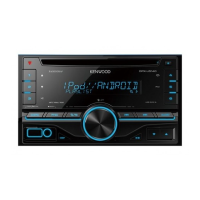
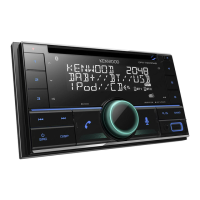
Why Kenwood DPX-7200DAB Car Receiver displays “NOT SUPPORT”?
- UubakerSep 23, 2025
If your Kenwood Car Receiver displays “NOT SUPPORT”, the connected phone does not support the Voice Recognition feature or phonebook transfer.

Why Kenwood DPX-7200DAB Car Receiver displays “NOT SUPPORT”?
If your Kenwood Car Receiver displays “NOT SUPPORT”, the connected phone does not support the Voice Recognition feature or phonebook transfer.
What to do if Kenwood DPX-7200DAB shows 'MISWIRING CHECK WIRING' error?
If your Kenwood Car Receiver displays the message “MISWIRING CHECK WIRING Turn the power off, then check to be sure the terminals of THEN PWR ON”, turn the power off, check the wiring and then turn the power back on.
What to do if Kenwood Car Receiver displays “UNSUPPORTED DEVICE”?
If your Kenwood Car Receiver displays “UNSUPPORTED DEVICE”, verify that the connected USB device is compatible with the unit and that the file systems are in a supported format. You can also try reattaching the USB device.
What to do if Kenwood Car Receiver displays “UNRESPONSIVE DEVICE”?
If your Kenwood Car Receiver displays “UNRESPONSIVE DEVICE”, ensure the USB device is functioning correctly and then reattach it.
What to do if Kenwood DPX-7200DAB displays “NO DEVICE”?
If your Kenwood Car Receiver displays “NO DEVICE”, connect a device (USB/iPod/iPhone) and then change the source to USB or iPod USB again.
What to do if Kenwood Car Receiver displays “DAB ANT ERR”?
If the Kenwood Car Receiver displays “DAB ANT ERR”, check the DAB antenna. If using a passive antenna (without a booster), set [DAB ANT POWER] to [OFF].
What to do if Kenwood DPX-7200DAB Car Receiver displays “CHECK APP”?
If your Kenwood Car Receiver displays “CHECK APP”, the Spotify application is not connected properly or the user is not logged in. Close and restart the Spotify application, then log in to your Spotify account.
Why Kenwood DPX-7200DAB displays “NO PAIR”?
If your Kenwood Car Receiver displays “NO PAIR”, there is no registered device connected or found via Bluetooth.
What to do if Kenwood Car Receiver displays “TOC ERROR”?
If your Kenwood Car Receiver displays “TOC ERROR”, ensure the disc is clean and inserted correctly.
Why Kenwood DPX-7200DAB displays “LOADING” in search mode?
If your Kenwood Car Receiver displays “LOADING” when you enter search mode, the unit is still preparing the iPod/iPhone music list. Allow some time for loading and try again later.
Explains the safety labeling and classification for laser products.
Outlines the basic terms and conditions of the software license.
Details the rights granted and restrictions imposed on software usage.
Specifies the requirements for transferring the software license with the product.
Official statement of compliance with EU directives for radio equipment, in English.
Essential preliminary instructions and precautions for using the device.
Critical safety advice and handling precautions to prevent hazards.
Guidance on how to interpret symbols and understand manual conventions.
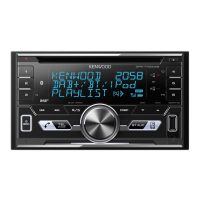
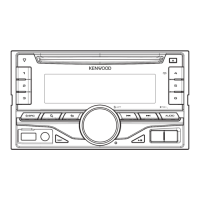
Identifies and describes the buttons and displays on the unit's front panel.
Instructions on how to perform a system reset to restore factory default settings.
Steps to select the display language and disable the demonstration mode.
Guide for configuring the device's internal time and date.
Instructions for adjusting other user-configurable device preferences.
Explanation of Digital Audio Broadcasting (DAB) technology and its benefits.
Steps for connecting the DAB antenna and preparing for signal reception.
Procedures for tuning into stations and saving them to memory.
Configuration options for tuning modes, mono/stereo, and network search.
Instructions for loading discs and starting playback.
Guide for connecting USB storage for media playback and device compatibility.
Steps to set up the Spotify app and account for use with the unit.
How to initiate music playback from Spotify via USB or Bluetooth.
Steps for connecting an external device via the 3.5mm jack.
Guide to controlling the car receiver using the smartphone remote application.
Lists compatible Bluetooth profiles and audio codecs for device integration.
Step-by-step instructions to establish a wireless connection with a Bluetooth device.
Information on automatic Bluetooth pairing when connecting compatible devices.
Procedures for answering, rejecting, and managing calls received via Bluetooth.
Adjusting microphone sensitivity, noise reduction, and echo cancellation for clearer calls.
Guide on how to initiate phone calls using the unit's interface.
Instructions to connect your smartphone to enable Amazon Alexa functionality.
Adjusting bass output and applying simplified sound profiles.
Specific parameters for configuring a 2-way speaker crossover system.
Specific parameters for configuring a 3-way speaker crossover system.
Guide to automatically determine and set speaker delay times based on listening position.
Controls for screen illumination levels and automatic dimming functions.
Options for changing illumination colors and configuring text display scrolling.
Settings for showing the clock and activating/deactivating the demo mode.
Critical safety warnings and cautions to follow during the installation process.
List of parts required for mounting the unit in the dashboard.
Detailed guide for securely fitting the unit into the vehicle's dashboard.
Steps to safely detach the unit from its installed position.
Guide for connecting external amplifiers and other audio devices.
Diagram and pinout for connecting the unit's harness to the vehicle's wiring.
Step-by-step guide for affixing the DAB antenna to the vehicle's windshield.
Advice on selecting the best location for the DAB antenna for signal strength.
Guidelines for cleaning the unit and properly handling audio discs.
Details on supported audio files and limitations for USB devices.
Information regarding the compatibility and use of Spotify and Amazon Alexa services.
How to change the information shown on the unit's display.
Basic steps to resolve common operational and connectivity problems.
Guidance on fixing problems with DAB and analog radio signals and connections.
Troubleshooting common errors related to media playback and device connectivity.
Resolving issues with the Spotify app and its connection to the unit.
Addressing problems with pairing, audio quality, and phone call management.
Troubleshooting issues with Alexa's voice recognition and connection stability.
Detailed technical data for radio reception and CD playback performance.
Technical details regarding USB compatibility and supported media file formats.
Technical parameters for auxiliary input, Bluetooth functions, and audio output.
Overall technical details including operating voltage, physical size, and weight.
 General
| DIN size | 2 DIN |
|---|---|
| CD player | Yes |
| Impedance | 40 Ω |
| Clock mode | 24h |
| Output power | 50 W |
| Product color | Black |
| Volume control | Touch |
| Frequency range | 30 - 15000 Hz |
| Disc types supported | CD-R, CD-RW |
| Audio output channels | 4.0 channels |
| Equalizer bands quantity | 13 |
| Signal-to-Noise Ratio (SNR) | 40 dB |
| Audio formats supported | AAC, FLAC, MP3, WAV, WMA |
| Display type | LCD |
| On Screen Display (OSD) languages | DUT, ENG, ESP, FRE |
| Bluetooth range | 10 m |
| Bluetooth version | 4.2 |
| Bluetooth profiles | A2DP, AVRCP, HFP, PBAP, SPP |
| USB ports quantity | 1 |
| Cables included | DC |
| Operating temperature (T-T) | -10 - 60 °C |
| FM band range | 87.5 - 108 MHz |
| LW band range | 153 - 279 kHz |
| Supported radio bands | DAB+, FM, LW |
| Preset stations quantity | 24 |
 Weight and Dimensions
| Depth | 158 mm |
|---|---|
| Width | 182 mm |
| Height | 111 mm |
| Weight | 1700 g |