Need help?
Do you have a question about the Kenwood DPX-U5120 and is the answer not in the manual?
Covers first-time use, demo mode cancellation, and general safety warnings.
Provides information on compatible disc types, proper handling, and cleaning procedures.
Explains how to reset the unit to its factory default settings.
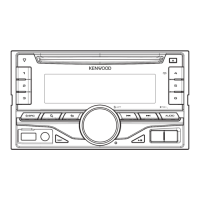
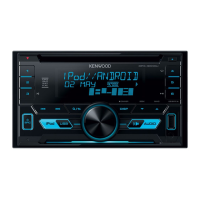
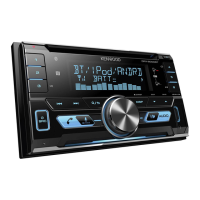
Describes the functions of the various buttons and the volume knob on the front panel.
Identifies the Auxiliary Input and USB terminals for external device connections.
Instructions on how to disable the initial demonstration display mode.
Guide to setting the unit's current time and date accurately.
Details on turning the unit on/off and switching between different audio sources.
Instructions for adjusting the audio volume levels.
Explains the general procedure for accessing and navigating through unit settings.
Initial connection, source selection, and basic playback controls for iPod/iPhone.
Navigating the music library and choosing songs to play.
Utilizing repeat and random play functions for music playback.
Enables direct operation of the iPod using its own controls.
Configuring various options related to iPod functionality and display.
Overview of different methods available for searching music on the iPod.
Finds music by artist or genre similar to the currently playing track.
Locates music by specifying search criteria and initial characters.
Search for songs by entering specific characters in names.
Manages favorite songs by registering, playing, and deleting them from a playlist.
Clears all registered songs from the My Playlist.
Connecting, selecting source, and controlling playback of USB devices.
Finding specific files on a connected USB device.
Using scan, random, and repeat playback sequences for USB audio files.
Adjusting skip search ratios and other USB-related settings.
Inserting discs, selecting sources, and controlling playback of CDs and audio files.
Searching for music and utilizing scan, random, and repeat playback modes.
Covers basic functions for operating an optional CD changer.
Searching for music by track number using the remote control.
Selecting radio source, band, and stations.
Setting radio tuning modes, such as Seek Mode.
Saving radio stations and automatically finding strong signals.
Accessing memorized radio stations via preset buttons.
Tuning to a specific frequency using direct input.
Adjusting the increments for tuning frequency steps.
Selecting audio source, playback controls, and music search for Bluetooth audio.
The initial process of pairing a Bluetooth-enabled device with the unit.
Detailed procedure for connecting a cell phone for hands-free use.
Managing incoming calls and active conversations during hands-free operation.
Handling incoming calls while already on an active call.
Continuing, switching, and answering calls during active conversations.
Using phonebook, speed dial, and manual dialing for making calls.
Navigating contacts and accessing speed dial entries for calls.
Using call history and manual number entry for making calls.
Creating voice commands for contacts and saving numbers for quick dialing.
Understanding the icons used to categorize phone book entries.
Choosing screen configurations like 4-line, 3-line, or clock display.
Adjusting brightness, contrast, and text scrolling behavior.
Controlling text movement and spectrum analyzer information display.
Adjusting screen brightness and key illumination effects.
Selecting the data to be shown for various sources like Tuner, CD, and USB.
Specifies text options for Tuner, CD, Audio/iPod, and Standby/Auxiliary input sources.
Setting the panel's illumination color, including custom user colors.
Setting the display for different auxiliary input source names.
Guide to setting the unit's current time and date.
Setting up display for two different time zones (Home and Sub City).
Adjusting clock time for U5120/DPX-MP3120 models.
Setting up basic unit parameters like beep sound, source select, and tuner preset type.
Enabling or disabling the unit's demonstration mode.
How the audio system automatically mutes when receiving a phone call.
Covers subwoofer, DSP, equalizer, bass, mid, treble, and sound effect settings.
Choosing from a variety of pre-defined equalizer profiles.
Fine-tuning individual equalizer bands for customized sound.
Adjusting sound output to compensate for the listener's seating position.
Detailed adjustments for speaker position and distance for optimal sound.
Configuring separate audio output for front/rear or main/sub sources.
Covers subwoofer, EQ, bass, mid, treble, and volume settings for specific models.
Adjusting sound based on vehicle type for optimal acoustics.
Configuring speaker sizes and locations for crossover frequency settings.
Detailed adjustments for speaker position and distance for optimal sound staging.
Adjusting frequency cutoffs for front, rear, and subwoofer speakers.
Saving customized sound settings for quick recall.
Loading previously saved sound settings.
Accessing recently used functions and settings.
Locking items to prevent deletion and deleting individual log entries.
Choosing which types of functions are logged by the unit.
Configuring the timing for when tuner station logs are recorded.
Covers pairing, device selection, SMS download, and voice tag setup.
Step-by-step process for pairing Bluetooth-enabled devices with the unit.
Pairing non-standard or problematic devices that may require special procedures.
Setting and editing the PIN code required for Bluetooth device pairing.
Choosing which registered Bluetooth device to use for connection.
Removing paired Bluetooth devices from the unit's memory.
Syncing contact information from a phone to the unit.
Creating voice commands for specific contacts for voice dialing.
Creating voice commands for phone number categories (e.g., Home, Mobile).
Retrieving and viewing text messages from a connected phone.
Basic commands like volume, source selection, return, and exit.
Detailed remote button functions for Tuner, USB/CD/Audio, and iPod sources.
Using the remote for making, receiving, and managing calls.
Instructions for installing and replacing the remote control's battery.
Lists playable audio file types (AAC, MP3, WMA) and disc media.
Information on USB devices, file systems, and connection best practices.
Lists all supported Apple iPod and iPhone models.
Information on the PC software used for managing audio files with database information.
Lists the components provided with the unit for installation.
Important safety guidelines and warnings before beginning installation.
Explains the connections for power, speakers, antenna, and control wires.
Instructions and diagrams for physically installing the unit into the car.
Covers common problems like beep sound, illumination, and radio reception.
Addresses errors related to disc playback and audio file skips.
Troubleshoots problems with phone calls, audio streaming, and voice recognition.
Explains common error codes and their potential causes.
Covers issues with USB, iPod, and phone connections or data transfer.
Detailed technical data for radio, CD player, USB interface, and audio components.
Technical data for auxiliary input and overall unit parameters like power and dimensions.
Explains Class 1 laser product marking and eco-friendly symbols.
Lists various brand trademarks (Bluetooth, Apple, Adobe) and their owners.
 General
| Bluetooth | Yes |
|---|---|
| MP3 Decoding | Yes |
| WMA Decoding | Yes |
| Power Output | 50 Watts x 4 Channels |
| RMS Power Output | 22W x 4 |
| Tuner | AM/FM |
| Audio Formats Supported | MP3, WMA, AAC, WAV |
| Display Type | LCD |
| Equalizer | 13-band |
| Speaker Impedance | 4 ohms |
| Steering Wheel Control Compatibility | Yes |


 To Next Page