Need help?
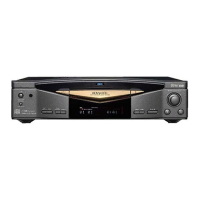
Do you have a question about the Kenwood DVF-3080 and is the answer not in the manual?
Unit power requirements for different regions.
Warnings and cautions for safe operation.
Explains symbols for shock risk and laser product classification.
Instructions for unpacking and checking included accessories.
Explanation of the automatic screen saver feature.
FCC warnings for USA and notice for Canada.
Details on discs compatible and incompatible with the player.
Explanation of icons found on DVD VIDEO discs.
Map of region codes and information on disc/player compatibility.
Notes on disc playback restrictions and inhibition icons.
How to check the TV's video format and select the player's output.
Unit maintenance, disc handling, cleaning, and storage guidelines.
Advice for moving unit and preventing condensation.
Wiring diagrams for connecting to TV via Composite, S-Video, and SCART.
Information regarding DTS audio output and connection.
Wiring diagrams for component video and audio component connections.
Explanation of front panel indicators and standby mode operation.
Instructions for battery installation and overview of remote functions.
Initial steps before accessing the setup menu and navigation guide.
Overview of initial settings available in the setup menu.
How to select menu, audio, subtitle, and disc menu languages.
Adjusting aspect ratio, display modes, and progressive scan.
Configuring digital audio output, sample frequency, and DRC.
Setting disc rating, security code, and country code.
Controls for PBC, BLE, and VCD menu navigation.
Lists of language and country codes for setup.
Features shown on-screen display and last scene memory function.
Steps for preparing, loading, and starting disc playback.
How to stop and pause disc playback.
How to skip between chapters or tracks and search disc content.
Controls for frame advance, slow motion, and direct track playback.
Changing audio language, subtitle language, and audio channels.
Feature to mark and recall specific points on a disc.
Selecting camera angles and playing tracks in random order.
Setting repeat modes, A-B segment repeat, and image zoom.
How to start CD playback via the TV screen.
Creating 3D surround effect and searching playback by time.
Creating custom track sequences and setting repeat playback.
Removing individual tracks or clearing the entire program list.
Media compatibility, preparation steps, and file naming guidelines.
How to verify media/files and best practices for saving files.
Operations for searching, skipping, and pausing media files.
Features for repeat playback, zoom, rotation, and menu bar.
Setting up slideshows and playing music with JPEG viewing.
Creating program edits and setting repeat playback for MP3/WMA.
Procedure to reset the player and troubleshoot general problems.
Troubleshooting common DVD player issues like playback and output.
Troubleshooting issues with title selection, parental controls, and menus.
Troubleshooting remote control and inhibition icon problems.
Comprehensive specifications for system, audio, video, and general features.
 General
| Type | DVD Player |
|---|---|
| Video Output | Composite, S-Video |
| Surround Sound | Dolby Digital, DTS |
| Remote Control | Yes |
| Power Consumption | 15W |
| Playback Formats | MP3 |
| Playback Features | Zoom |
| Playable Disk Types | CD, CD-R, CD-RW, DVD, DVD-R, DVD-RW |
| Audio D/A Converter | 24bit / 96kHz |
| Video D/A Converter | 10 bit / 27 MHz |
| Supported Disc Formats | DVD, CD |

 To Next Page