13
kitchen timer
When the kitchen timer is running, other functions cannot be used.
When the microwave is not in use, this feature allows you to use the microwave as a timer.
To set the kitchen timer, follow the steps below.
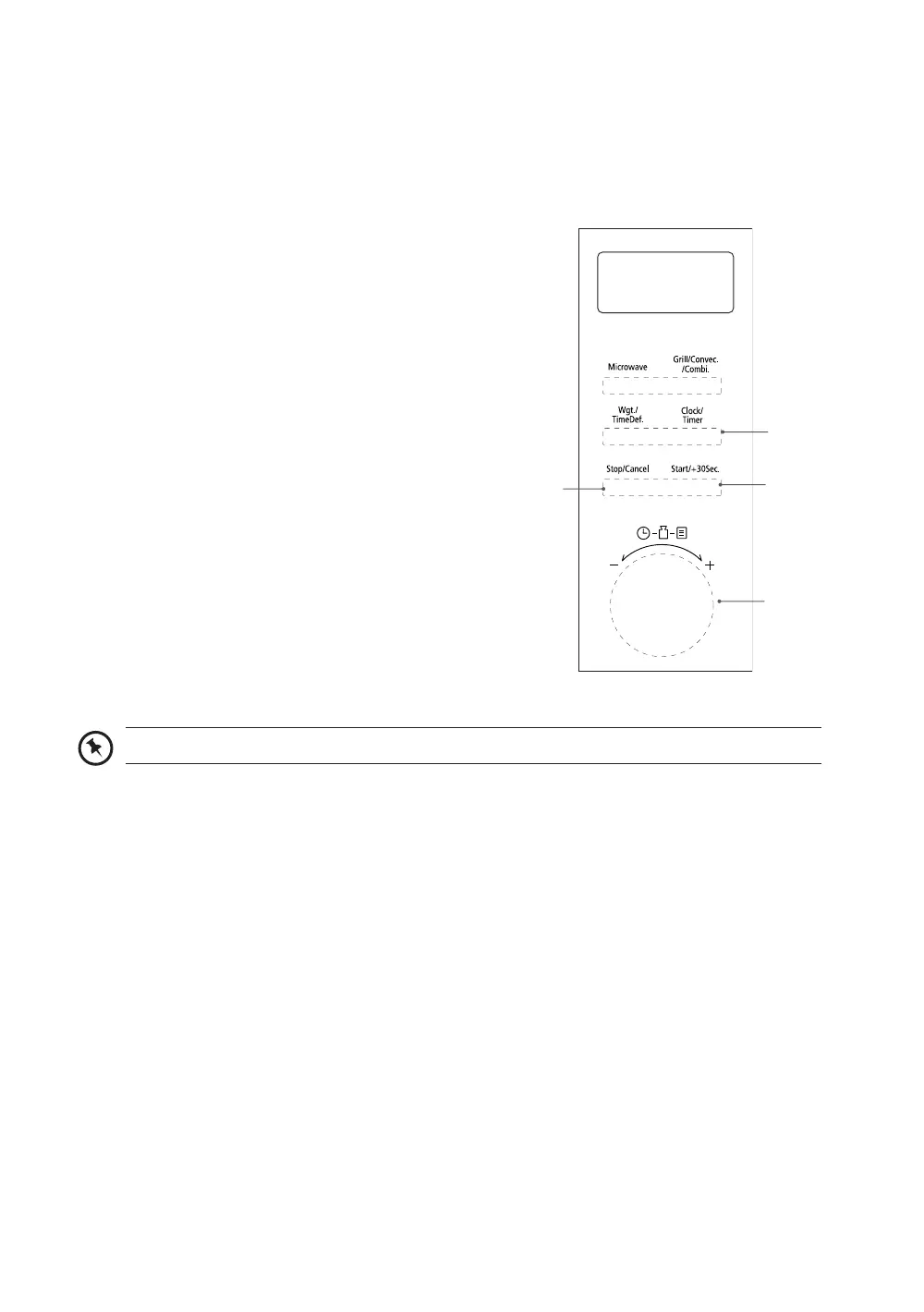
1. Press the Clock/Timer (1) button twice. The
display will show “00:00”.
2. Turn the Parameter (2) dial to set the timer
time. The longest time you can set is 95
minutes.
3. Press the Start/+30sec. (3) button to confirm
the setting and to start the countdown. You
can press the Stop/Cancel (4) button to
cancel the timer.
4. Once the elapsed time is reached, the
microwave will sound and return to its original
state.
The kitchen timer is not a clock; it is a timer.
2
4
1
3
K25CSS21_IB_Final210812.indd 13K25CSS21_IB_Final210812.indd 13 12/8/2021 2:48 PM12/8/2021 2:48 PM


 To Next Page