17
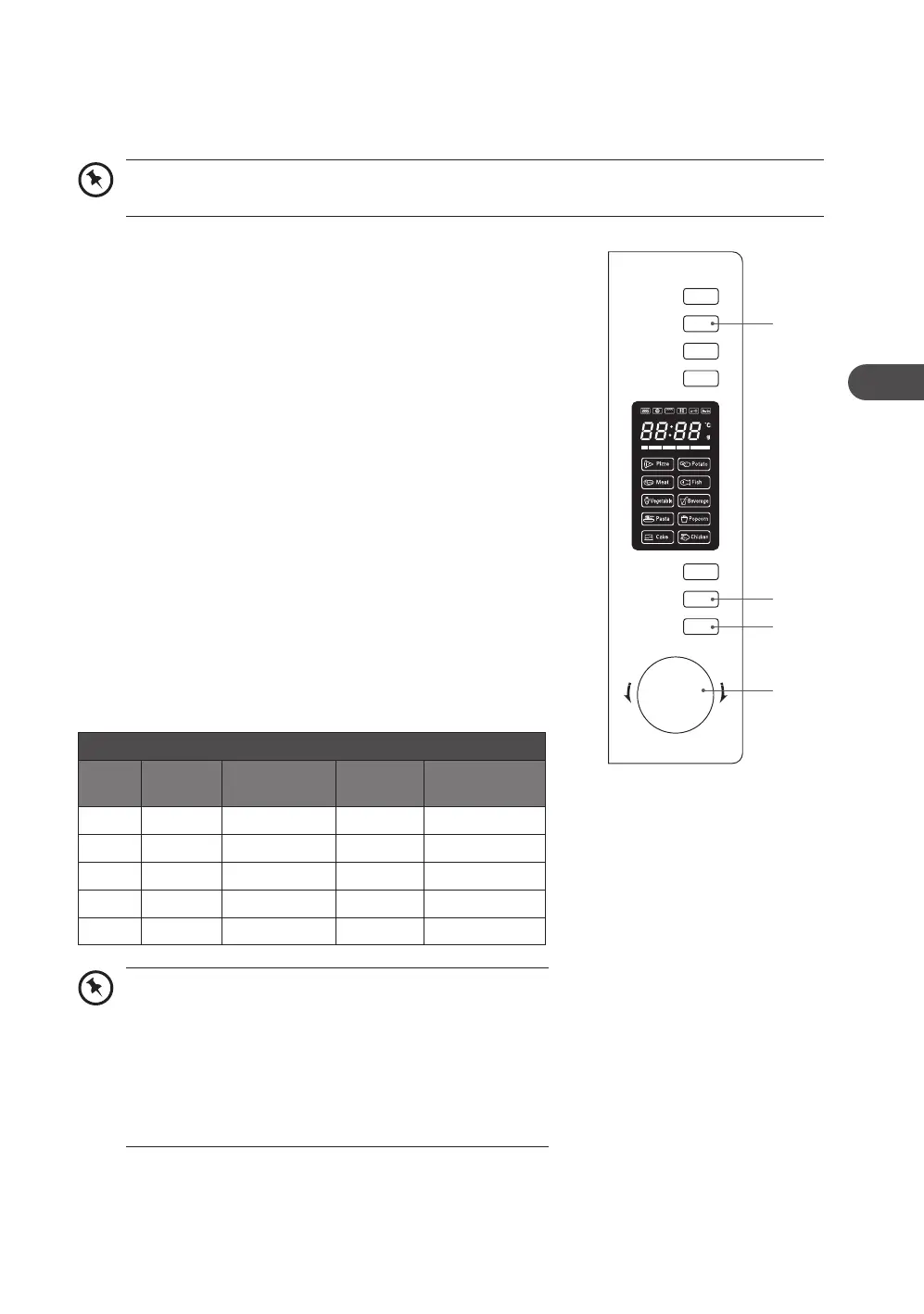
1. Press the Grill/Combi. (1) button once. The LED will display
“G-1”.
2. Press the Start/+30Sec./Confirm (3) button to confirm.
3. Turn the Timer/Weight/Auto Menu (4) dial to set the cooking
time from “0:05” to “95:00”.
4. Press the Start/+30Sec./Confirm (3) button to start cooking.
5. Press the Stop/Clear (2) button to pause the cooking. Press
the Stop/Clear (2) button again to cancel the setting.
For Combination Cooking (Microwave and Grill), follow the
steps below:
1. Press the Grill/Combi. (1) button twice. The LED will display
“C-1”. Press the Grill/Combi. (1) button three times and the
LED will display “C-2”.
2. Press the Start/+30Sec./Confirm (3) button to confirm.
3. Turn the Timer/Weight/Auto Menu (4) dial to set the cooking
time from “0:05” to “95:00”.
4. Press the Start/+30Sec./Confirm (3) button to start cooking.
5. Press the Stop/Clear (2) button to pause the cooking. Press
the Stop/Clear (2) button again to cancel the setting.
Grill / Combo Button Control
press
order
LED
display
microwave
power
grill
power
convection
power
1 G-1 –
3
–
2 C-1
3
–
3
3 C-2
3 3
–
4 C-3 –
3 3
5 C-4
3 3 3
grill or combination cooking
For Grilling, please follow the steps below.
We recommend that you use the supplied grill rack. Place your food on the grill rack then
place on top of the glass turntable plate.
When half the grill time has passed, the microwave
will beep twice to remind you to turn over the food.
To obtain better grilling performance, press the Stop/
Clear (2) button once to pause the cooking, open the
door and turn over the food. Afterwards, close the
door and press the Start/+30Sec./Confirm (3) button
to continue. If there is no operation, the microwave will
continue cooking.
Microwave
Grill/Combi.
Convection
W.T./Time
Defrost
Clock/
Kitchen Timer
Stop/Clear
Start/+30Sec.
/Confirm
T
i
m
e
r
•
W
e
i
g
h
t
•
A
u
t
o
M
e
n
u
4
3
2
1
K30CSS21E_IB_5L_Final210524.indb 17K30CSS21E_IB_5L_Final210524.indb 17 20/9/2021 5:03 PM20/9/2021 5:03 PM


 To Next Page