EasyManua.ls Logo

Kenwood KDC-252U - Listening to Radio Broadcasts; Radio Tuning and Station Settings

Kenwood KDC-252U
24 pages
Print Icon
To Next Page IconTo Next Page
To Previous Page IconTo Previous Page
Loading...
Listening
to
the
radio
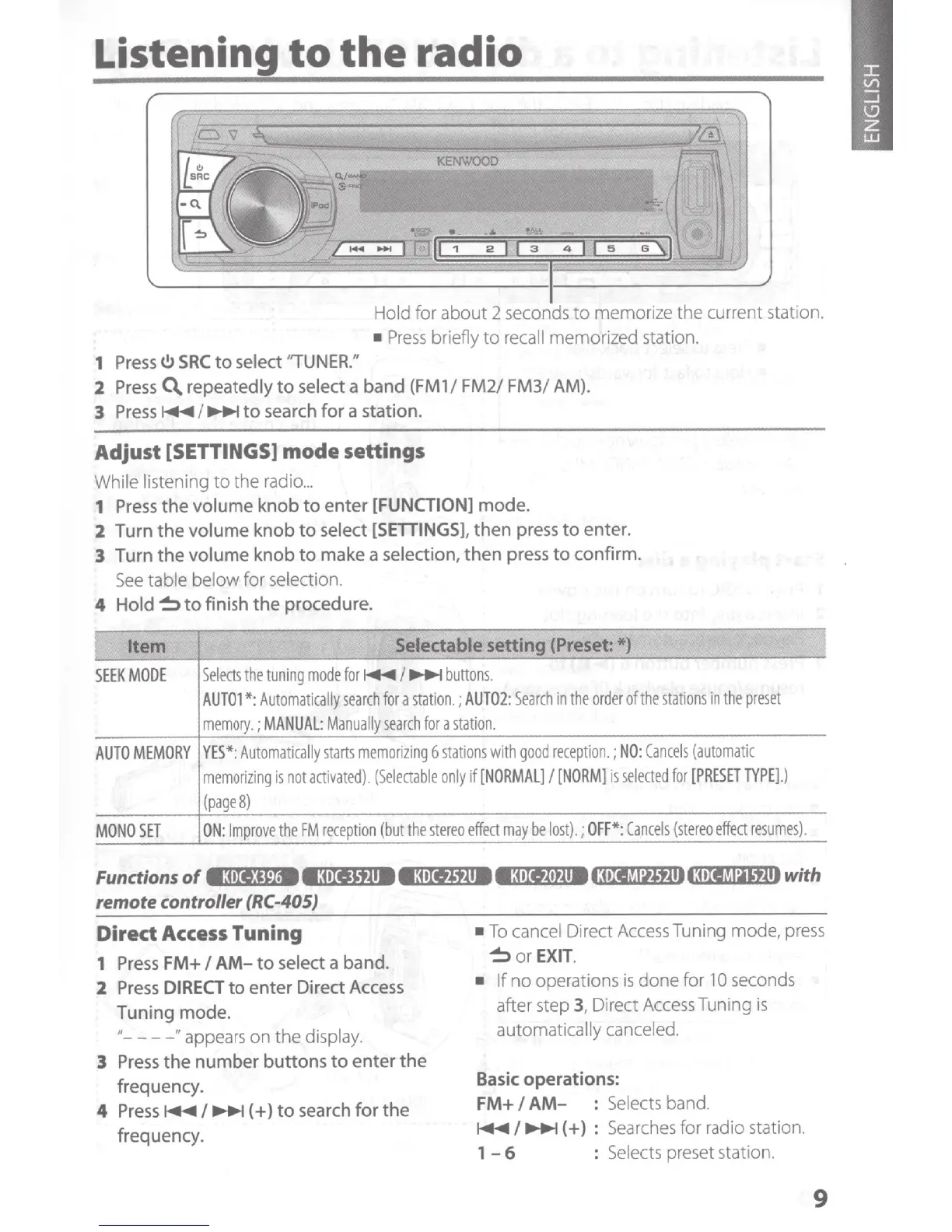
Hold for
about
2 seconds
to
memorize
the
current station.
Press
briefly
to
recall
memorized
station.
1
Press(.!)
SRC
to
select ''TUNER."
2
Press
~repeatedly
to
select a
band
(FM
1
I
FM21 FM31 AM
).
3
Press
~
I
~
to
search
for
a station.
Adjust
[SETTINGS]
mode
settings
While listening
to
the
radio
...
1
Press
the
volume
knob
to
enter
[FUNCTION]
mode
.
2 Turn
the
volume
knob
to
select
[SETTINGS],
then
press
to
enter
.
3 Turn
the
volume
knob
to
make a selection,
then
press
to
confirm.
See
table below for
se
lection.
4
Hold~
to
finish
the
procedure.
1
Item
SEEK
MODE
Selectable setting
(Preset:
*)
Selects
the
tuning
mode
for
~
I
~
buttons.
AUTOl
*:Automatically
search
for
a
station.;
AUT02:
Search
in
the
order
ofthe
stations
in
the
preset
memory.;
MANUAL
:
Manually
search
for
a
station.
AUTO
MEMORY
YES*:
Automatically
starts
memorizing
6
stations
with
good
reception.
;
NO
:
Cancels
(automatic
memorizing
is
not
activated).
(Selectable
only
if
[NORMAL]
I
[NORM]
is
selected
for
[PRESET
TYPE
].)
(page
8)
MONO
SET
ON:
Improve
the
FM
r
eception
(but
the
stereo
effect
may
be
lost).;
OFF
*:
Cancels
(stereo
effect
resumes).
Functions
of
e:me)M
•3•11'*118
e:ortJ1.118
e:ox•~·t11813•IJ~
~
hlJ111113•IJMa'f111
with
remote controller
(RC-405)
I
Dired
Access
Tuning
1
Press
FM+
I
AM-
to
select a band.
To
cancel Direct
Access
Tuning mode,
press
~
or
EXIT.
2
Press
DIRECT
to
enter
Direct Access
Tuning mode.
"----"appears
on
the
display.
3
Press
the
number
buttons
to
enter
the
frequency.
4
Press
~I~
(
+)
to
search
for
the
frequency.
If
no operations
is
done for
1
0
seconds
after step 3, Direct
Access
Tuning
is
automatically canceled.
Basic operations:
FM+
I
AM-
: Selects band.
~I~(+}
:
Searches
for radio station.
1 -
6 : Selects preset station.
9

Other manuals for Kenwood KDC-252U

Related product manuals