Need help?
Do you have a question about the Kenwood KGC-4032 and is the answer not in the manual?
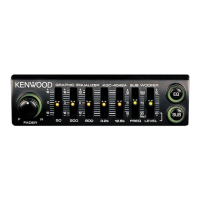
Move the Graphic equalizer knob upward to increase the level of the selected frequency band.
Move the Graphic equalizer knob downward to decrease the level of the selected frequency band.
Set the switch to 'LOW' when the level meter display is too large.
Set the switch to 'HIGH' when the level meter display is too small.
Rotate the Fader controller to the left to emphasize front speaker sound.
Rotate the Fader controller to the right to emphasize rear speaker sound.
Describes how to install the unit into the dash panel using provided fixtures.
Describes how to install the unit beneath the dash board using provided fixtures.
Details the center frequencies and equalization range of the graphic equalizer.
Lists specifications for output power, frequency response, THD, and input sensitivity.
Provides operating voltage, current consumption, dimensions, and weight.
This document describes the Kenwood KGC-4032, a graphic equalizer with amplifier, providing detailed instructions for its installation, operation, and maintenance. The manual emphasizes safety precautions, proper cleaning procedures, and troubleshooting tips to ensure optimal performance and longevity of the device.
The Kenwood KGC-4032 is designed to enhance the audio experience in a vehicle by allowing precise control over the sound frequency response and amplification. As a graphic equalizer, it enables users to adjust the level of specific frequency bands, thereby tailoring the sound output to their personal preferences and the acoustic characteristics of their car. The integrated amplifier boosts the audio signal, providing a more powerful and clear sound.
The core function of the device is equalizer curve adjustment. This allows users to modify the sound profile by increasing or decreasing the level of nine distinct frequency bands: 60 Hz, 120 Hz, 250 Hz, 500 Hz, 1 kHz, 2 kHz, 4 kHz, 8 kHz, and 16 kHz. Each band can be adjusted within a range of -12 dB to +12 dB. By manipulating these bands, users can emphasize bass, boost treble, or fine-tune mid-range frequencies to achieve a desired sound. For instance, increasing lower frequency bands can add depth to bass, while increasing higher frequency bands can enhance clarity and brightness. A dedicated graphic equalizer switch allows users to toggle the equalization effect on or off. When switched off, a flat frequency response is obtained, meaning no equalization is applied.
Another key feature is the level meter, which visually indicates the output level of the audio. This helps users monitor the signal strength and prevent clipping or distortion. The level meter has two sensitivity settings: "LOW" for large output levels and "HIGH" for small output levels. Users can switch between these settings to ensure the meter display is always appropriate for the current volume, providing an accurate visual representation of the audio dynamics.
The fader adjustment feature is crucial for optimizing the sound balance between the front and rear speakers in a 4-speaker system. By rotating the fader controller, users can emphasize the sound from either the front or the rear speakers. Rotating the controller to the left emphasizes the front speakers, while rotating it to the right emphasizes the rear speakers. This allows for a customized sound stage, ensuring that all occupants experience balanced audio. It's important to note that the fader function operates only with a 4-speaker system, and the preout signal is directed to the rear speakers when the fader is in use.
The device also includes an input sensitivity control, which can be adjusted to 0.3 V or 5 V. This allows the KGC-4032 to be connected to various head units or audio sources, ensuring compatibility and optimal signal matching. For Kenwood systems, the default 0.3 V setting is typically recommended.
Operating the KGC-4032 is designed to be intuitive, with clear controls for sound customization.
To perform equalizer curve adjustment, users simply press the graphic equalizer switch to "ON." Then, they can move the individual graphic equalizer knobs for each frequency band. Moving a knob upward increases the level of that frequency band, while moving it downward decreases the level. This allows for precise, real-time sound sculpting.
The level meter provides visual feedback on the audio output. If the display appears too large, indicating a high output, users can switch the level meter setting to "LOW." Conversely, if the display is too small, indicating a low output, switching to "HIGH" will provide a more visible indication. This ensures that the visual feedback is always useful and informative.
For fader adjustment, users rotate the fader controller. Turning it to the left will make the sound from the front speakers more prominent, while turning it to the right will emphasize the rear speakers. This allows for easy adjustment of the front-to-rear sound balance, creating a personalized listening environment.
Proper maintenance is essential for the KGC-4032's longevity and performance. The manual provides clear guidelines for cleaning and troubleshooting.
Cleaning the unit should always be done with the power turned off. Users are advised against using abrasive pads, thinners, benzine, or similar harsh objects, as these can damage the unit's surfaces. Instead, the front panel and other exterior surfaces should be wiped with a soft, dry cloth or a soft cloth lightly moistened with a neutral detergent. This gentle approach helps maintain the unit's appearance and prevents damage to its controls and display.
Troubleshooting is made easier with a dedicated guide that addresses common issues. For instance, if the power cannot be switched on, the manual suggests checking if the backup fuse or the fuse of the connected head unit is blown, or if the equalizer's power connector is securely connected to the power supply. If a fuse is blown, it should be replaced with a new one of the specified capacity after ensuring no short circuits in the associated wires. If no sound is heard from the speakers, users are advised to check if the fader controller is turned fully to the front or rear, or if the speaker cords, system power, or pre-out connections are not secure. It also suggests checking if the pre-fader control of the head unit is set to the minimum position. The guide emphasizes connecting cords properly according to the instructions and setting the head unit's fader to the center position to check for sound output.
The manual also includes important safety warnings to prevent electric shock, fire, and injury. Users are cautioned against opening the enclosure (front panel, top, or bottom cover), as this could expose them to electrical components. The unit is designed for a 12 V DC negative grounding system, and connecting it to other power sources could cause damage. It should not be placed in direct sunlight or near heating devices, nor should water be splashed on it. Dropping metal pieces, needles, coins, or other electrically conductive materials into the unit is also prohibited, as this could lead to short circuits. Finally, the unit should not be placed in areas with excessive dust, high humidity, or on unstable surfaces, which could compromise its operation and safety.
For installation, the manual recommends choosing a position that ensures overall safety and ease of operation, using only the supplied accessories. Before installation and wiring, it is crucial to remove the negative terminal of the battery to prevent short-circuiting. After connecting all input/output cords, ground, and backup power supply lead, the negative battery terminal can be reconnected. If a fuse blows, it's important to check for short-circuited wires before replacing it with a new fuse of the same capacity. The manual also highlights that since the unit uses BTL output, speaker wires without stripes should always be connected to the speaker system terminals, and these wires should never touch the chassis (ground). Any unused output wires should be insulated to prevent short circuits, and unconnected wires should be secured to prevent contact with the vehicle chassis. If installation difficulties arise, users are advised to contact their Kenwood dealer.
 General
| Type | Stereo Graphic Equalizer |
|---|---|
| Input Impedance | 50 kOhms |
| Output Impedance | 1 kOhm |
| Input Sensitivity | 150 mV |
| Signal-to-Noise Ratio | 100 dB |
| Total Harmonic Distortion | 0.005% |
| Number of Bands | 7 Bands |
| Power Supply | 14.4V DC (11-15V allowable) |


 To Next Page