EasyManua.ls Logo

Kenwood KSC-SW11 - User Manual

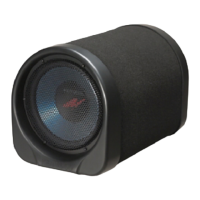
Kenwood KSC-SW11
8 pages
Print Icon
To Next Page IconTo Next Page
Loading...
K
SC
-
S
W1
1
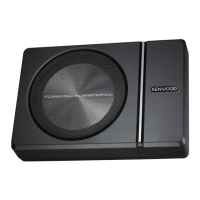
POWERED ENCLOSED SUBWOOFER
INSTRUCTION MANUAL
C
AISSON D’EXTRÊME GRAVE AMPLIFIÉ
MODE D
'
EMPLOI
G
EKAPSELTER SUBWOOFER MIT VERSTÄRKER
BEDIENUNGSANLEITUNG
S
UBW
OO
FER MET
S
PANNING
SC
IR
C
UI
T
GEBRUIK
S
AANWIJZIN
G

Questions and Answers

  • D
    Deborah LewisJul 26, 2025
    Why won't my Kenwood Subwoofer turn on?
    • M
      mossbradJul 26, 2025
      If your Kenwood Subwoofer's power won't turn on and the illumination doesn't light, consider these potential causes: * A blown fuse. Check the (+)/(-) polarity of the power cord to ensure there are no shorts, and then replace the fuse with one of the correct rated capacity. Also, reconnect the cords correctly. * The power supply pin (yellow) of the 10-pin connection cord is not connected. Connect the cord correctly. Attach the grounding terminal to the metallic section of the vehicle (not a coated surface) by tightly screwing it. Ensure the connector is fully inserted. Check all cord connections, and then connect the (-) cable to the battery. * The negative (-) cable of the car battery is disconnected. Check all cord connections, and then connect the (-) cable to the battery.
  • S
    Stacy WrightJul 31, 2025
    What to do if Kenwood KSC-SW11 remote control does not work?
    • R
      Ryan FernandezJul 31, 2025
      If the remote control for your Kenwood Subwoofer is not working, it could be due to the remote control cord being unplugged. Ensure that the cord is plugged into the REMOTE terminal and that the connector is fully inserted.
  • C
    Corey PowellAug 5, 2025
    What to do if my Kenwood KSC-SW11 Subwoofer has no sound?
    • K
      kristabradfordAug 5, 2025
      If your Kenwood Subwoofer is not producing any sound, there might be several reasons: * The attenuator of the center unit might be turned ON. In this case, you should switch the attenuator OFF. * The VOLUME control might be set to the MIN position. Increase the volume to an optimum level. * The speaker cords may be connected improperly. Ensure the cords are correctly connected. * The connection terminals might not be fully inserted. Make sure the connectors or jacks are fully inserted into the terminals.
  • T
    thompsonmackenzieAug 11, 2025
    How to fix small sound on Kenwood KSC-SW11?
    • E
      Erika WilsonAug 11, 2025
      If the sound from your Kenwood Subwoofer is small, it could be due to the following reasons: * The input level is set too low. Adjust the input level to an optimum level using the VOLUME control knob. * The connection terminals are connected improperly. Ensure the cord is plugged into the REMOTE terminal and that the RCA cord is properly connected.
  • P
    Paul HansenAug 15, 2025
    What to do if Kenwood KSC-SW11 sound is distorted?
    • M
      Monica HowardAug 15, 2025
      If the sound quality from your Kenwood Subwoofer is bad (distorted), it is likely that the input level is set too high. To resolve this, adjust the input level to an optimum level using the VOLUME control knob.
  • L
    Lindsay LoweAug 20, 2025
    Why does my Kenwood KSC-SW11 Subwoofer sound unnatural?
    • H
      hallscottAug 20, 2025
      If the sound from your Kenwood Subwoofer is unnatural, it might be because the speaker cords are connected with incorrect positive (+)/negative (-) polarity. Ensure that the cords are connected correctly. Also, attach the grounding terminal to the metallic section of the vehicle (not a coated surface) by tightly screwing it.

Summary

Instruction Manual

Important Safety Instructions

Parts Included

Connection

Terminals of Subwoofer

Identifies the power/speaker input and remote terminals on the subwoofer unit.

Connecting the Remote Control Unit

Guides on how to connect the remote control unit to the subwoofer for power indication.

Speaker Input Connection

Explains how to connect the subwoofer to the front or rear speaker outputs of the center unit.

RCA Input Connection

Details connecting the subwoofer using RCA jacks for audio input from the center unit.

Installation

Fixing the Cord in Place

Instructions for securing the remote control and 10-pin connector cords to the unit.

Fixing the Subwoofer

Details two methods for physically mounting the subwoofer unit in a vehicle.

Installing the Remote Control Unit

Guides on attaching the remote control unit using hook-and-loop fasteners.

Fuse Exchange

Procedure for replacing the fuse, noting the correct capacity and insertion method.

Operation

Name of Each Part (Remote Control)

Identifies illumination, volume, frequency controls, and phase switch on the remote unit.

Adjusting the Sound (Remote Control Operation)

Explains how to adjust cut-off frequency and balance bass from speakers and subwoofer.

Adjust the Low Frequency Phase

Guides on setting the phase switch (0° or 180°) for optimal low-frequency tone.

Troubleshooting Guide

Specifications

Kenwood KSC-SW11 Specifications

General IconGeneral
Product type-
Subwoofer typeActive subwoofer
Low pass filterYes
Subwoofer peak power150 W
Low pass filter range50 - 125 Hz
Subwoofer frequency range- Hz
Magnet typeFerrite
Product colorBlack
DC input voltage14.4 V
Remote control typeWired
InterfaceRCA
Line inputs (RCA)1
Housing materialAluminium, Rubber, Steel
Cables includedDC
Weight and Dimensions IconWeight and Dimensions
Depth70 mm
Width190 mm
Height280 mm
Weight2800 g

Related product manuals